MPX vs CAN

Thread Starter

john2k

Joined Nov 14, 2019
219
If you connect just the newer cluster to a scan tool via CAN bus, can you talk to it? If you do the same with the old cluster, can you talk to it? If you can talk to each ot them separately, you should be able to talk to them together..
Sorry i'm not following. Do you mean connect the newer cluster to pins 6 and 14 on DLC3 with the scan tool plugged in as well? And then try using the scan tool to see if I can get communication on the can tool?

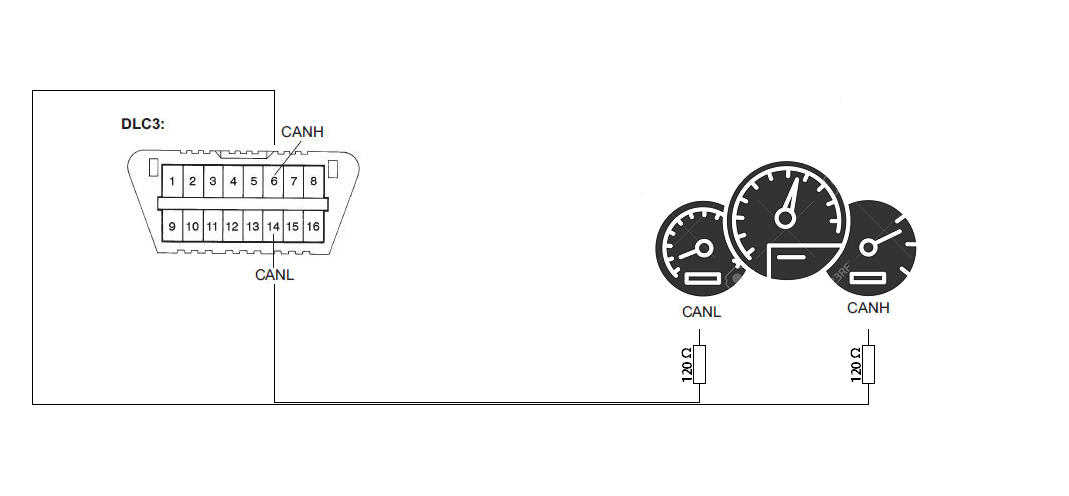
dont forget the CAN bus lines need 120 ohm resistors on there as well.
The CAN main bus lines have 2 terminating 120ohm resistors in parallel according to the diagram I posted in post #15 What I tried is just taking some electrical wire about 80cm long from pin 14 and 6 from DLC3 directly to the CANH and CANL lines on the newer cluster, do I need to put resistors there somewhere? Does the extension electrical wire have to be of certain resistance?
 

bwilliams60

Joined Nov 18, 2012
1,450
CAN bus wiring is made up of a twisted pair of wiring and usually has a special insulation which provides a characteristic impedance of 120 ohms. It also has two terminating resistors, one at each end of the run that measure 120 ohms a piece. The total resistance on the CAN bus should be 60 ohms. If you look at Post 15, the diagram is laid out perfectly. You can then attach nodes to your CAN bus to communicate. So the DLC would connect on there which would be connected to your scan tool, and then the cluster can be connected on there as well. Both the DLC and the cluster must have power and ground going to them as well, otherwise they will not communicate. Each node must be 40" or less in length and I think max run is 140 feet. @Papabravo is a CAN bus guru and maybe he can chime in on this but that is what you need. If you try to connect in on your vehicle, the cluster will also need an address so that it can talk. I don't think it will be plug and play, it would have to be programmed into the system.
 

Papabravo

Joined Feb 24, 2006
22,082
CAN bus wiring is made up of a twisted pair of wiring and usually has a special insulation which provides a characteristic impedance of 120 ohms. It also has two terminating resistors, one at each end of the run that measure 120 ohms a piece. The total resistance on the CAN bus should be 60 ohms. If you look at Post 15, the diagram is laid out perfectly. You can then attach nodes to your CAN bus to communicate. So the DLC would connect on there which would be connected to your scan tool, and then the cluster can be connected on there as well. Both the DLC and the cluster must have power and ground going to them as well, otherwise they will not communicate. Each node must be 40" or less in length and I think max run is 140 feet. @Papabravo is a CAN bus guru and maybe he can chime in on this but that is what you need. If you try to connect in on your vehicle, the cluster will also need an address so that it can talk. I don't think it will be plug and play, it would have to be programmed into the system.
Besides the usual physical layer restrictions, there are a couple of additional conditions.
  1. If you try to transmit at a baudrate other than the one used by the other devices, they will transmit error frames and you will quickly go BUSOFF
  2. If you do not respond correctly to queries from a master device you may be isolated or quarantined by the master.
  3. If you are unable to authenticate your presence on the network you may be ignored.
 

Thread Starter

john2k

Joined Nov 14, 2019
219
CAN bus wiring is made up of a twisted pair of wiring and usually has a special insulation which provides a characteristic impedance of 120 ohms.
So where can I get this kind of cable? I can't seem to find any cable specific for this. I take it a twisted pair of cable from a cat5e cable won't be good enough (too thin possibly)? So should both ends of each wire from the twisted pair have to measure a resistance of 120ohm? So lets say I have a green and white cable. Do I measure both ends of the green cable and make sure resistance is at 120ohm and then the same for the white cable? If the resistance isn't at 120 for each cable, do I add a resistor in line at the end of each cable before it goes to the new cluster pin? So essentially making sure CANH has a cable with a resistance value of 120ohm and same for CANL? I've drawn a diagram below of what I am thinking


It also has two terminating resistors, one at each end of the run that measure 120 ohms a piece. The total resistance on the CAN bus should be 60 ohms.
The current bus already has the two terminating 120 ohm resistors on it. The DLC branches out of this, and then if i branch out of the DLC pin 6 and 14, do I need resistance there too?

If you look at Post 15, the diagram is laid out perfectly. You can then attach nodes to your CAN bus to communicate. So the DLC would connect on there which would be connected to your scan tool, and then the cluster can be connected on there as well. Both the DLC and the cluster must have power and ground going to them as well, otherwise they will not communicate.
By DLC we are talking about the 16 pin OBD2 port right? So the ODB port is connected to the canbus as a node. In terms of power and ground. The OBD connector has a battery terminal on pin16 and has two ground pins 4 and 5 (Chassis Ground and Signal Ground). The cluster is connector to common ground on the car which is the chasis ground. Do I need to plug in a scan tool in the ODB port at the same time while i'm running these two cables to the cluster?
 

bwilliams60

Joined Nov 18, 2012
1,450
CAN bus is simply two wires twisted together. As mentioned, there is a resistor at each end. If the wires are yellow and green for example, the resistor would be attached to each of the wires at each end, forming a circuit. Yellow to resistor to green, just like in post 15.
if the vehicle already has it, you need not do anything else. I thought you were bench testing.
DLC is the datalink connector or OBD connector as you call it. Plugging in a scan tool is just a way to see if the BUS is recognizing the cluster.
Twisted pair wiring can be found in many places. Wrecking yard comes to mind first. Go and cut a length out of a car. Go to a heavy truck dealer and ask for a length of it. Sit down when they tell you the price. I think Digikey also sells it or Google it. Lots of places have it.
So for your diagram, it will be correct if you take out the resistors. Not needed. The only thing I don't know is if you need a gateway.
 

Thread Starter

john2k

Joined Nov 14, 2019
219
I see, yes i may have confused the situation as I am doing a combination of bench testing and just to see if i would get any response on the newer cluster I took it to the car plugged in power from the cigerette socket and tried connecting pins6 and 14 from OBD2 port to the canh and canl wires on the cluster but I got no response whatsoever. But I am told that there are quite few common messages across both clusters so surely if it was communicating via pin 6 and 14 from the OBD port then I would have got a response. So i'm thinking that connecting the CAN wires from the cluster directly into the live cars OBD2 pin 6 and 14 isn't quite working or my cable type is wrong or something.
 

Thread Starter

john2k

Joined Nov 14, 2019
219
Are you connecting CAN HI AND CAN LO to the sam signals from the car/bench setup? It will make a difference.
Yes so basically this is exactly what i have on the bench:

The new cluster (it's pre-connected to a connector with a length of cable cut off) > connected to a +12v indoor bench power supply > using the cigerette light power plug > +12v goes to always live pin on cluster and from the same +12v i have a rocker switch going to the ignition pin on the cluster (this way I can simulate ignition on/off with the rocker switch) I then have the negative from the power supply going to two different pins on the cluster as the pinout diagram states. The cluster turns on/off nicely when I turn rocker switch on and off.

Next I have the two twisted CAN wires coming out from this cluster socket.

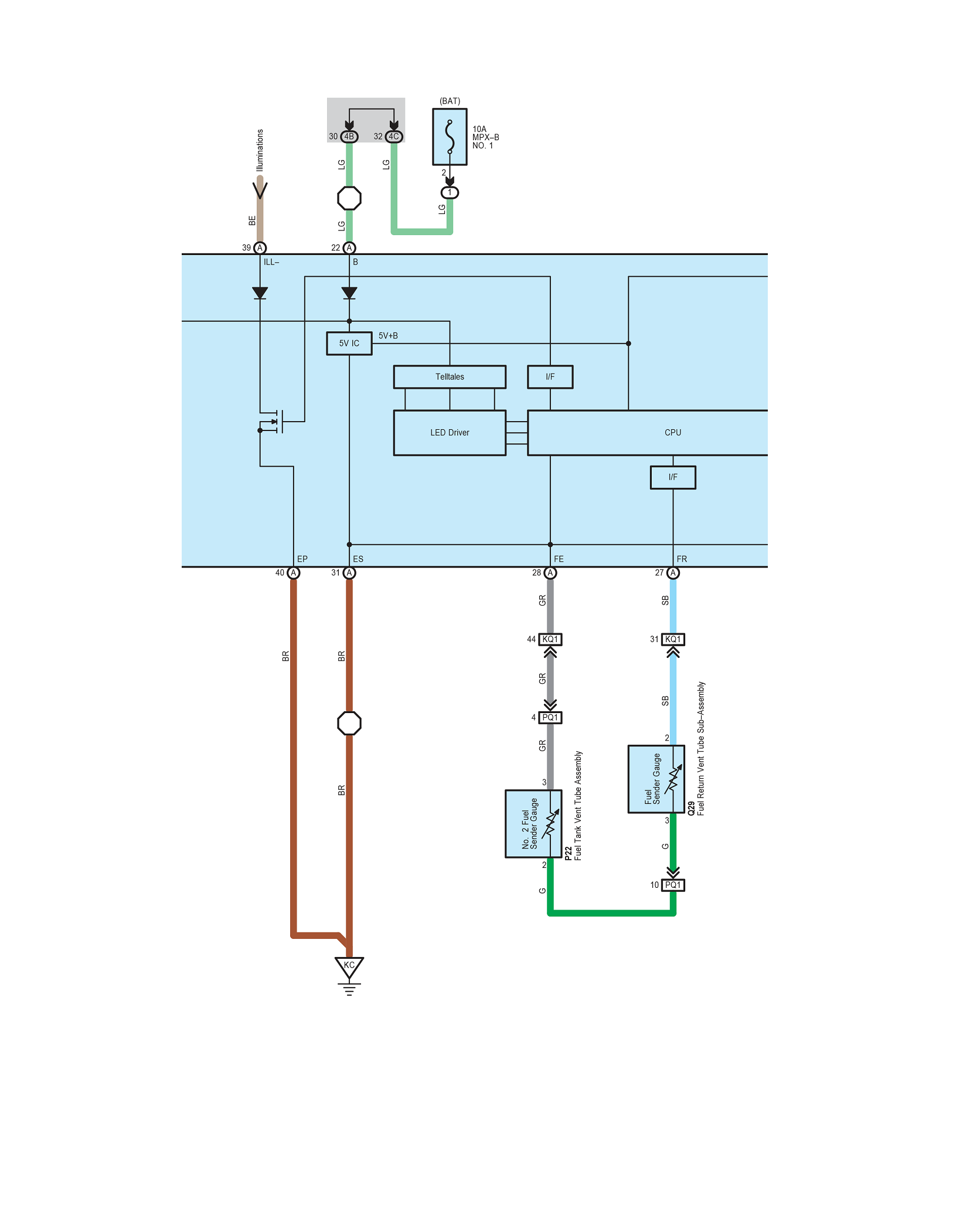
So what I tried to do is disconnect the cigerette power plug from the bench power supply and took the new cluster to the car to see if I can get any readings from the CANBUS. I placed the cluster on the seat and plugged in the cigerette plug that powers this cluster. I extended the twisted pair of CAN cable from the new cluster end and wired it to a ODB2 plug extension on pins 6 and 14 but I got nothing. I'm wondering does the ground have something to do with it? The ODB2 port has 2 ground pins: pin4 and pin5. The cluster has two ground pins: pin31 & pin40 but they are both labelled as ground and the scematic for those two grounds going to the cluster is show in the pic below (it's the two brown cables)


So what I am understanding about the CANBUS system so far (please correct me if i'm wrong) it seems canbus has two wires running parallel that are terminated on both ends with the 120ohm resistors. And apparently when the CAN bus is idle, both CANH and CANL wires carry 2.5V of electricity. But when transmitting data, the CAN High wire increases to 3.75V and the CAN Low wire drops to 1.25V, creating a 2.5V voltage differential between the two wires. It is this voltage differential on which CAN communication is based. Is this how it works? If so then technically both CANH and CANL wires are positive wires so it would mean I will need to be on the same ground cable that the canbus is on isn't it? So question is, what ground does the CANBUS share? the commond chassis ground or the signal ground?
 

bwilliams60

Joined Nov 18, 2012
1,450
If you have power and ground crom the cigarette lighter and you see the cluster come to life, and CAN bus from DLC, if it can, it should communicate. How are you plugging the scan tool into this? Is the vehicle throwing any new codes with it connected? I would still think no communication because it is not addressed but I might also think that there should be a code recognizing a disturbance of sorts on the CAN bus. It would be nice to see the data lines on a scope when it is connected.
 

Thread Starter

john2k

Joined Nov 14, 2019
219
I'm not plugging in any scan tool, just the newer cluster with power from cigerette socket and the CANH and CANL wires to DLC. Do I need to plug in the scan tool to the DLC too? I've got my canbus sniffer and sender kit which arrived, i'm going to try and hook that in to the DLC and see if it gets online and can get data.
 

Thread Starter

john2k

Joined Nov 14, 2019
219
I just measured the resistance between the CAN-H and CAN-L wires coming out of the new cluster and it measures 120ohms. I think This means that it must have a 120ohm resistor inside the cluster on the can line. According to the diagram in post #15 there are already two terminating resistors at the end of each end of the can bus. So I'm thinking, what I tried to do by connecting the can lines from the new cluster to pins 6 and 14 on the DLC, the new cluster can lines if they have a resistor at the end of them will that cause an issue receiving messages?
 

bwilliams60

Joined Nov 18, 2012
1,450
Connecting a scan tool to the system allows you to see what is populating on the CAN bus and see if it recognizes the new cluster. It may also generate a code to give you an idea of what it is seeing and if it it seeing it at all.
The CAN sniffer should output a lot of information. It would be nice if you could pop up a few screen shots and share with us. Once you get used to it, you can start figuring out where the signals are from and how they are generated.
I would measure the CAN bjs resistance with everything plugged in and see what the overall resistance is. You want it to be 60 ohms. You may have to remove a resistor if it is much less than that like say 40 ohms. Three resistors on line.
 

Thread Starter

john2k

Joined Nov 14, 2019
219
So I wired in the sniffer to pins 6 and 14 on the DLC. Pressed record so that it saves data to a text file. Started the engine it started recording a lot of rx messages. I did a few things like turn on and off lights, rev etc. Eventually the ABS fault light on the dash came on but it disappeared when I turned car off and on again and disconnected the sniffer. I need to figure out how to playback the rx messages on newer cluster. I also plugged in the sniffer to the new cluster on the bench and received lots of rx messages. I've attached two text files. 1 is the LIVE car recording and the other is the BENCH-CLUSTER recording. Is there any better way to understand this? There are a lot of duplicates, is there a way to group it and better understand it?
 

Attachments

Thread Starter

john2k

Joined Nov 14, 2019
219
OK, so I removed all the duplicates from the newer bench cluster and i'm left with only 12 unique message ID's

614
615
3E0
610
611
619
4A6
4B6
613
6F0
612
442

None of these message ID's seem to exist in the recording from the LIVE car. So this has got me thinking that the message ID's must be completely different in this variant of car. The strange thing is I downloaded a spreadsheet of canbus data from a Toyota Prius newer than my car and a lot of the message ID's from the prius matches my car.
 

Thread Starter

john2k

Joined Nov 14, 2019
219
I've got quite a few can frames working on the new cluster on the bench by just playing around with the frames. Just a quick question. If for example I have the following frame:

0x7C0 DLC=8 DATA=03 3B A7 40 00 00 00 00

and when it refers to first byte, second byte is the first byte in this example 03? and second byte 3B?

I was told that first and second bytes are the tachometer value. So where would I put that and what value? Is it 0-7 or 0-7000 or something else?
 
Last edited:

bwilliams60

Joined Nov 18, 2012
1,450
Very interesting. What sniffer are you using? You should be able to get the sniffer to eliminate all the repetition and de-clutter all the noise. As for identifying tach etc, that is beyond my scope. I am not a programmer but what I do know is that you should be able to pick it out by setting up your sniffer to watch for changes in the data. So if the only thing you did was change RPM up and down in steps, you should be able to pick them out and manipulate them. The values are generally done in HEX code and you would have to change them to a decimal value. I am guessing. there are better people on here than me on this stuff. I will stay with this thread though as I have the same curiosity but not enough time to pull it off right now. Too many other projects but it is on the burner.
 
Top