LTS Modeling of Capacitor Transient Current Charging and Discharging

Thread Starter

SamR

Joined Mar 19, 2019
5,470
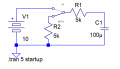
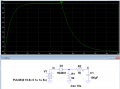
I would like to be able to plot waveforms of capacitor transient currents and voltages in both charging and discharging phases.

This would be steady state, but what the heck is the circled anomaly?
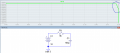
1772968259057.png
But how do I designate the actual charging and discharging based on the calculated time period? Or do I even need to have the time period for LTS to do this?
 

ericgibbs

Joined Jan 29, 2010
21,390
Hi Sam,
Did you notice that the current in your plot was 1.021fAmps.

I suspect the dip at the end of the plot is an LTSpice artifact, at that extremely low current, and should be ignored.

EA femtoampere (

) is a unit of electric current equal to

amperes (one quadrillionth of an ampere),
 
Last edited:

Thread Starter

SamR

Joined Mar 19, 2019
5,470
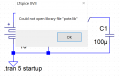
Rut-Roh... Ummm... Apparently Win10 started putting LTS files on One Drive??? Which is full and I don't even really use cloud storage! Need to find a fix for this...
1772977146675.png
1772977252024.png


1772977203666.png
 

ericgibbs

Joined Jan 29, 2010
21,390
hi
I do not use OneDrive, a number of users have reported problems when the OneDrive is full.
All my LTS working files are in my: C:\Users\eric gibbs\Documents\LTspiceXVII

E
 

Thread Starter

SamR

Joined Mar 19, 2019
5,470
Did you notice that the current in your plot was 1.021fAmps.
Yes, the cap is too small and the resistor too big. Just threw some fast numbers on the schematic for grins and giggles. And assume that is also due to LTS considering the cap already fully charged as well.
 

Thread Starter

SamR

Joined Mar 19, 2019
5,470
Guess I'll have to move the LTS files and disable one drive as well... No idea why it started putting them on one drive...
 

Thread Starter

SamR

Joined Mar 19, 2019
5,470
Well, I thought I was up to date with version 17 but having to upgrade to ver. 26! Back later...
 

WBahn

Joined Mar 31, 2012
32,702
I would like to be able to plot waveforms of capacitor transient currents and voltages in both charging and discharging phases.

This would be steady state, but what the heck is the circled anomaly?

View attachment 364358
But how do I designate the actual charging and discharging based on the calculated time period? Or do I even need to have the time period for LTS to do this?
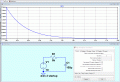
When you do a transient analysis, the simulator has to determine the initial conditions and for things like DC sources, the assumption it makes is that the DC source has been one since the beginning of time, which in this case means that the capacitor will have been fully charged long before the start of the simulation. This is why the current in the capacitor is so low (~0.000000000000001 A). As for the behavior at the end of the simulation, that is an artifact of the simulation, possibly related to Gmin, which is the resistance (default is 1 GΩ) that the simulator places between every node and ground -- for a node at 10 V, this amounts to a current of about 10 nA, which is many orders of magnitude larger than the current in your plot. The current in the resistor is calculated based on the difference between the node voltages on either side of it, which are 10 V. The node voltages are represented as double-precision floating point values, which have 53 bits of significand, giving you 15 to 16 sig figs. This means that the smallest difference that can be represented in this voltage is about 1.11 fV.

You do need to have the time period if you are doing a transient analysis, because the simulator has to know how long to run the simulation for.

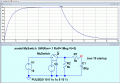
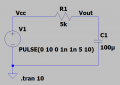
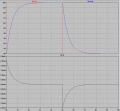
To see the transient behavior (the charging and discharging of the capacitor), you can do a number of things. The simplest is to use a Pulse waveform instead of a DC waveform for your source.

Your time constant is 0.5 s, so you want your source to be on for at least five time constants. Let's make the period 10 s with an ON time of 5 s. Will make the rise and fall times of the edges 1 ns to approximate a true square wave.

1772991417114.png

1772991457040.png

I always label any nodes that I'm going to plot, so that people (including myself) don't have to guess which node a particular trace represents.
1772991534768.png
 

WBahn

Joined Mar 31, 2012
32,702
And if the cap already has a partial charge? Is that possible? And discharging?
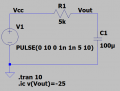
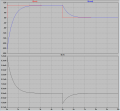
You can force the initial conditions at various points in your circuit. There are various ways to do this. The most common is to use the .ic command to directly set the voltage to whatever you want.

For instance, let's say that you wanted the initial condition on the cap to be -25 V. You could do that with

.ic v(Vout)=-25

1772991804965.png
1772991833743.png
 

WBahn

Joined Mar 31, 2012
32,702
Well, I thought I was up to date with version 17 but having to upgrade to ver. 26! Back later...
I'm also using Version 17. I generally don't update software unless I have a specific reason for it. If it ain't broke....
 

Thread Starter

SamR

Joined Mar 19, 2019
5,470
If it ain't broke....
Not sure that it was truly broken but somehow it started pointing at one drive to retrieve library files it could not fine. I have no real need for one drive, but it somehow gets enabled when I enabled MS Office for Word and Exell use...

But there are substantial changes from ver 17 to 26 including the graphics of the interface and apparently the keyboard short keys as well.
 

WBahn

Joined Mar 31, 2012
32,702
Not sure that it was truly broken but somehow it started pointing at one drive to retrieve library files it could not fine. I have no real need for one drive, but it somehow gets enabled when I enabled MS Office for Word and Exell use...
That's a stupid One Drive issue. I hate One Drive (which is not to say that it doesn't have it's uses). I don't mind the concept of having a cloud drive that I can use, but I hate Windows always trying to force me into using it. I used to have to disable it every couple of months. I haven't had to do that for some time, so perhaps enough people complained?

But there are substantial changes from ver 17 to 26 including the graphics of the interface and apparently the keyboard short keys as well.
This is one of the main reasons I don't upgrade until I have to -- I get real tired of having to relearn how to do even simple things.
 

crutschow

Joined Mar 14, 2008
38,314
But there are substantial changes from ver 17 to 26 including the graphics of the interface and apparently the keyboard short keys as well.
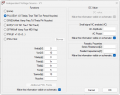
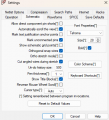
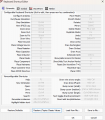
You can change the Keyboard Shortcut references to the originals, if desired, in the Settings/Schematic window (which I did).
There's a option at the bottom to restore to the classic values.

1772993851039.png
1772994212284.png
 

Thread Starter

SamR

Joined Mar 19, 2019
5,470
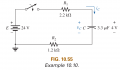
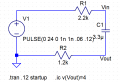
Spent some time going over the results here and familiarizing myself a bit with the new version. Going to simulate an example from Boylestad. I like the simplicity of eliminating the switch and diode additions to the circuit that @WBahn presented so I'm going to start there. I've got an issue with the lack of documentation for LTSpice parameters. There have been many books and articles written on using/application of LTS for various types of circuits, but I don't seem to find anything documenting the definitions of the actual parameters used in LTS. For example, PULSE(V1 V2 Tdelay Trise Tfall Ton Period Ncycles). Where are these parameters defined in the documentation? Some of it I can suss out from the entry fields and how they were used in the example @WBahn gave but where is it defined? Anyway... Here is the problem to analyze in LTS.
1773151205303.pngFor which τ=11.2ms x5≅60ms .: for Ton= 0.06 Here is where I'm a bit lost. I have no clue as to just what Tperiods definition is but assume from the above example it should be 2xTon so Tperiods=.12
1773157391412.png
For which when I run the analysis...
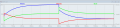
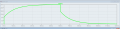
1773157561460.png
Hmmm... The Vin does not start @ 4V? I thought it might be the .ic v(Vout)=4 but removing it still gives...
1773158194170.png
So, I'm a bit confused... Good place to take a break...
 
Top