looking help on 8051 timer interrupt and switch input

JohnInTX

Joined Jun 26, 2012
4,787
John and Parth, I'm following this thread closely. But I'm staying on the sidelines because I don't do programming in C, but rather in assembly... last time I did programming in C was in 1992... :D
I'll step in with a comment when I think it appropriate. In the meantime, carry on. :)
As you know, the help that @Parth786 most needs to further improve is in the problem solving logic and program design. That is hard for any beginning programmer. Any help along those lines would be much appreciated by all, I am sure.
Thanks in advance and feel free to jump right in, pard'ner.
 

Thread Starter

Parth786

Joined Jun 19, 2017
642
John and Parth, I'm following this thread closely. But I'm staying on the sidelines because I don't do programming in C, but rather in assembly... last time I did programming in C was in 1992... :D

I'll step in with a comment when I think it appropriate. In the meantime, carry on. :)
Thanks for being with us
Getting there.
You need to define the type returned by the function.
You also need to declare the variable return_value.
Be sure brackets are lined up and code is properly indented so that you know what the various blocks are.
can we write this type. I am using int because function will return integer value
C:
#define Switch_Not_Pressed (0)
#define Switch_Pressed  (1)
int check_Switch( unsigned int return_value)  // what type does this return?
{
   return_value = Switch_Not_Pressed;
   if(Switch == 0)                     /* Switch is pressed */
     {
     Debounce_time(50);        /* wait 50 msec */        
      if(Switch == 0)                 /* check switch again */
            return_value = Switch_Pressed; /* switch is really pressed */
     }
     return return_value;
}
 
Last edited:

JohnInTX

Joined Jun 26, 2012
4,787
You can return an int if you want but consider this: the logical return values are only FALSE and TRUE. You can represent that in a single bit (BOOLEAN type) if the compiler supports bit types or char (a short int) which can also return 0 or 1 (FALSE or TRUE) but does it with fewer bytes. Review the data types supported by the compiler. I am pretty sure Kiel 8051 supports the BOOLEAN type. But for now, you can leave it.

The function declaration in line 3 is incorrect. As written, return_value is used as a temporary (called 'automatic' in C) variable and should be declared inside the function and as the same type as the function. Having return_value in the () means you are passing in an unsigned int and using its value. You aren't using a passed in value for return_value in this function. The compiler should issue a warning.

If you were passing 'return_value' as written, there is another problem. You pass in an unsigned int but are returning an int. unsigned int is not the same type as int. The compiler should warn you about that too.

And as long as we are on the subject of compiler warnings, NEVER run code with any unresolved warnings. A warning means that the compiler has guessed at what you want to do and generated code so that it could continue with the build. It does NOT mean that you should run the code. I always treat compiler warnings as run-time errors that haven't happened yet. The compiler is trying to help you - don't ignore it's warnings.
 
Last edited:

Thread Starter

Parth786

Joined Jun 19, 2017
642
John and Parth, I'm following this thread closely. But I'm staying on the sidelines because I don't do programming in C, but rather in assembly... last time I did programming in C was in 1992... :D

I'll step in with a comment when I think it appropriate. In the meantime, carry on. :)
You can return an int if you want but consider this: the logical return values are only FALSE and TRUE. You can represent that in a single bit (BOOLEAN type) if the compiler supports bit types or char (a short int) which can also return 0 or 1 (FALSE or TRUE) but does it with fewer bytes. Review the data types supported by the compiler. I am pretty sure Kiel 8051 supports the BOOLEAN type. But for now, you can leave it.

The function declaration in line 3 is incorrect. As written, return_value is used as a temporary (called 'automatic' in C) variable and should be declared inside the function and as the same type as the function. Having return_value in the () means you are passing in an unsigned int and using its value. You aren't using a passed in value for return_value in this function. The compiler should issue a warning.

If you were passing 'return_value' as written, there is another problem. You pass in an unsigned int but are returning an int. unsigned int is not the same type as int. The compiler should warn you about that too.

And as long as we are on the subject of compiler warnings, NEVER run code with any unresolved warnings. A warning means that the compiler has guessed at what you want to do and generated code so that it could continue with the build. It does NOT mean that you should run the code. I always treat compiler warnings as run-time errors that haven't happened yet. The compiler is trying to help you - don't ignore it's warnings.
while reading old threads I found this information https://forum.allaboutcircuits.com/...mbedded-c-for-kiel-switch-program-code.72877/
Its similar that what you are talking about, there is function
Code:
bit switch_get_input(count unsigned char debounce_period)
{
      bit return_value = switch_not_pressed;
      if (switch_pin == 0)      //switch is pressed
       { 
          delay_loop_wait(debounce_period);       //debounce - just wait...
      
          if (switch_pin == 0)                           //check switch again
           {
               
                  while (switch_pin == 0);               //wait until the switch is relised.
                 return_value = switch_pressed;
  }
I didn't understand 1 line . why there is char debounce_period ?
Note: I didn't want to copy pastes someone others code but I had doubt that's why I asked
 
Last edited:

JohnInTX

Joined Jun 26, 2012
4,787
I didn't understand 1 line . why there is char debounce_period ?
He is passing the debounce time to the switch input routine. You don't have to do that.

As for the difference in the call to the debounce timer, look at line 8 in your code in #62. It's the same thing. You call a delay function and pass it a parameter that specifies how long you want to delay.
Note that the function names are different - it doesn't matter to the function but his name is more general than yours i.e. the function is a time delay, it can be used for debouncing or any other purpose do it's a better name.
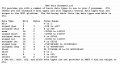
The parameter to the delay function is a number. In his it is a character which is ALSO a short integer with value of -128 <= n <= 127 if it is signed, 0 <= n <= 255 if it is unsigned. In yours, you have specified a LITERAL number so it is interpreted as a signed integer.

Read up on this in the Keil compiler manual or help files under 'Data Types' or in a good C reference. You can't do good C without knowing that stuff perfectly. This is from an early version of Keil C51. In particular note the differences in signed and unsigned and the size differences between bit, char and int.
8051 Types.jpg
 
Last edited:

Thread Starter

Parth786

Joined Jun 19, 2017
642
is it correct program to read switch status ?
Code:
#define Switch_Not_Pressed (0)
#define Switch_Pressed  (1)
bit check_Switch()
{
     bit return_value;
     return_value = Switch_Not_Pressed;
     if(Switch == 0)                           /* Switch is pressed */
        {
          Debounce_time(20);                      /* wait 20 msec */      
           if(Switch == 0)                        /* check switch again */
            return_value = Switch_Pressed;   /* switch is really pressed */
         }
     return return_value;
}
 

JohnInTX

Joined Jun 26, 2012
4,787
Looks like it will work!
Be sure to use 'void' in the parenthesis of the function declaration to ensure that no parameters are passed to it.

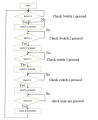
So that's one switch. You have 4 total. Time to sketch a quick flow chart to see how you would call 4 of these and return the number of the switch pressed (or 0 if none are pressed).
 

Thread Starter

Parth786

Joined Jun 19, 2017
642
Looks like it will work!
Be sure to use 'void' in the parenthesis of the function declaration to ensure that no parameters are passed to it.

So that's one switch. You have 4 total. Time to sketch a quick flow chart to see how you would call 4 of these and return the number of the switch pressed (or 0 if none are pressed).
I think this logic will work to check switch status
upload_2017-9-16_1-55-10.png
 

Thread Starter

Parth786

Joined Jun 19, 2017
642
I don't. Remember the questions are inside the diamonds with arrows for yes and no. Things inside boxes are things the processor does.
ok my mistake. look at logical explanations
Do forever
while switch 1 pressed , Return 1
while switch 2 pressed , Return 1
while switch 3 pressed , Return 1
while switch 4 pressed , Return 1
while No switch pressed , Return 0

we can use for loop
example
for(switch = 1; switch <4, switch ++);
check switch 1 if pressed than return 1, increment counter check switch 2 if pressed than return 1, increment counter check switch 3, if pressed than return 1, increment counter check switch 4 if pressed than return 1, condition false none switch pressed check forever
 
Last edited:

JohnInTX

Joined Jun 26, 2012
4,787
ok my mistake. look at logical explanations
Do forever
while switch 1 pressed , Return 1
while switch 2 pressed , Return 1
while switch 3 pressed , Return 1
while switch 4 pressed , Return 1
while No switch pressed , Return 0

we can use for loop
example
for(switch = 1; switch <4, switch ++);
check switch 1 if pressed than return 1, increment counter check switch 2 if pressed than return 1, increment counter check switch 3, if pressed than return 1, increment counter check switch 4 if pressed than return 1, condition false none switch pressed check forever
You can't, actually, because your switch input routine (check_Switch() above) does not take a parameter that indicates which switch to sample. So that incrementing value in the for loop can't be used. It's not a bad idea, it just doesn't fit what you just wrote.

Your logic in the first part is more what I had in mind. See 'CheckSwitches()' in the PDF.

The two routines on the left side use CheckSwitches() to make a convenient interface to the rest of the program. The dashed lines are not really part of the flow for the individual routines but I put them in there to show you how the call and return value stuff works.

Does it make sense?
 

Attachments

Last edited:

Thread Starter

Parth786

Joined Jun 19, 2017
642
You can't, actually, because your switch input routine (check_Switch() above) does not take a parameter that indicates which switch to sample. So that incrementing value in the for loop can't be used. It's not a bad idea, it just doesn't fit what you just wrote.

Your logic in the first part is more what I had in mind. See 'CheckSwitches()' in the PDF.

The two routines on the left side use CheckSwitches() to make a convenient interface to the rest of the program. The dashed lines are not really part of the flow for the individual routines but I put them in there to show you how the call and return value stuff works.

Does it make sense?
Its look like good . I appreciate your work. Now Should I write program for flow chart because main target is to check program weather its working or not according to what we want to do it.
 

Thread Starter

Parth786

Joined Jun 19, 2017
642
If you have traced it's flow and it does what you have in mind, sure.
We have four subroutines which can return value true or false than We make subroutine to check which switch has been pressed
This is my attempt :
C:
#include <REG51.h>

sbit Switch_1 = P1^1;
sbit Switch_2 = P1^2;
sbit Switch_3 = P1^3;
sbit Switch_4 = P1^4;

#define Switch_Not_Pressed (0)
#define Switch_Pressed  (1)

/* this is delay function */
void Debounce_time (unsigned int Loop)
{
  for (Loop = 0; Loop < 40000; Loop++);
  {

  }
}
bit check_Switch_1(void)
{
  bit return_value_1;
  return_value_1 = Switch_Not_Pressed;
  if(Switch_1 == 0)  /* Switch 1 is pressed */
     {
        Debounce_time(20);  /* wait 20 msec */
         if(Switch_1 == 0)  /* check switch again */
           return_value_1 = Switch_Pressed;  /* switch is really pressed */
    }
         return return_value_1;
}
bit check_Switch_2(void)
{
        bit return_value_2;
        return_value_2 = Switch_Not_Pressed;
        if(Switch_2 == 0)  /* Switch 2 is pressed */
           {
             Debounce_time(20);  /* wait 20 msec */
             if(Switch_2 == 0)  /* check switch again */
                  return_value_2 = Switch_Pressed;  /* switch 2 is really pressed */
           }
            return return_value_2;
}
bit check_Switch_3()
{
          bit return_value_3;
          return_value_3 = Switch_Not_Pressed;
         if(Switch_3 == 0)  /* Switch 3 is pressed */
          {
             Debounce_time(20);  /* wait 20 msec */
             if(Switch_3 == 0)  /* check switch 3 again */
                return_value_3 = Switch_Pressed;  /* switch is really pressed */
         }
                return return_value_3;
}
bit check_Switch_4(void)
{
           bit return_value_4;
           return_value_4 = Switch_Not_Pressed;
           if(Switch_4 == 0)  /* Switch 4 is pressed */
              {
                  Debounce_time(20);  /* wait 20 msec */
                   if(Switch_4 == 0)  /* check switch 4 again */
                       return_value_4 = Switch_Pressed;  /* switch 4 is really pressed */
              }
  return return_value_4;
}
void CheckSwitches(void)

  {
       int ReturnValue = Switch_Not_Pressed ;

         if (check_Switch_1()== Switch_Pressed )
            {
                 ReturnValue = Switch_Pressed  ;
             }
         else if (check_Switch_2()== Switch_Pressed)
           {
               ReturnValue = Switch_Pressed;
           }
         else if (check_Switch_3()== Switch_Pressed)
          {
              ReturnValue = Switch_Pressed;
          }
         else if (check_Switch_4()== Switch_Pressed)
          {
              ReturnValue = Switch_Pressed;
          }
          else
          {
              ReturnValue == Switch_Not_Pressed;
          }
  }
void wait_for_a_switch(void)
        {

         }
void wait_for_no_switches(void)
       {

        }
Note : I left two empty functions, wait for switch and wait for no switch because I want to sure that the subroutine for checking switches is correct or not ?
 
Last edited:

JohnInTX

Joined Jun 26, 2012
4,787
Recheck the return value for each switch in CheckSwitches.
Also, you don't need the last 'else' after checking switch 4. Do you see why?

Overall though, you are making great progress!
 

Thread Starter

Parth786

Joined Jun 19, 2017
642
Recheck the return value for each switch in CheckSwitches.
Also, you don't need the last 'else' after checking switch 4. Do you see why?
Overall though, you are making great progress!
if function return 1 that means switch 1 has been pressed
if function return 2 that means switch 2 has been pressed
if function return 3 that means switch 3 has been pressed
if function return 4 that means switch 4 has been pressed
if function return 0 that means none switch has been pressed
C:
void CheckSwitches(void)
  {
       int ReturnValue = 0;
  
         if (check_Switch_1()== Switch_Pressed )
             {
                  ReturnValue = 1 ;
              }
         else if (check_Switch_2()== Switch_Pressed)
             {
                  ReturnValue = 2;
              }
         else if (check_Switch_3()== Switch_Pressed)
             {
                  ReturnValue = 3;
              }
         else if (check_Switch_4()== Switch_Pressed)
             {
                   ReturnValue = 4;
             }
          return ReturnValue;  
  }
.
Overall though, you are making great progress!
I don't think. I think I am taking so much time. I am too long to from original code for "password based system "
 
Last edited:

JohnInTX

Joined Jun 26, 2012
4,787
That should fix it.
I don't think. I think I am taking so much time. I am too long to from original code for "password based system "
Parth, things take the time they take. You are just learning this stuff now and you should not expect that everything goes perfectly all the time. Embedded programming is not simple. To succeed takes a plan, study, practice and time. It also takes experience and that's what you will gain over time. This actually is not a trivial program for a beginner.

Here's a piece of advice: Time pressures will always be a part of anything you do. If you are working on a project, in school or industry even, the due date gets bigger and bigger as it gets closer and closer. Stress builds, especially if you are having problems, and you get tempted to take short-cuts - bypass that difficult and time-consuming planning and flow-charting stage and throw something together and hope it works. That rarely is successful because as we have seen, the real thinking and arriving at a solved problem happens before any coding at all. Example: I posted a flow chart that I knew would work, you coded it almost perfectly on the first try. What is harder the planning and solution or the coding? Yeah. Not the coding.

So ignore the time pressures and keep to the process. Panic shortcuts will make things take longer. Re-read your signature. That's pretty good advice too.

Next:
Fill out those other two functions. When you do, you will have a simple way to detect push buttons and get codes from them AND know when the user has taken his fingers off the buttons.
After that, do a flow chart that (finally!) uses that 'for' loop to get 4 buttons and store each button code into an element of an array. Be sure to call wait_for_no_switch() each time to be sure that all buttons have been released before looking at another one. The processor is fast. If you don't check that the buttons have been released before checking for another, each push will be entered many times.

Lets not worry about the LCD right now. If you are simulating, you should be able to examine the contents of the array to verify that the switch codes are in there. Can you set BREAKPOINTS in your simulation?

At this point, you should begin to see the 'layers' in the code structure. As we get into the higher layers, for example, wait_for_a_switch(), the low level details of what kind of switch, how its hooked up, debouncing etc. are 'hidden'. They still exist but are not part of the conversation. As we code higher and higher levels that do more, we eventually get to what a simple plain-language description of the program:

"A system has 4 buttons and a display. Get a 4 number password and if it's valid, say 'Welcome.' If not, say 'Invalid' "

Does that sound familiar?

You are doing fine. Carry on.
 

Thread Starter

Parth786

Joined Jun 19, 2017
642
That should fix it.
Parth, things take the time they take. You are just learning this stuff now and you should not expect that everything goes perfectly all the time. Embedded programming is not simple. To succeed takes a plan, study, practice and time. It also takes experience and that's what you will gain over time. This actually is not a trivial program for a beginner.
Here's a piece of advice: Time pressures will always be a part of anything you do. If you are working on a project, in school or industry even, the due date gets bigger and bigger as it gets closer and closer. Stress builds, especially if you are having problems, and you get tempted to take short-cuts - bypass that difficult and time-consuming planning and flow-charting stage and throw something together and hope it works. That rarely is successful because as we have seen, the real thinking and arriving at a solved problem happens before any coding at all. Example: I posted a flow chart that I knew would work, you coded it almost perfectly on the first try. What is harder the planning and solution or the coding? Yeah. Not the coding.
So ignore the time pressures and keep to the process. Panic shortcuts will make things take longer. Re-read your signature. That's pretty good advice too.
Thanks for being a good mentor and for guiding me on the right path. sometime I feel nervous when people try to help me and I couldn't give result back. that time I feel very bad.
Fill out those other two functions. When you do, you will have a simple way to detect push buttons and get codes from them AND know when the user has taken his fingers off the buttons.
After that, do a flow chart that (finally!) uses that 'for' loop to get 4 buttons and store each button code into an element of an array. Be sure to call wait_for_no_switch() each time to be sure that all buttons have been released before looking at another one. The processor is fast. If you don't check that the buttons have been released before checking for another, each push will be entered many times.

Lets not worry about the LCD right now. If you are simulating, you should be able to examine the contents of the array to verify that the switch codes are in there. Can you set BREAKPOINTS in your simulation?

At this point, you should begin to see the 'layers' in the code structure. As we get into the higher layers, for example, wait_for_a_switch(), the low level details of what kind of switch, how its hooked up, debouncing etc. are 'hidden'. They still exist but are not part of the conversation. As we code higher and higher levels that do more, we eventually get to what a simple plain-language description of the program:
I compiled this code with no error and warning
C:
#include <REG51.h>
sbit Switch_1 = P1^1;
sbit Switch_2 = P1^2;
sbit Switch_3 = P1^3;
sbit Switch_4 = P1^4;

#define Switch_Not_Pressed (0)
#define Switch_Pressed  (1)

/* this is delay function */
void Debounce_time (unsigned int Loop)
{
  for (Loop = 0; Loop < 40000; Loop++);
  {
 
  }
}
bit check_Switch_1(void)
{
  bit return_value_1;
  return_value_1 = Switch_Not_Pressed;
  if(Switch_1 == 0)  /* Switch 1 is pressed */
  {
  Debounce_time(20);  /* wait 20 msec */ 
  if(Switch_1 == 0)  /* check switch again */
  return_value_1 = Switch_Pressed;  /* switch is really pressed */
  }
  return return_value_1;
}
bit check_Switch_2(void)
{
  bit return_value_2;
  return_value_2 = Switch_Not_Pressed;
  if(Switch_2 == 0)  /* Switch 2 is pressed */
  {
  Debounce_time(20);  /* wait 20 msec */ 
  if(Switch_2 == 0)  /* check switch again */
  return_value_2 = Switch_Pressed;  /* switch 2 is really pressed */
  }
  return return_value_2;
}
bit check_Switch_3()
{
  bit return_value_3;
  return_value_3 = Switch_Not_Pressed;
  if(Switch_3 == 0)  /* Switch 3 is pressed */
  {
  Debounce_time(20);  /* wait 20 msec */ 
  if(Switch_3 == 0)  /* check switch 3 again */
  return_value_3 = Switch_Pressed;  /* switch is really pressed */
  }
  return return_value_3;
}
bit check_Switch_4(void)
{
  bit return_value_4;
  return_value_4 = Switch_Not_Pressed;
  if(Switch_4 == 0)  /* Switch 4 is pressed */
  {
  Debounce_time(20);  /* wait 20 msec */ 
  if(Switch_4 == 0)  /* check switch 4 again */
  return_value_4 = Switch_Pressed;  /* switch 4 is really pressed */
  }
  return return_value_4;
}
int CheckSwitches(void)

  {
       int ReturnValue = 0;
   
         if (check_Switch_1()== Switch_Pressed )
          {
            ReturnValue = 1 ;
          }
         else if (check_Switch_2()== Switch_Pressed)
          {
             ReturnValue = 2;
          }
         else if (check_Switch_3()== Switch_Pressed)
          {
            ReturnValue = 3;
          }
         else if (check_Switch_4()== Switch_Pressed)
          {
            ReturnValue = 4;
          }
          return ReturnValue;
  }
int wait_for_a_switch(void)
  {
  unsigned int SwitchNum;
          {
          while (SwitchNum = CheckSwitches())
          {
            if (SwitchNum == 0)
             {
             }
          }
          return SwitchNum;
          }
        }
void wait_for_no_switches(void)
   
  {
  unsigned int SwitchNum;
          {
          while (SwitchNum = CheckSwitches())
          {
            if (SwitchNum == 0)
             {
             }
          }
          return ;
          }
        }
Note: How to indent code within forum posts. Every time I do it manually
"A system has 4 buttons and a display. Get a 4 number password and if it's valid, say 'Welcome.' If not, say 'Invalid' "
Does that sound familiar?
Exactly same thing I want to do
 
Last edited:

JohnInTX

Joined Jun 26, 2012
4,787
It's not a bad start but shows a common problem. Flow charts are not structured and C is so sometimes you can't do a 1:1 translation directly.

In wait_for_a_switch you correctly identify that a while (or other) loop is necessary but the required C structure is not exactly like the flow chart so there is a problem in translation. As I read it, it won't wait. Check this modification out:

C:
unsigned int wait_for_a_switch(void)
{
  unsigned int SwitchNum = 0;  // start with 'no switch'

  while (SwitchNum == 0)  // loop while 'no switch' - including the first time
    SwitchNum = CheckSwitches());  //and loop until you get some non zero value (switch pushed)
    
  return SwitchNum;  // then return that value
}// wait for a switch
A lot simpler. It has all the logic that the flow chart shows - it's just rearranged for C.

A couple of details:
Be sure to be consistent with your types. You said that the function returns an int - that is a signed int by default. But SwitchNum is declared as unsigned int. The compiler should complain about a 'type mismatch'.

With this in mind, take a shot at 'wait for no switch'.

And indents can be a problem. I usually paste the code directly into the edit window then add code tags manually.
 
Last edited:

Thread Starter

Parth786

Joined Jun 19, 2017
642
With this in mind, take a shot at 'wait for no switch'.
.
Please look at this routine. In flow chart there is no return value, compiler gives three warning.
C:
unsigned int wait_for_no_switches(void)

  {
  unsigned int SwitchNum = 0;  // start with 'no switch'
    
          while (SwitchNum != 0)
          SwitchNum = CheckSwitches();
          return SwitchNum ;
        }
 
Last edited:
Top