Hi.
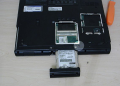
Does anyone know a brand/model of a newer laptop with a SATA hard drive installed on a side slot ?
(This is not about using the optical drive to install a HD)
Yes, until you have to carry 2 laptops and 2 power bricks...
[ Running Ubuntu since 5.04 with zero point zero 'blue screens' nor other crappy failures/virus and will never go back to Win as main OS. ]
as a note, it is important to mention how and when you are swapping hdds, which you did mention.
there is a difference when you swap hdds in a powered off notebook state - safe eject, and a power on state - hotswapping. this will determine in what cases you can swap and when you should not. your current intentions are to have swapable hdds host operating systems, in which case you can eject safely only when powered off.
is this your current notebook on the op image? if yes, how many total hdd slots does it have?
To swap only when very off. Done for years on a 4-slot desktop 'tower'. This typed on a single bottom-of-case slotted laptop, which sometimes I do the swap. Image is stolen from web.
I guess look for hot swap option, I know you said that you don't need the actual option, but if it is present, then it tells you that you have an easy access to the drive, which is what you are looking for.
some things I would consider which will accomodate requirements for multi os operation.
1. avoid an idea of a side slot design for a reason that the interface might wear off by frequent hdd swapps. that means re-soldering a new interface should wear off occur.
2. a notebook/laptop should not be of an ultra slim/slim design.
3. a device should have mininum of 2 interfaces for storage attachment. ideally m2/msata and sata, and an easy access to all internals. back pannel access varies between manufacturers.
my current memory layout you could use as a reference.
notebook: acer aspire v3 772g.
this notebook has 4 interfaces for connecting storage internally.
1. m.2 socket, ssd, 128gb, hosts a dual boot operating environment:
1.1. ubuntu 16.04 lts.
1.2. windows 10 pro.
1.3. swap space.
1.4. shared file space (exfat).
you have mentioned that you prefer not to mix nt with linux, however, when dual booting from the same hard drive, that is partitoned into 2, and has this type of os layout, there is no native way for windows to access linux partion, since there is no native support for windows to work with an ext file system. if you deploy linux and nt properly there is also no way for windows to modify mbr of the target storage. therefore you get 2 isolated operating environments on one memory device.
2. sata, 6gps, 2tb, hdd.
3. sata, 6gps, 2tb, hdd.
4. I use odd slot with odd-hdd adapter with a sata, ssd, 256gb memory device on board hosting gaming content, that I can eject in a similar fashion to the side hdd slot that you are looking for in a computer. I removed a bottom screw, so the entire ejection procedure is toolless.

 Facebook
 Google
 GitHub
 Linkedin