LED strip controller not working properly

Thread Starter

Nutshell

Joined Mar 5, 2017
17
Hello everyone,

I've recently had my rgb led strip trimmer circuit printed. It's a basic pwm controller which uses 3 different 555's, one for each color.
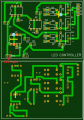
shot_2.PNG
(don't mind the crappy design, I'm lazy)

There are 3 potentiometers connected to some of those Pxx squares, as I needed them to be separated from the PCB.

parts list:
NE555 (U1, U2, U3)
4k7 resistors (R1, R2, R3)
100nF capacitors (C1 - C6)
1N4148 (D1 - D6)
IRF540N (Q1, Q2, Q3) (Q3 is connected to U1, Q1 is connected to U3)
B10K pots (first one: P5, P6, P7; second one: P8, P9, P10; third one: P11, P12, P13; the middle pin of the pots is always connected to pin 3 of the 555)

The problem is that the circuit doesn't control the colors: the strip remains white (all colors at max brightness), even though it occasionally blinks when I rotate the pots.

The circuit worked flawlessly on a breadboard, so I guess it should be a PCB issue, but I can't figure out why it doesn't work.
I'll attach the schematic but it's quite a mess, so tell me if you need more details.
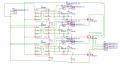
sch.PNG

Thank you in advance
 
Last edited by a moderator:

philba

Joined Aug 17, 2017
959
You need to take a methodical approach.
  1. Make sure that your board was fab'd correctly. Did you continuity check all the traces? Did you visually inspect to look for bridges? With a magnifying glass? Always do this for a board you get made, before populating it. I have confidence in the board houses I use but they still sometimes send me a bad board.
  2. Check your components for correct orientation.
  3. Verify your IC footprints (sometimes easy to reverse)
  4. Verify that your soldering job is correct. redo any dodgy looking joints and check for bridges.
If your schematic is correct (and I think it is based on your breadboard results) and you follow those steps, you will probably have an "oh f@ck" moment. Hopefully salvageable but if not, get as much testing as you can from the existing board before you send it off again.
 

Thread Starter

Nutshell

Joined Mar 5, 2017
17
You need to take a methodical approach.
  1. Make sure that your board was fab'd correctly. Did you continuity check all the traces? Did you visually inspect to look for bridges? With a magnifying glass? Always do this for a board you get made, before populating it. I have confidence in the board houses I use but they still sometimes send me a bad board.
  2. Check your components for correct orientation.
  3. Verify your IC footprints (sometimes easy to reverse)
  4. Verify that your soldering job is correct. redo any dodgy looking joints and check for bridges.
If your schematic is correct (and I think it is based on your breadboard results) and you follow those steps, you will probably have an "oh f@ck" moment. Hopefully salvageable but if not, get as much testing as you can from the existing board before you send it off again.
Thanks for the fast reply! I've been busy all day, so I've just put my hands on the board again.
- I've rebuilt the circuit on another board (they sent me around 10 of them); I've checked all traces and they look ok to me. Can't see any bridge/unwanted connection on the board;
- all components were oriented properly, same for ICs;
- I've soldered all components both on top and bottom layer, I don't think that's the problem here (I checked the traces' continuity after soldering, placing the probes on the pins of the components).

That said, the circuit still doesn't work properly. All the components get warm though... Not too much, just as much as they normally would in a working project. Maybe there's a problem with the circuit itself and I just got lucky with the breadboard build somehow, or there's a design failure on the PCB somewhere.

TL;DR: the strip stays white regardless of how I rotate the pots.

Anyway, are the pics enough to understand the schematic or you need further details (or, perhaps, a decently drawn diagram)?
 

bertus

Joined Apr 5, 2008
22,899
Hello,

Can you post a decent schematic?
Why are the gates of the fets connected to the DIS connection of the 555?

Bertus
 

philba

Joined Aug 17, 2017
959
Did you continuity check the traces? I didn't see you say that.

I didn't look at the schematic because you said that it worked correctly in the BB. If that is true then you need to start debugging. (Though, that is a horrible schematic, I gave up trying to figure it out.) Use your BB version as a reference. Look for differences. Working through the schematic, take voltage measurements. Don't suppose you have an O'scope.
 

Thread Starter

Nutshell

Joined Mar 5, 2017
17
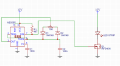
The complete circuit is made by 3 of these (one for each color):
circuit.PNG
Why are the gates of the fets connected to the DIS connection of the 555?

Bertus
Is that bad? I've seen that done in many similar circuits.

Did you continuity check the traces? I didn't see you say that.
Yes, I did. And yes, I forgot to mention that. Whoops

(Though, that is a horrible schematic, I gave up trying to figure it out.)
Can't blame you.

Well then, I'll try to debug tomorrow. First I'll see if it works when I build only one of the 3 circuits on the pcb, then I'll proceed the boring way.
 

Thread Starter

Nutshell

Joined Mar 5, 2017
17
Well then, I'll try to debug tomorrow. First I'll see if it works when I build only one of the 3 circuits on the pcb, then I'll proceed the boring way.
I just tried rebuilding the circuit I've posted (the decently-drawn one) on a breadboard and I confirm it works like a charm. On the PCB though, the pot only changes very slightly the duty cycle (the average voltage can be adjusted between 12.25V, which is the source voltage, and around 12.08V) and the 555 operates at audible frequencies (in the bb build it doesn't do that). I concluded there must be something wrong with the PCB design itself, but I've inspected it many times without noticing anything wrong... Well, I'll keep searching, surely there's a stupid connection somewhere.
 

philba

Joined Aug 17, 2017
959
I got curious and did an LT Spice simulation - it worked. It has about a 780 uS period. Note that I used a NE555 model. What are you actually using on the PCB and is it different from the Breadboard?

One other question - is your PCB homemade? If it was, the lack of plated through holes could be an issue.
 
Last edited:

Thread Starter

Nutshell

Joined Mar 5, 2017
17
I got curious and did an LT Spice simulation - it worked. It has about a 780 uS period. Note that I used a NE555 model. What are you actually using on the PCB and is it different from the Breadboard?

One other question - is your PCB homemade? If it was, the lack of plated through holes could be an issue.
I'm currently using 555's from 2 different lots (NE555, NE555P), they both work on the bb and not on the PCB.
I had my circuits printed by EasyEDA, through holes are plated. The other circuit I got from them - a low voltage cutoff for 18650's - works perfectly, that's why I tend to exclude the problem could be a manufacturing issue.

Alright, back to trying to figure out the problem.
 

Thread Starter

Nutshell

Joined Mar 5, 2017
17
Good news, I managed to get a single circuit to work by applying some changes to the board:
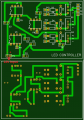
shot_2 (1).PNG
yellow lines equal cuts made to disconnect traces; those colored dots indicate points that were connected together with 2 wires.
I guess the problem was that connection between pin 2/6 and 7.
I should be able to use the same trick on all 3 circuits to make the whole board work, so I guess the problem's solved.
Thanks for your time, guys!
 

philba

Joined Aug 17, 2017
959
It sounds like you are on your way to a working board.

Did the PCB not implement the schematic? Or maybe you made some mistakes in entering the schematic? Seems strange. Your PCB SW should not allow you make connections that aren't in the schematic.

For future reference, use the schematic part of your PCB layout SW to create the schematic. Then breadboard exactly from that schematic and keep the schematic updated with any changes. Then lay out the board from the schematic. That way you have the best shot at getting a board that will work.
 

Thread Starter

Nutshell

Joined Mar 5, 2017
17
It sounds like you are on your way to a working board.

Did the PCB not implement the schematic? Or maybe you made some mistakes in entering the schematic? Seems strange. Your PCB SW should not allow you make connections that aren't in the schematic.

For future reference, use the schematic part of your PCB layout SW to create the schematic. Then breadboard exactly from that schematic and keep the schematic updated with any changes. Then lay out the board from the schematic. That way you have the best shot at getting a board that will work.
Sorry for the wait, I'm quite busy these days.
I used the software implemented on easyeda.com (it automatically imports schematic connections when you start drawing a PCB). On the original schematic (the crappy one, for reference) there's no connection between pins 2/6 and 7; so either I've drawn a faulty connection manually (3 times though?) or there was a problem with the 555 model I used.
I'll definitely triple-check the connections next time.

Anyway, with the help of some weird-looking wires lying around, the circuit works fine now.
 
Top