Learning to program the PIC16LF1823

jpanhalt

Joined Jan 18, 2008
11,087
I concur with OBW. The only time I have seen that error is when I don't have the correct chip selected or power properly defined and/or connected. What has caught me a time or two is when the chip is properly defined in the code, but I haven't selected it properly in the programmer "configure" screen (I still use MPLAB 8.92).

BTW, Thank you for a very complete question with links to the relevant data and errata sheets.

EDIT: In light of Max's post (below) , I use an ICD3 exclusively. I do have a PK3, but once I got the ICD3, I saw no reason to use it.
 
Last edited:

MaxHeadRoom

Joined Jul 18, 2013
30,661
I also use MPLAB IDE 8.92, but I found it is a pain in the neck with Pickit3, I have to initiate everything in the proper order, otherwise it throws an error, Pickit2 is a breeze by comparison.
Max.
 

Thread Starter

cmartinez

Joined Jan 17, 2007
8,762
I think I found the problem... I soldered the first circuit using In52/Sn48 wire, whereas I put together another one using paste from a syringe. In the first case, I used the flux included with the wire, and in the second case the flux is already pre-mixed with the solder microspheres. Of course, I followed OB's advice and the very first thing I did was solder the MCU and nothing else to the board, and then test it immediately... and no problems came up. Then I began to add one component at a time, and tested it every time until I was done. Again, no problems showed up.

Image00001.jpg

Either way, I noticed that the wire showed a very poor attachment strength to the PCB's copper traces. I could very easily remove it by scratching it lightly with one of my nails. That's a weakness that the paste does not suffer from.

It doesn't make much sense, though. Since my MM's readings were all the same in both boards... perhaps I inadvertently zapped the chip while handling it? It's been unusually dry around here, and everything I touch tends to deliver small spark. Although I consider myself an extremely careful person in that regard.

And Max, I never worked with the PickIt2, but I'm under the impression is that maybe Microchip sacrificed simplicity for flexibility when it designed the PickIt3. Although I think they could've made a much better job on the MPLAB's UI. For instance, the option of powering the chip from the PickIt device, or separately, is buried too deep into several menus and dialog boxes.
 

jpanhalt

Joined Jan 18, 2008
11,087
Glad it worked.

Why indium solder? Years ago, I had a discussion with a technical adviser at Indium Corporation (of America) about indium alloy solder. He cautioned me about using it on gold plated pads. Apparently, it dissolves gold and can give poor joints. I got by with a bismuth (14%?) alloy for low temperature.
 

Thread Starter

cmartinez

Joined Jan 17, 2007
8,762
Glad it worked.

Why indium solder? Years ago, I had a discussion with a technical adviser at Indium Corporation (of America) about indium alloy solder. He cautioned me about using it on gold plated pads. Apparently, it dissolves gold and can give poor joints. I got by with a bismuth (14%?) alloy for low temperature.
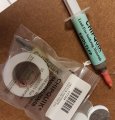
The only low temp solder that I had experience with before indium is the paste shown in the pic I posted. But the paste is too messy for my taste, and makes dark poodles under which the traces are hard to discern when working with it. That is because I have no access to the stencils one's supposed to use. So I apply a blob here and there on the board and then move the iron around until the solder sticks to the traces. Then I clean the board best I can and place the components on the board, carefully aligning its pins with the tinned traces, finally pressing (and passing) the iron on each pin, one by one, very carefully, until done.

Mind you, I only go through the process I described when soldering temperature sensitive components, such as ADC's and SMT MCU's and voltage references. I normally set the iron to 450°F for those cases. For all the other components, such as diodes, resistors, capacitors and some transistors, I set the iron to 575°F and use ordinary 60/40, 0.020" solder, Kester brand.
 

jpanhalt

Joined Jan 18, 2008
11,087
Well, bad news from Ohio. My favorite low-temp solder is Kester#58/245, lot date 1999.

That is Sn43 Pb43 Bi 14 with #245 flux in 0.031" diameter. No longer made. Melts at 291° to 324°F and behaves just like regular 63/37 leaded solder with the nice Kester 44 flux (probably with some small modifications to account for the different number). I have a 1# spool and could send you several meters, but that would do you no good for a production part. Let me know.

There are some alternatives with "no clean" flux. Chip-Quik and others. I have used Chip-Quik removal solder (high bismuth) but never its assembly solder.
 

Thread Starter

cmartinez

Joined Jan 17, 2007
8,762
I'm banging my head down here ... I keep getting this stupid message from the MPLAB X:

upload_2019-8-22_18-10-9.png

And I'm getting this message even from devices that are in perfect working condition! :mad: What the hell is going on?
 

Thread Starter

cmartinez

Joined Jan 17, 2007
8,762
I think I finally found the culprit...

It was two issues, actually, and they were intermittent. That's why they were so hard to track and find.

There are two key components in my circuit being driven directly by the PIC10LF322, one is a magnetoresistive sensor (which I initially confused as a hall sensor), and the other one is a simple SMT nFet, the particular part number being DMN1019USN.

Well, the sensor's output is normally high and it's no wonder that it was making trouble, since the pin it's connected to has a direct participation in the programming process. I'm going to have to find a way to work around that problem... perhaps adding a simple diode should suffice.

But the nFet was much trickier to understand. Without the nFet installed, things would go smoothly for the programmer, but once its gate was connected to the MCU, things would stop working altogether. What gives? Shouldn't an nFet's gate behave like a low value capacitor? That shouldn't be much a problem for the programmer, right? And why the hell was it intermittent?

So I decided to take a very close look at its datasheet, and here's what I found:

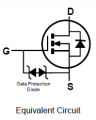
upload_2019-8-23_13-0-34.png

The stupid gate has an internal TVS connected to the source, so maybe that thing was snubbing the programmer's attempts at communicating with the device.

It's very important to me that no jumpers need to be connected and disconnected when one wants to program or run the device normally. This last problem is going to be trickier for me to solve without adding additional circuitry, I think.
 

Thread Starter

cmartinez

Joined Jan 17, 2007
8,762
UPDATE:

Nope ... a diode didn't work for preventing the sensor's output from interfering with the programming process... now I've got two problems to solve, and they will most probably require the use of additional components ... maybe an analog switch ic?
 

OBW0549

Joined Mar 2, 2015
3,566
But the nFet was much trickier to understand. Without the nFet installed, things would go smoothly for the programmer, but once its gate was connected to the MCU, things would stop working altogether. What gives? Shouldn't an nFet's gate behave like a low value capacitor? That shouldn't be much a problem for the programmer, right? And why the hell was it intermittent?
The MOSFET data sheet cites its input capacitance at more than 2000 pF; that is likely much more than the programmer will tolerate. The intermittency probably indicates the condition was marginal-- sometimes it works, sometimes it doesn't.

I long ago learned to do what Microchip recommends: either use the programming pins ONLY for programming, or isolate them from the rest of the circuit during programming, either with jumpers or with a switch.
 

jpanhalt

Joined Jan 18, 2008
11,087
Well, the sensor's output is normally high and it's no wonder that it was making trouble, since the pin it's connected to has a direct participation in the programming process. I'm going to have to find a way to work around that problem... perhaps adding a simple diode should suffice.
It may matter which pin that participates in programming is being used. Microchip recommends against a diode in the DAT and CLK lines, but elsewhere, it depends on how it is oriented.

Can you show the schematic or at least show which MCU pins are attached to what? That can be simply descriptive (e.g., PIN2 --> mosfet gate). For MCLR it would help to see everything attached to it.

John
 

Thread Starter

cmartinez

Joined Jan 17, 2007
8,762
The MOSFET data sheet cites its input capacitance at more than 2000 pF; that is likely much more than the programmer will tolerate. The intermittency probably indicates the condition was marginal-- sometimes it works, sometimes it doesn't.

I long ago learned to do what Microchip recommends: either use the programming pins ONLY for programming, or isolate them from the rest of the circuit during programming, either with jumpers or with a switch.
Interesting, just 2 nF of capacitance will cause trouble... guess I'm going to have to find a workaround.

Can you show the schematic or at least show which MCU pins are attached to what? That can be simply descriptive (e.g., PIN2 --> mosfet gate). For MCLR it would help to see everything attached to it.
The chip has only 6 pins, four of them are configurable GP I/O's, and only one of them does not participate in the programming process.
  • ICSPDAT is connected to the nFet's gate.
  • ICSPCLK is connected to a LED through a 270 ohm resistor and then to ground.
  • /MCLR goes to the magnetoresistive sensor
  • RA2 is connected to a NO pushbutton, and is not connected to the programmer
Maybe if I used /MCLR for the fet's gate I wouldn't need to disconnect it during programming? My reasoning being that the most delicate (high frequency) signals should be present at ICSPDAT and ICSPCLK and that the /MCLR pin should more tolerant
 

jpanhalt

Joined Jan 18, 2008
11,087
Actually, Microchip makes a point of needing MCLR's voltage to change quickly.

Here are two links that may be of interest:
1) https://www.elnec.com/sw/30277d.pdf (original directions)
2) https://microchipdeveloper.com/dtda:icsp-considerations (update)


From the "update:"
upload_2019-8-23_16-23-1.png

You will find in some early datasheets directions to use a resistor and capacitor on MCLR to isolate it from glitches in VCC when MCLR is "on". Unfortunately, that practice can lead to difficulty programming as it slows the transition, so many later datasheets recommend against any capacitor on MCLR. A compromise seems to be to isolate the capacitor (if used) with a diode.

If you are not using MCLR for a reset, I would turn it off in the configuration and avoid the glitch problem. That will not affect ICSP. You could also consider a diode for your sensor, if it will tolerate it.

As for having the mosfet directly on the DAT line, that might affect programming as others have mentioned too. A resistor may give sufficient isolation but would slow turn-on. I would try it with the mosfet DC'd. If that fixes the problem, can you swap the mosfet with the LED? Same approach with the LED.
 
Last edited:

OBW0549

Joined Mar 2, 2015
3,566
Interesting, just 2 nF of capacitance will cause trouble...
Not "will," but rather "may."

Sometimes 2 nF of capacitance is not "just" 2 nF; in some situations, especially when short rise and fall times of CMOS logic signals are critical to performance, a 2 nF capacitive load on an I/O pin can be a complete showstopper, and 2 nF can be a "huge" capacitance.

It all depends.
 

Thread Starter

cmartinez

Joined Jan 17, 2007
8,762
Now I'm getting this stupid message .... even after I've disconnected all peripherals and only the programmer is connected to the chip. :mad:

upload_2019-8-23_17-55-42.png

Boy, I miss working with my old and reliable AT89LP4052.... :(
 

be80be

Joined Jul 5, 2008
2,395
Your powering the target from a pickit 3 I guess.
The pickit3 is bad to error if you use it to power the target . I power all my chips with there own power.
Them good old days of the pickit2 are gone it would power anything almost.
 

Thread Starter

cmartinez

Joined Jan 17, 2007
8,762
Evil spirits. It's evil spirits, I tell ya. I think your PICKit needs an exorcism...
I don't think this freaking chip cares too much about my religion... anyway, what I did is "reset" the entire project by moving the source file to a new directory and creating a new project from scratch in the terriblysuckybetterthannothingstupid MPALB X user interface.

Problem solved...
 

jpanhalt

Joined Jan 18, 2008
11,087
Agree w/ @be80be .

The specification is vague, but it is said that PK3 can only supply 20 to 30 mA at most.* Even with my ICD3 (about 100 mA), I usually supply the target from my PC. I just took a standard USB cable, isolated the +5V and GND, and added a power plug to mate with my PCB's.

*Years ago, I was having problems with my first PK3. Put an o'scope on its power lines, and it slumped terribly. Added a large tantalum cap to help, but then I got a replacement and ICD3 from Microchip. My replacement PK3 from Microchip is virtually unused since then.

Edit: Just saw your post. I type slowly,very slowly.
 

Thread Starter

cmartinez

Joined Jan 17, 2007
8,762
Agree w/ @be80be .

The specification is vague, but it is said that PK3 can only supply 20 to 30 mA at most.* Even with my ICD3 (about 100 mA), I usually supply the target from my PC. I just took a standard USB cable, isolated the +5V and GND, and added a power plug to mate with my PCB's.

*Years ago, I was having problems with my first PK3. Put an o'scope on its power lines, and it slumped terribly. Added a large tantalum cap to help, but then I got a replacement and ICD3 from Microchip. My replacement PK3 from Microchip is virtually unused since then.

Edit: Just saw your post. I type slowly,very slowly.
Oh I tried powering the chip externally, using a pack of four AAA batteries, and the result was the same until I re-did the project. Although I did notice that the LED flashes a little brighter when using the batteries than powering it from the Pickit3
 
Top