Learning to program the PIC16LF1823

OBW0549

Joined Mar 2, 2015
3,566
I just found out that the simple instruction of dividing an 8 bit register by another, with an integer result and a remainder does not exist in the PCI16F1823... :mad:
Not that this will help you in the present instance, but this sort of thing is part of why I suggested a while back that you consider using the 16-bit PICs (dsPICs & PIC24F): the instruction set is much more capable, and makes assembly language programming a lot less painful.

I don't want to risk derailing the thread, so I'll shut up now. :)
 

Thread Starter

cmartinez

Joined Jan 17, 2007
8,762
Not that this will help you in the present instance, but this sort of thing is part of why I suggested a while back that you consider using the 16-bit PICs (dsPICs & PIC24F): the instruction set is much more capable, and makes assembly language programming a lot less painful.

I don't want to risk derailing the thread, so I'll shut up now. :)

1594128872895.png
 

Thread Starter

cmartinez

Joined Jan 17, 2007
8,762
Dumb question, the PIC16F1823 manual states that the "SUBWF f, d" function does is "Subtract (2's complement method) W register from register f.

What does that mean exactly? That the numbers to be subtracted must have a 2's complement format, or that the result will be represented in 2's complement or something else?
 

MaxHeadRoom

Joined Jul 18, 2013
30,661
As follows:
SUBWF
Subtract (2’s complement method)
W register from register ‘f’. If ‘d’ is
0, the result is stored in the W
register. If ‘d’ is 1, the result is
stored back in register ‘f’.
Not sure what debugger MPLB-X has but MPLAB-IDE has a few one such as MPLB SIM you can step through the pgm and see the results in any selected register etc.
Max.
 
Last edited:

jpanhalt

Joined Jan 18, 2008
11,087
That just describes the internal method. The instruction works on your "regular" bytes and subtracts W from F. You must supply the destination, which can be W or F. If W > F, STATUS,0 is clear. If W <= F, STATUS,0 is set (=1).

That causes some confusion with the way STATUS works during addition. Just think of it as the carry/borrow bit.
 

Thread Starter

cmartinez

Joined Jan 17, 2007
8,762
I understood as much. I was just wondering if say 255 - 127 = 128 ... or if the result would be something else because of that 2's complement thing...
 

jpanhalt

Joined Jan 18, 2008
11,087
If w=127 and f=255, then subwf <regf> =128. You can put the answer in either f or w.

If you do multi-byte subtraction, you will want to use subwfb for the high byte as that avoids having to check STATUS,0.
 

joeyd999

Joined Jun 6, 2011
6,282
Subtraction via 2's complement method means: complement (in 2's fashion) the subtrahend, and add the result to the minuend, resulting in the difference.

So, 2's complement subtraction is actually addition.
 

MaxHeadRoom

Joined Jul 18, 2013
30,661
I have MPLAB loaded on my project page, if I want to see exactly what the result is on a certain register/instruction, I just single step through that section and see immediately what the result is. ;)
Max.
 

Thread Starter

cmartinez

Joined Jan 17, 2007
8,762
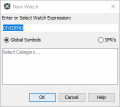
Trying to learn how to use the debugger at this point. I can't figure out how to add watchers to my variables. I'm doing what the help instructions ask me to do (right click on the variable and select add watch) and it's just not working. All other registers report just fine, but when, say, I right click over DIVIDEND (which was declared as DIVIDEND EQU 075H) and select new watch, it'll take to a dialog box such as this one:

1594156862208.png

And after clicking ok, it just won't add it to the "Watches" list.
 

joeyd999

Joined Jun 6, 2011
6,282
Trying to learn how to use the debugger at this point. I can't figure out how to add watchers to my variables. I'm doing what the help instructions ask me to do (right click on the variable and select add watch) and it's just not working. All other registers report just fine, but when, say, I right click over DIVIDEND (which was declared as DIVIDEND EQU 075H) and select new watch, it'll take to a dialog box such as this one:


And after clicking ok, it just won't add it to the "Watches" list.
Ha! The very reason I still won't use MPLABX. You need to reserve your register "variables" as resources, otherwise, MPLABX just doesn't understand.

In the olden days, one could "view" a named address any way they wanted to. But those darn whipper-snapper millennial tool coders are too smart for that.
 

MaxHeadRoom

Joined Jul 18, 2013
30,661
I have played around the edges of MPLB-X using assembly, but so far it has been a frustrating experience.
I guess I am used to MPLAB v8.92 . Where my assembly experience has been so far.
I get the the distinct impression that Microchip has abandoned assembly support in favor of C , going by all their current app notes and examples etc.
Including MPLAB-X. :mad:
Max.
 
Top