Is AI making embedded software developers more productive

be80be

Joined Jul 5, 2008
2,395
I run into a good one the AI I use added new feature call deep research it can’t write code when using this feature. It can only research it and then it’ll post what it finds like it wrote it. This was so terrible. I finally figured out how to turn that off. And switched back to the one that wrote the code it argues with you too like one of the sites that it posted with no longer there, but it does come up when you google it to a placeholder that was put on because evidently the domain was for sale
 

Futurist

Joined Apr 8, 2025
772
I run into a good one the AI I use added new feature call deep research it can’t write code when using this feature. It can only research it and then it’ll post what it finds like it wrote it. This was so terrible. I finally figured out how to turn that off. And switched back to the one that wrote the code it argues with you too like one of the sites that it posted with no longer there, but it does come up when you google it to a placeholder that was put on because evidently the domain was for sale
What AI service are you using and what question did you ask it?
 

be80be

Joined Jul 5, 2008
2,395
Gemini 2.5 pro but it has code writing but on my laptop in windows 11 it has deep research which is just that deep research i'm paying for the pro its great we can do in hours what took me weeks lol. i turned off deep research I think my cat turn it on
I was man what happen here im getting pages of useless research most links was dead ends and the code id fix the mistakes and bang let it look at it and get the broken code right back. Where as pro it would clean it up plus it wrote code not from the web
 

be80be

Joined Jul 5, 2008
2,395
Here working code it using flask to toggle pins on pico this the pico code

Code:
# main.py - FINAL VERSION for the Raspberry Pi Pico

import machine
import time
import sys
import json
import select

# --- Pin Definitions ---
output_pins = [machine.Pin(id, machine.Pin.OUT) for id in [16, 17, 18, 19]]
button_pins = [machine.Pin(id, machine.Pin.IN, machine.Pin.PULL_DOWN) for id in [10, 11, 12, 13]]
adc = machine.ADC(machine.Pin(26))

# --- Set up a poller to check for incoming data without blocking ---
poller = select.poll()
poller.register(sys.stdin, select.POLLIN)

# --- Main Loop ---
last_sent_time = time.ticks_ms()

while True:
    # --- Check for commands from the Pi Zero without blocking ---
    if poller.poll(0):
        try:
            command_str = sys.stdin.readline().strip()
            if command_str.startswith('TOGGLE'):
                pin_index = int(command_str.split(':')[1])
                if 0 <= pin_index < len(output_pins):
                    output_pins[pin_index].toggle()
        except (ValueError, IndexError):
            pass # Ignore malformed commands
            
    # --- Send sensor data every 200ms ---
    if time.ticks_diff(time.ticks_ms(), last_sent_time) > 200:
        button_states = [btn.value() for btn in button_pins]
        adc_value = adc.read_u16()
        
        data = {
            "buttons": button_states,
            "adc": adc_value
        }
        
        print(json.dumps(data))
        last_sent_time = time.ticks_ms()

    time.sleep(0.01)
 

be80be

Joined Jul 5, 2008
2,395
No thats just one piece of the pie there the web UI and html code too the html code you can't post the whole thing here the pico code is simple the app.py for flask
Code:
# app.py - FINAL CORRECTED VERSION

import serial
import json
import threading
import time
from flask import Flask, render_template_string, jsonify

# --- Serial Port Configuration ---
SERIAL_PORT = '/dev/ttyACM0'
BAUD_RATE = 115200

# --- Global variable to store the latest data from the Pico ---
pico_data = {
    "buttons": [0, 0, 0, 0],
    "adc": 0,
    "status": "Connecting..."
}

# --- Serial Communication Thread ---
def serial_reader():
    """Continuously reads data from the Pico in a separate thread."""
    global pico_data
    while True:
        try:
            with serial.Serial(SERIAL_PORT, BAUD_RATE, timeout=2) as ser:
                time.sleep(2) # Wait for Pico to reboot
                pico_data["status"] = "Connected to Pico"
                print("Successfully connected to Pico.")
                while True:
                    if not ser.is_open:
                        break
                    try:
                        line = ser.readline().decode('utf-8').strip()
                        if line:
                            data = json.loads(line)
                            pico_data.update(data)
                    except (json.JSONDecodeError, UnicodeDecodeError, serial.SerialException):
                        pass
        except serial.SerialException:
            pico_data["status"] = f"Pico not found at {SERIAL_PORT}. Retrying..."
            print(f"Pico not found. Retrying in 5 seconds...")
            time.sleep(5)

# --- Flask Web Application ---
app = Flask(__name__)

@app.route('/')
def index():
    return render_template_string(open('template.html').read())

@app.route('/data')
def get_data():
    return jsonify(pico_data)

@app.route('/toggle/<int:pin_index>')
def toggle_pin(pin_index):
    if not 0 <= pin_index <= 3:
        return jsonify({"status": "error", "message": "Invalid pin"}), 400
    try:
        with serial.Serial(SERIAL_PORT, BAUD_RATE, timeout=1) as ser:
            command = f"TOGGLE:{pin_index}\n"
            ser.write(command.encode('utf-8'))
            return jsonify({"status": "success", "message": f"Toggled output {pin_index}"})
    except serial.SerialException:
        return jsonify({"status": "error", "message": "Pico not available"}), 503

# --- Main execution block ---
if __name__ == '__main__':
    thread = threading.Thread(target=serial_reader, daemon=True)
    thread.start()
    app.run(host='0.0.0.0', port=5000)
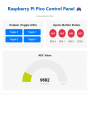
I made pdf of the html

picoUI.png\
It took about 10 minutes to write and debug next to doll it up
 

Attachments

Last edited:

Futurist

Joined Apr 8, 2025
772
No thats just one piece of the pie there the web UI and html code too the html code you can't post the whole thing here the pico code is simple the app.py for flask
Code:
# app.py - FINAL CORRECTED VERSION

import serial
import json
import threading
import time
from flask import Flask, render_template_string, jsonify

# --- Serial Port Configuration ---
SERIAL_PORT = '/dev/ttyACM0'
BAUD_RATE = 115200

# --- Global variable to store the latest data from the Pico ---
pico_data = {
    "buttons": [0, 0, 0, 0],
    "adc": 0,
    "status": "Connecting..."
}

# --- Serial Communication Thread ---
def serial_reader():
    """Continuously reads data from the Pico in a separate thread."""
    global pico_data
    while True:
        try:
            with serial.Serial(SERIAL_PORT, BAUD_RATE, timeout=2) as ser:
                time.sleep(2) # Wait for Pico to reboot
                pico_data["status"] = "Connected to Pico"
                print("Successfully connected to Pico.")
                while True:
                    if not ser.is_open:
                        break
                    try:
                        line = ser.readline().decode('utf-8').strip()
                        if line:
                            data = json.loads(line)
                            pico_data.update(data)
                    except (json.JSONDecodeError, UnicodeDecodeError, serial.SerialException):
                        pass
        except serial.SerialException:
            pico_data["status"] = f"Pico not found at {SERIAL_PORT}. Retrying..."
            print(f"Pico not found. Retrying in 5 seconds...")
            time.sleep(5)

# --- Flask Web Application ---
app = Flask(__name__)

@app.route('/')
def index():
    return render_template_string(open('template.html').read())

@app.route('/data')
def get_data():
    return jsonify(pico_data)

@app.route('/toggle/<int:pin_index>')
def toggle_pin(pin_index):
    if not 0 <= pin_index <= 3:
        return jsonify({"status": "error", "message": "Invalid pin"}), 400
    try:
        with serial.Serial(SERIAL_PORT, BAUD_RATE, timeout=1) as ser:
            command = f"TOGGLE:{pin_index}\n"
            ser.write(command.encode('utf-8'))
            return jsonify({"status": "success", "message": f"Toggled output {pin_index}"})
    except serial.SerialException:
        return jsonify({"status": "error", "message": "Pico not available"}), 503

# --- Main execution block ---
if __name__ == '__main__':
    thread = threading.Thread(target=serial_reader, daemon=True)
    thread.start()
    app.run(host='0.0.0.0', port=5000)
I made pdf of the html

View attachment 356044\
It took about 10 minutes to write and debug next to doll it up
Man, I forgot how ugly web UI code looks when working at that raw level!
 
Top