Ibanez 10 watt amp fix

Thread Starter

shuey79

Joined Dec 10, 2023
11
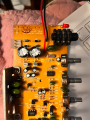
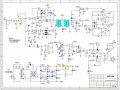
I have a Ibanez 10 watt amp (IBZ10A) that is buzzing when its plugged in. No guitar sound is coming out and the volume pot doesn't have any affect on it. I've tested the voltage at the secondary (+-+) which was 14vac (on each positive wire to ground) unplugged from circuit board. When I plug in the board it gets 6.1vac (on each positive wire to ground), this is before it goes to anything. The diodes, on what I think is the bridge rectifier, get pretty hot within a matter of seconds. I've been taking components off the board and testing them per peoples suggestions (on youtube) but I haven't found any bad ones. Can anyone offer me any pointers on troubleshooting this. I've attached the schematic that I got from Ibanez (sorry for the blur -- ibanez sent it like that).
 

Attachments

MrChips

Joined Oct 2, 2009
34,725
Don’t remove components and test them. That is not the right trouble-shooting approach. Do you have a DMM? We need to look at symptoms.
We’ll continue tomorrow.
 

Thread Starter

shuey79

Joined Dec 10, 2023
11
Don’t remove components and test them. That is not the right trouble-shooting approach. Do you have a DMM? We need to look at symptoms.
We’ll continue tomorrow.
yea I have a dmm. I forgot to mention that I’ve already replaced the tda2030 ic and the two filter capacitors (c31 & c32) even though the original ones tested fine. It was suggested by others elsewhere to do this. No change though.
 

MrChips

Joined Oct 2, 2009
34,725
We don't replace components until there is evidence that they need replacing. We trouble-shoot by looking at functionality within the circuit.

The first thing would be to test the voltages at the power supply with the DMM, across C31 and C32. Pay attention to the polarity of the capacitors and the sign of the reading on the DMM.

If the diodes are getting hot immediately, that is a sign that there is a short circuit across the power supply.
See if you can determine which of the four diodes are getting hot. If you measure the voltages at C31 and C32, it should tell you which side has the short, B+ or B-.

After that, using the DMM in Ohm's range, with the amplifier unplugged, look for a short across the power rail. I suspect one of the capacitors is shorting.

With more information, we can guide you through the trouble-shooting steps and procedures.

Ibanez IBZ10A.jpg
 

Thread Starter

shuey79

Joined Dec 10, 2023
11
We don't replace components until there is evidence that they need replacing. We trouble-shoot by looking at functionality within the circuit.

The first thing would be to test the voltages at the power supply with the DMM, across C31 and C32. Pay attention to the polarity of the capacitors and the sign of the reading on the DMM.

If the diodes are getting hot immediately, that is a sign that there is a short circuit across the power supply.
See if you can determine which of the four diodes are getting hot. If you measure the voltages at C31 and C32, it should tell you which side has the short, B+ or B-.

After that, using the DMM in Ohm's range, with the amplifier unplugged, look for a short across the power rail. I suspect one of the capacitors is shorting.

With more information, we can guide you through the trouble-shooting steps and procedures.
I tested the voltages at the power supply to the capacitors (was;t sure if AC or DC and could only get a reading in DC so I went with that). C31 showed 14vdc, C32 showed 0.3vdc. These where both tested at the + of these caps. As for the diodes, its kinda hard to pin point which ones specifically are getting hot. I tried with my infrared heat gun really close and noticed that d9 was the one getting hot. The d10 was hot but not as hot (differed ~2 degrees). Not sure how accurate the heat gun values are though since there isn't a whole lot of room between the diodes.

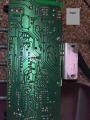
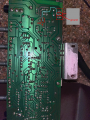
As for the DMM in Ohm's, there is continuity on the positive of the C32 cap and ground which doesn't make sense because when you look at the traces on the board it goes to ground:

IMG_3752.png
 

MrChips

Joined Oct 2, 2009
34,725
I tested the voltages at the power supply to the capacitors (was;t sure if AC or DC and could only get a reading in DC so I went with that). C31 showed 14vdc, C32 showed 0.3vdc. These where both tested at the + of these caps. As for the diodes, its kinda hard to pin point which ones specifically are getting hot. I tried with my infrared heat gun really close and noticed that d9 was the one getting hot. The d10 was hot but not as hot (differed ~2 degrees). Not sure how accurate the heat gun values are though since there isn't a whole lot of room between the diodes.

As for the DMM in Ohm's, there is continuity on the positive of the C32 cap and ground which doesn't make sense because when you look at the traces on the board it goes to ground:
You need to redo the voltage measurements.
Set your DMM to DC.
Connect the BLACK lead to GROUND.
Use the RED lead for testing.
You will record 4 measurements, two on the terminals on C31, +ve and then -ve.
Then two terminals on C32, +ve and then -ve.
Make sure that you record the sign indicated on the meter.
 

Thread Starter

shuey79

Joined Dec 10, 2023
11
You need to redo the voltage measurements.
Set your DMM to DC.
Connect the BLACK lead to GROUND.
Use the RED lead for testing.
You will record 4 measurements, two on the terminals on C31, +ve and then -ve.
Then two terminals on C32, +ve and then -ve.
Make sure that you record the sign indicated on the meter.
I’ll try again. I don’t have a lot of time to do this while plugged in. I have maybe 30 seconds before the c31 capacitor blows up. This already happened before but I replaced it.
 

MrChips

Joined Oct 2, 2009
34,725
If C31 is blowing up then likely D9 is bad.
With the unit unplugged, check with diode checker on all four diodes, D9, D10, D11, and D12, both forward and reverse measurement.
 

Thread Starter

shuey79

Joined Dec 10, 2023
11
Resistance measurements below:

D9:
forward-biased (positive on anode):
.594
reverse-biased (negative on anode):
1.746

D10:
forward-biased:
.596
reverse-biased:
1.744

D12:
forward-biased:
.583
reverse-biased:
1.732

D11:
forward-biased:
.577
reverse-biased:
1.734
 
Top