I2C communication question

Thread Starter

Gajyamadake

Joined Oct 9, 2019
310
Hi, there!
I'm now Drawing the flow chart for general I2C communication first.

The picture is attached that write data to salve device
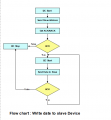
1575455104676.png


Is this idea correct?
 

JohnInTX

Joined Jun 26, 2012
4,787
It doesn't make much sense. Are you trying to read a sequence of bytes from an I2C slave into a buffer?
What is the part number of the slave device?

Second cup of coffee:
Your loop executes 7 times but doesn't do anything.
You have no STOP condition.

If you are writing to an I2C slave, you only need one START. You send START, the slave address with R/W=0, the data byte(s) then a STOP. Verify ACK after each byte sent. Send STOP when the last byte is written.

If you are reading from an I2C slave, you usually have to WRITE the address you are reading from then change to read and read the data:
START + SlaveAddress + R/W=0 then write the address you want to read from - verify ACK after each byte sent.
REPEAT START + SlaveAddress + R/W=1, verify ACK (to change to read from the previously set address) then read each byte. After each byte, the MASTER generates ACK. On the last byte, the master generates NAK (to tell the slave that no further bytes will be read) then STOP to terminate the transaction and free the bus.

To buffer the received bytes, init the buffer before the I2C transaction begins. When you receive a byte, put it into the buffer and bump the index.

When done, or after any error (NAK etc), send STOP to free the bus.
 
Last edited:

Thread Starter

Gajyamadake

Joined Oct 9, 2019
310
What is the part number of the slave device?
JohnInTX Thank you so much for the response. I haven't thought of anything specific yet. I just thought that one is a mater and the other is slave and I made flow chart to show how they will communicate for i2c communication. I thought I should start with a simple example, so I did
It doesn't make much sense. Are you trying to read a sequence of bytes from an I2C slave into a buffer?
Yes I made a flow chart to read the sequence of of bytes from an I2C slave into a buffer
 

JohnInTX

Joined Jun 26, 2012
4,787
See my expanded response above.

Attached is the I2C specification. Chapter 3 describes the protocol for slave writes and reads. Page 15 shows what I described above. I2C is not hard but many fail because they don't take the time to fully understand the protocols involved. If you read and understand chapter 3, you'll know what you need to implement most I2C devices.
 

Attachments

Last edited:

Thread Starter

Gajyamadake

Joined Oct 9, 2019
310
If you are writing to an I2C slave, you only need one START. You send START, the slave address with R/W=0, the data byte(s) then a STOP. Verify ACK after each byte sent. Send STOP when the last byte is written.
I made new flow chart as per description to write data to slave

1575643490768.png
 

Thread Starter

Gajyamadake

Joined Oct 9, 2019
310
If you are writing to an I2C slave, you only need one START. You send START, the slave address with R/W=0, the data byte(s) then a STOP. Verify ACK after each byte sent. Send STOP when the last byte is written.
I think it should be work as per your explanations

1575647438474.png


Please read page 15 of the spec. What does START do? What ALWAYS comes after a START? Where does the STOP go?
I have recreated flow chart after reading description on page 15 and chapter 3

I have attached documents : Write data byte's to slave
 

Attachments

Last edited:

JohnInTX

Joined Jun 26, 2012
4,787
Much better!
A few things:
1) R/W = 0 for write.
2) The last decision diamond doesn't show that it checks anything. That is incorrect. You say 'GET ACK/NAK From Slave' but you don't test anything. Always ask yourself if you have considered all of the possibilities at each step.
3) On the last byte of a slave WRITE, the slave will still ACK the byte to indicate that it has received the second byte. It is when the master is reading from the slave that the master generates a NAK to indicate that no more data will be read.
 

Thread Starter

Gajyamadake

Joined Oct 9, 2019
310
Much better!
A few things:
1) R/W = 0 for write.
2) The last decision diamond doesn't show that it checks anything. That is incorrect. You say 'GET ACK/NAK From Slave' but you don't test anything. Always ask yourself if you have considered all of the possibilities at each step.
3) On the last byte of a slave WRITE, the slave will still ACK the byte to indicate that it has received the second byte. It is when the master is reading from the slave that the master generates a NAK to indicate that no more data will be read.
You replied while I was editing last post. There is one image and one PDF file to show how we can write data to slave device.
I think the first one image is better
 

JohnInTX

Joined Jun 26, 2012
4,787
Getting there.
int buffer[N} declares the buffer. I assume you mean buffer[N] = byte_read; Declare the buffer at the top of the flow chart and use it in the flow.
What is happening in the buffer loop? You are not reading anything from the I2C slave.
As you read each byte, put it in the buffer.
ACK each byte read from the slave.
After the last byte read, send NAK instead of ACK.
Send STOP
 

Thread Starter

Gajyamadake

Joined Oct 9, 2019
310
Getting there.
int buffer[N} declares the buffer. I assume you mean buffer[N] = byte_read; Declare the buffer at the top of the flow chart and use it in the flow.
What is happening in the buffer loop? You are not reading anything from the I2C slave.
As you read each byte, put it in the buffer.
ACK each byte read from the slave.
After the last byte read, send NAK instead of ACK.
Send STOP
Alright Here I am doing similar
Please checkout new attachment
 

Attachments

JohnInTX

Joined Jun 26, 2012
4,787
You need a block in the loop that says 'Read Byte From Slave' to show where that happens.
You need to show what you do with the data received.
Declare the buffer at the top, not in the loop.
Otherwise, you basically have it.
 

BobaMosfet

Joined Jul 1, 2009
2,211
First, I'm sorry I missed this thread (been busy)- because I'm *really* proud of you for taking up flow-charting. That speaks incredible volumes to your desire to be a real engineer in how you approach things.

I offer this, as an addition to flow-charting.

Tables.

When you see something like i2c/twi, you need to remember that everything is tied to a high or low value on the signal lines. The charts that are provided in the data sheets, and frequently other information, can be more easily digested prior to writing your flow-chart if you identify key pieces and put them in a table. A table is powerful because you can summarize all of your possibilities (for example what the SDA/SCL high/low combinations mean) and then you can make sure your flow-chart reflects each one being handled properly.

And you can extend columns on the table to identify what registers and flags you need to set, and how to set them, for any given MCU, which can greatly simplify getting the overall process in your head.
 

jpanhalt

Joined Jan 18, 2008
11,087
That is certainly in the form of a table, but before I would write anything, I would ask myself what was the purpose of the table? Then I would start designing that table. With that in mind, what is the purpose of the table you show? You should be able to do that in a simple sentence.

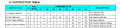
Since you mention SPI, here's an example of the instruction codes used to control a GLCD using an SPI protocol.

1575711203146.png

Now, the subject here is I2C. That protocol has a lot of "conditions" (e.g., Start, Stop, Restart, Ack, Nack, etc.) that are defined by the SDA and SCL lines.

Can you make a table for each "condition" that shows the corresponding states of SDA and SCL for each? (My purpose? Define Each I2C Condition)

As a starter, this presentation by Microchip walks through each condition and gives the answers: http://ww1.microchip.com/downloads/en/devicedoc/i2c.pdf

ConditionSDASCLComment
StartH --> LHSDA transitions high to low while SCL is held high
StopL --> HHSDA transitions low to high while SCL is held high
And so forth ...
Those comments are probably not necessary and were fabricated for illustration. Comments may be more important when describing the other conditions.


John

PS: My first attempt using the "Table function" in our reply window. Very primitive compared to any word processor I have used. For example, how does one adjust column widths? EDIT: What one sees when creating the table is not what one gets. The columns automatically adjust. For me, that is even worse than not being able to adjust them.
 
Last edited:
Top