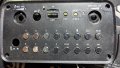
I repaired this portable speaker but the Bluetooth is still not working

Thread Starter

rambomhtri

Joined Nov 9, 2015
606
Yeah, but I tried to find out about that chip and couldn't find anything. I don't even know that brand. I was hoping to check which pin is the antena and check for continuity.

What else can I do to test if the BT chip works?
It doesn't look brunt or that it failed.

There's the black cable mystery still going on. The white cable I guess is the FM radio antenna cable, which connects the PCB to the external typical common radio antenna. However, the black cable is soldered at that antenna's base, with the white cable (I sanitized and resoldered it), and the other black end is loose, so that must be wrong, right?
It's acting, if I leave it like that, as an antenna that already exists (FM antenna). Where that cable must be soldered to?

1654697488323.png
 

Thread Starter

rambomhtri

Joined Nov 9, 2015
606
Yeah, it works, continuity CHECK. I see nothing wrong in that area... could it be I am just not setting the speaker in pairing mode?

It's weird... I've tried all the combinations of buttons while in Bluetooth mode and nothing makes the BT stop blinking, which I recognize as a "pairing" state. Long press mode button, Play, even tried some combinations of 2 buttons... if I could at least get a look at the manual...
 

Thread Starter

rambomhtri

Joined Nov 9, 2015
606
Get a Bluetooth scanner app for your phone.
My Android phone already scans. Is there any way to check if the antenna is signaling?

Sounds way too deep but with a DMM is there anything I can test on the PCB to check the antenna is trying to make contact?
 

KeithWalker

Joined Jul 10, 2017
3,615
Try pairing your speaker with some other Bluetooth device.
The black and white wired connected to the mic RF receiver should not be connected to anything else. They are two halves of a dipole antenna.
 

Thread Starter

rambomhtri

Joined Nov 9, 2015
606
About the antennas... really?
I don't know much about them, telecommunications is not something that I control at all. TBH the loose black end doesn't look pulled of from anywhere, the cut is clean.

Why would you want 2 parallel antennas?

I'm gonna try with an older phone but... Bluetooth is Bluetooth, should work with everything.
 

KeithWalker

Joined Jul 10, 2017
3,615
About the antennas... really?
I don't know much about them, telecommunications is not something that I control at all. TBH the loose black end doesn't look pulled of from anywhere, the cut is clean.

Why would you want 2 parallel antennas?

I'm gonna try with an older phone but... Bluetooth is Bluetooth, should work with everything.
1. Look up "Dipole antenna".
2. Yes, it should work with the Bluetooth on an older phone.
 

Thread Starter

rambomhtri

Joined Nov 9, 2015
606
Nothing... I'm assuming that when you put the Bluetooth tab it enters in pairing mode automatically. If not... Anyone guesses what combination key can go to pairing Bluetooth mode?
PXL_20220608_230845187.jpg
 

Ya’akov

Joined Jan 27, 2019
10,280
My Android phone already scans. Is there any way to check if the antenna is signaling?

Sounds way too deep but with a DMM is there anything I can test on the PCB to check the antenna is trying to make contact?
A scanning app will show you all the BT signals, not just what the phone thinks you can pair with.
 

Thread Starter

rambomhtri

Joined Nov 9, 2015
606
Nothing, I give up, either something is wrong with the BT or I don't know the combination keys (tried everything from press, double press and long press individual keys and multiple keys) for BT pairing. I have assembled it already.

Thank you all for your support though!
I'm creating now another thread about troubleshooting an expensive laptop motherboard that won't turn on. Died suddenly for no reason. Was using it a month ago, and overnight, it broke. Woke up, tried to turn it on, nothing, 100% dead.
 
Top