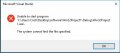
I run Visual Studio 2017 and C++ program not start because appears on the screen "Unable to start program.....This system cannot find the file specified."
This is screen:
Remove VS17 check for any leftovers in registry.
Restart Pc and re install VS 17 make sure that every step is OK.
At a certain moment the system will ask you to define maps/ files to stuff the goodies in.
Use, if possible, the default locations.
MS will give support when purchased within the last period. ( I think one year but not sure)
Build the project, look in the output pane for build errors. The output will tell you if the .exe file was created or not. If the .exe was not created, then fix the errors and try
again. If the .exe was created, then check the debug settings for your project to make sure it is pointing to the output directory.
Typically the default settings for output a debug directories work great. If you start moving things around and specifying different output directories, etc.. then you have to pay attention or the debugger won't be able to find things.

 Facebook
 Google
 GitHub
 Linkedin