HX-711 Saturating

Thread Starter

swisscheese

Joined May 12, 2022
6
I have an HX-711 amplifying a load cell and feeding an ATTINY85. I'm using the simple code from the datasheet - no libraries. I'm only getting 0xFFFFFF in the result which indicates saturation. I tried shorting A- to A+ and get the same. I tried the B channel. I tried the circuit on a PCB and a breadboard. The voltages at A- and A+ look fine - right in the middle of the supply range and nearly identical. I tried the 24 and 25 and 26 bit modes. I tried a different HX-711 module. I'm using this load cell. I'm at a loss. Any ideas?
 

ericgibbs

Joined Jan 29, 2010
21,412
hi swiss,
Welcome to AAC.
Do you have a circuit diagram to post.?
Also post your program code, we can then compare results.
E
 

Thread Starter

swisscheese

Joined May 12, 2022
6
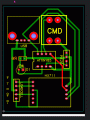
Here is the PCB:
https://gyazo.com/4ec5fe849e00325082a4db71ecad4f98

Here is the code:
C-like:
uint8_t SDA = 0;
uint8_t SCK = 2;
uint8_t Btn = 1;
uint8_t LED = 3;
uint8_t PiezoPin = 4;

void LedOn   () { digitalWrite (LED,1); }
void LedOff  () { digitalWrite (LED,0); }

bool BtnPressed () { return (digitalRead (Btn) == 0); }
void Blink () { LedOn (); delay (100); LedOff (); delay (200); }
void BlinkN (int n) { while (n--) Blink (); }
void BlinkBinary (unsigned long n) { LedOn (); delay (1000); LedOff (); delay (500); while (n) { BlinkN ((n&1) ? 2 : 1); delay (500); n = n / 2; } } // note that order of bits is reversed

void setup() {
  pinMode (LED,OUTPUT);
  pinMode (Btn,INPUT_PULLUP);
  pinMode (SDA,INPUT_PULLUP);
  pinMode (SCK,OUTPUT);
  BlinkN (3); }

void Clk1() { digitalWrite(SCK, HIGH); }
void Clk0() { digitalWrite(SCK, LOW); }
bool Data() { return (digitalRead(SDA)); }

long Read () {
long x = 0;
Clk0 ();
while (Data () != LOW);
for (int i=0;i<26;i++){ // 24 (ch A), 25 (ch B) or 26 (ch A) - see specs
  Clk1 ();
  x = x << 1;
  Clk0 ();
  if(Data ()) x++; }
Clk1 ();
Clk0 ();
return(x); }

void loop() {
long Val = abs (Read ());
BlinkBinary (Val); } // getting 25 1's = saturation - maybe bad load cell? But shorting A+,A- (or B's) gave same. Grounding Bs did not help.
EG 1613.gif
 
Last edited by a moderator:

ericgibbs

Joined Jan 29, 2010
21,412
Hi swiss,
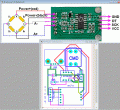
I assume the PCB layout view is of the Component side of the PCB, and it is a single side PCB
The tracking looks OK except for the area marked with a Black circle, shows two tracks crossing [near Piezo]
I suggest adding some smoothing/coupling capacitors on the USB +5V supply.

I am not familiar with that Tiny Coding, perhaps another member maybe able to advise.

E
EG 1614.gif
 

Thread Starter

swisscheese

Joined May 12, 2022
6
This morning I tried pulling A+ up or down via a 10K resistor and still got 0xFFFFFF. Also Clk and Dt lines on scope look fine. Also I grounded the B lines per the mfg recommendation.
 

ericgibbs

Joined Jan 29, 2010
21,412
hi swiss,
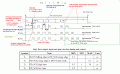
Do you have an oscilloscope on the bench.
If Yes, you could check the Data and Clock lines on the HX711 module to conform to the required specification.
E
HX711timing1.gif
 
Top