How to use attiny88

Thread Starter

Insidcircuit.

Joined Oct 9, 2022
16
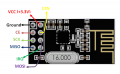
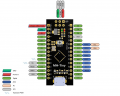
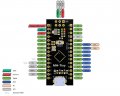
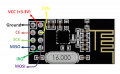
Is it possible to use attiny88 for both the drone (NRF24l01) transmitter and receiver instead of using Arduino nano? mh-tiny-pinout-1024x814.jpg If yes can you please help me with the diagram of how to wire it to NRF24?nRF24L01-Pinout.png
 

SamR

Joined Mar 19, 2019
5,470
The AT88 is a microprocessor. Different AT's have different I/O pin counts. Then there is, in addition, Voltage regulation, frequency control, and a host of various communication protocol channels. So no, the AT88 cannot, by itself, replace the Nano. Building from scratch, it is hard to beat the price of a Nano by doing it yourself from components. IF you don't need everything that the Nano provides, there may be some savings in weight but it wouldn't be by much.
 

DickCappels

Joined Aug 21, 2008
10,661
Without understanding what the Nano is doing and how it does it one cannot say that one can replace the other. The two have the same CPU and register stack but differ in the ways @SamR mentioned above. Another main difference between the two is the amount of memory available.

Sometimes you can modify or re-write the code of get around some of the differences between controllers, but first you have to be able to explain exactly what the code is doing.
 

Thread Starter

Insidcircuit.

Joined Oct 9, 2022
16
Without understanding what the Nano is doing and how it does it one cannot say that one can replace the other. The two have the same CPU and register stack but differ in the ways @SamR mentioned above. Another main difference between the two is the amount of memory available.

Sometimes you can modify or re-write the code of getting around some of the differences between controllers, but first, you have to be able to explain exactly what the code is doing.

What I'm asking for is that I want to know how to wire the nrf24l01 receiver to attiny88 for drone ESC
 

MrChips

Joined Oct 2, 2009
34,629
1666702934108.png
1666702888615.png

The easy part
nRF24L01 <=> ATtiny88
NSS <= SS D10
MOSI <= MOSI D11
MISO => MISO D12
SCK <= SCK D13
GND = GND

The not so obvious part
CE <= any spare output pin
IRQ = ignore if not being used
Vcc <= +3.3V

The difficult part
Write code to use the nRF24L01
 
Thread starter Similar threads Forum Replies Date
M Microcontrollers 2
Top