Facebook
 Google
 GitHub
 Linkedin

Hi everyone,
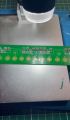
I’m working on fixing my Akai Mini 25 keyboard. One of the keys stopped responding, so I took it apart and found that one of the gold contacts on the PCB is no longer conductive. I ran a continuity test and confirmed that this contact is indeed non-functional. You can see in the attached photo where I’m pointing with tweezers—the small pin that’s supposed to be gold is no longer conductive.
When I tested continuity between this pin and the nearby transistor or resistor (D19), there was no connection. Everything else seems to be working fine, so this is the only problem area.
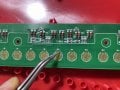
Any idea how to bridge that non conductive defaulty part?
Thanks for your help!
I’m working on fixing my Akai Mini 25 keyboard. One of the keys stopped responding, so I took it apart and found that one of the gold contacts on the PCB is no longer conductive. I ran a continuity test and confirmed that this contact is indeed non-functional. You can see in the attached photo where I’m pointing with tweezers—the small pin that’s supposed to be gold is no longer conductive.
When I tested continuity between this pin and the nearby transistor or resistor (D19), there was no connection. Everything else seems to be working fine, so this is the only problem area.
Any idea how to bridge that non conductive defaulty part?
Thanks for your help!