How to program a 12F508

trebla

Joined Jun 29, 2019
599
In conclusion, the only PROPER WAY to do it, is in Assembler.
Correct?
I understand it is harder to do it, but I will fit more code into the pic and also more carefully , than letting some automatic nutjob like hitechC do it's thing.
I wrote programs for base-line PICs in assembler because the tiny RAM size. Non-optimized compilers use extra RAM space for their automatic variables. However, i have tried CCS PICC PCB (command line) compiler and this generates smaller code and takes less RAM (not always). This is compiler is for base-line PICs only and has plugin for MPLAB as well. But this is not free, it has free trial period for 45 days and after that period it stops working unless you buy a licence ($50). For evaluating you must download entire PCC IDE (which supports all 8-16 bits PICs and also dsPICs), unfortunately.
 

Thread Starter

q12x

Joined Sep 25, 2015
2,227
That is very good information about PCC IDE . I never heard of it. I am trying it right now. Super many thanks.
But it is true what I said before, right? That doing it in ASM will fit more code into the pic and also more carefully distributed/arranged. Correct? I want to be sure, thats why I ask you.
 
Last edited:

trebla

Joined Jun 29, 2019
599
But it is true what I said before, right? That doing it in ASM will fit more code into the pic and also more carefully distributed/arranged. Correct? I want to be sure, thats why I ask you.
It depends:
1. how good is the compiler optimization
2. how good are you in writing optimal code
 

Ian Rogers

Joined Dec 12, 2012
1,136
The big issue you have here is lack of resources.... I have the pro version of XC and the highest optimisation level. but even that will struggle with the pic12f508.. We used to help an Indian gentleman ( EVERYONE here knew him ) and he was adamant on using the pic16f676.. with about as much resource as you have but at least a decent hardware stack... We call it "Flogging a dead horse"..
 

Thread Starter

q12x

Joined Sep 25, 2015
2,227
Can you tell me what Im doing wrong?
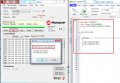
CCS C does not support my Pickit2 programmer device (the black box) directly.
SO I must use the PiCkit2 programmer software (in the picture below).
I just made this little program in CCS C. I get no errors so it must be ok.
I've also look inside 12f508.h file and read it's instruction for pins (ex: IN_B1) from there as well.
But im not 100% my code is good enough though even if its with no errors.
In the project folder, I get the 01.hex. I even open it and look into it.
I referenced that 01.hex into PiCkit2 programmer. and selected the device as 12f508 as you can see in the image.
But I still get that stupid error "Invalid OSCCAL Value detected" when I am trying to write it. And the device is not written because that OSCCAL error.
Do you know what that error means? And how to avoid it? or correct it?
Thank you!
Screenshot_3.jpg
 

trebla

Joined Jun 29, 2019
599
There are two things pop in my mind:
1.Try in PICkit2 programmer software Tools -> OSCAL -> Auto Regenerate
2. or insert in the beginning of Main() function this:
Code:
#asm
CALL 0x03ff
MOVWF OSCCAL
#endasm
I try find something i can test with, i hope i find a old gasoline pump controller where i used PIC12F509 :)
 

Thread Starter

q12x

Joined Sep 25, 2015
2,227
Excelent mister @trebla and thank you !
For 1.>> I did PICkit2 programmer software Tools -> OSCAL -> Auto Regenerate
many times before and now as well, but is always the same error.
I even look up some forum answers and I find some possible ways to [Set manually]
but none worked.
It boiled down to :
"
The PICkit2 should be able to recalibrate it. If it can't, there's some underlying reason which you want to get to the bottom of. Try erasing the PIC, turning off code protect, and then re-try the auto-calibrate.
"
and another one:
"
Any value up to about 50h will work. You can simply disregard the notice for the oscillator value and program the chip. 3450 //That's 50h //What's the 34 stand for? //That's the instruction to load the oscillator
"
also: "Oscilator Calibration Address: 05" for pic 12f508 - find it in its 12F508.h file for CCS C compiler

For2.>> I get an error with your code:
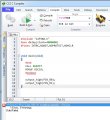
*** Error 12 "01.c" Line 11(5,11): Undefined identifier OSCCAL (see the screenshot as well)
Screenshot_1.jpg
Maybe this will help you:
Here is the 12F508.h check it inside and maybe you can see something useful.
It is the ONLY WAY I know to find specific code for this specific PIC. If it is another way, please tell me.
(the webiste does not let me give you direct *.h, but in a *.zip format)
 

Attachments

trebla

Joined Jun 29, 2019
599
I found a pic12f508 chip and also the DM164120 demo kit so i wrote the same program as in post #46. Only difference is that i use MPLAB 8.9 IDE with CCS PICC PCB compiler as i not have the full PICC IDE licence. I don't get any errors in compile time nor programming time with PICkit2 programmer software.

Secondly, i made some stupid mistakes in this assembler code - PIC12f508 has 1ff reset vector not 3ff because less memory compared to pic12f509.

I compiled corrected code with no errors:

pic12f508 OSCCAL restore:
#include <12F508.h>
#use delay(clock=4000000)
#Fuses INTRC,NOWDT,NOPROTECT,NOMCLR

#byte OSCCAL  = 0x05

void main(void) {

#asm
CALL 0x01ff
MOVWF OSCCAL
#endasm
    
    while(1) {
        
        output_high(PIN_B0);
        output_high(PIN_B1);
    }
}
 

trebla

Joined Jun 29, 2019
599
If you don't get any OSCCAL error during programming anymore, then try compile this code without assebler code part and see if you get any error during programming again.
 

BobaMosfet

Joined Jul 1, 2009
2,211
Ok... Thank you for your answers. I really wanted an external memory for my dinky PIC.
But we can not have everything we want, correct?
I will buy some other more powerful PICs in the future as you are telling me, and I believe you all, and I know it as well too. But for now I have to work with these dinky 12f508 pics I have. And I have a good bunch of them.

Now, on another subject, related to my external memory request. I made this 3 leds blinker.
It works fine. I programmed the PIC and it does the job fine. No problem. Also tested in proteus simulator and also is good there as well.
1. The problem I get from it is like this:
If you look with attention to my code, the last lines of code is not a "for" as the others.
THat's because I got an error:
Error [1360] C:\Prog\mplab\HiTechC-PIC12F508-05\05.c; 50. no space for auto/param main@i_57
If you look on the "Memory Usage Gauge" window, the one with the green circles-pies, you will notice that "Data Memory" is almost full. I didn't know what that thing is, until this error.
That is why I used that repeated code in the end. Because it is using the "Program Memory" circle-pie.
I notice if im making a simple variable, it is using considerable space from "Data Memory". That sucks !!!
In the end I figure out the way to make it work as in the image. But I was very lucky this time.

View attachment 236752
This is the visual led configuration and functionality:
look at the code and look at this image pattern and you will get what i want to make.
It's a very simple thing.
View attachment 236753


2.Another problem is this hitech C that I work with.
- I dont have the professional version of it:
After each successful built it is telling me (the red arrows) that the code is not cleaned. Only the Pro version will clean it. This sucks even harder.
View attachment 236754

In conclusion, the only PROPER WAY to do it, is in Assembler.
Correct?
I understand it is harder to do it, but I will fit more code into the pic and also more carefully , than letting some automatic nutjob like hitechC do it's thing.
I want your opinion on this last one.
Thank you.
If you can use GNU C/C++ with an IDE for PIC- do it. It's a professional grade compiler, freely available under GNU license. It will allow you to optimize your code and so forth and will be robust and reliable. Furthermore, you can do inline assembly language where you need it.

Dropping to assembly language totally is not always wise. If you're not working at NASA, and fighting for every byte, C will usually do a very, very reasonable job of optimization. It's more important to understand HOW your compiler builds code and utilizes the spaces it's given. Understanding how the program space or 'heap' is used, how stack and stack frames are used will go along ways towards you controlling your space and using it efficiently.

Secondly, it is possible to have external RAM, but in order to use it, you have to create your own memory management system that manages paging to swap memory in and out. This is way above your head right now. But it's a method I use for giving 8-bit micros as much RAM as I wish, within it's ability to do 32-bits.

My advice for you, at this stage- use a PIC micro that has 16K or better at least 32K of flash to work with. Or switch to the ATMEGA AVR line for the same reasons. It makes far more sense for you at this stage to solve your memory problem by swapping MCUs, than anything else. Don't bog yourself down when you're trying to learn.
 

Thread Starter

q12x

Joined Sep 25, 2015
2,227
If you don't get any OSCCAL error during programming anymore, then try compile this code without assebler code part and see if you get any error during programming again.
Dont worry about stupid mistakes. I made hundreds of them. The important thing is to make it work in the end. That is all that matters.
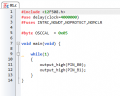
I made your code again and no osccal error inside ccs c:
1619460034107.png
I still get an error in Pickit2 programmer
but im starting finally to see a result. The pic is written now through pickit2 programmer.
It finally works. It's a miracle. Thank you so much mister @trebla
Another issue is that led 3, or pin_B2 is not ON.
I looked in my previeous code and I had some special code to make it work:
__CONFIG(0x3FA);
or
TRIS = 0b0000;
GPIO = 0b0000;
OPTION = 0b11000111;
But how to write it here?

1619460868181.png
 

Thread Starter

q12x

Joined Sep 25, 2015
2,227
For some strange reason, I press the autogenerate button and it find OSCCAL 0C32 and now I have no error and programming the pic accordingly. THat is very good progress.
I have a very big problem. Where do I find the hexa value for TRISGPIO ?
#byte TRISGPIO = 0x86
I copied this 0x86 from completly other pic program in the hope i get lucky but I wasnt.
So where should I search for it? Thank you.
 

Thread Starter

q12x

Joined Sep 25, 2015
2,227
slowly but surely I managed to figure out some stuff.
Not there yet, I didnt managed to make that led3 ON yet.
But I'll push it until I find it. Hopefully with your help will go faster.
Here is what I find:
Screenshot_6.jpg
 

trebla

Joined Jun 29, 2019
599
Sorry, i wasn't able to deal with this earlier. These CCS guys don't want to let you deal with registers direcly and have created bunch of internal functions for you :) You can find function prototypes in device header file you sent to me. Also there must be a PDF file containing CCS C manual, maybe in installation folder or you can download it here (the last item).

With GPIO.2 is strange beahavior for this PIC family, caused by T0CKI TRIS override. I put some example code together. You notice that i don't use TRIS function because CCS C input and output functions set corresponding TRIS bits automagically, also input functions enable weak pull-ups in same way.

Example code:
#include <12F508.h>
#include <stdint.h>
#use delay(clock=4000000)
#Fuses INTRC,NOWDT,NOPROTECT,NOMCLR


void main(void) {

setup_counters (RTCC_INTERNAL,RTCC_DIV_2);
uint8_t i;
//set_tris_b(0b00111000);

output_b(0);
    
    while(1) {
        
        for(i = 0; i < 8; i++) {

            delay_ms(35);
            output_toggle(PIN_B0);
            output_toggle(PIN_B1);
            output_toggle(PIN_B2);
        }
        delay_ms(800);
    }
}
 

Thread Starter

q12x

Joined Sep 25, 2015
2,227
You can find function prototypes in device header file you sent to me. Also there must be a PDF file containing CCS C manual, maybe in installation folder or you can download it here (the last item).
Excelent guidance ! This is what I want to know. I guess most of the time but is very good when I get confirmation on my guesses. It means I guessed right. Haha. I already open the pdf and look very summarily in it, I must admit.
All that im concentrated on right now is to make this thing work properly. And all I am doing is tweaking it until it gives me what I want. With your help hopefully it will go faster. I also want to try my previous code, remember? the one in which I had diferent code in the end because program memory and data memory. I really like this program CCS C is having a meter like mplab has. Very cool guidance, especially for these little dinki PIC's.
Thank you for your code !!!
I just test it and it works ! I made my own code with the basic high and low and it also works. You have some very nice code wizardry there, I like it. Can you explain to me what was the problem and how did you find the solution? Where did you look to find it as well?
Thank you so much ! You are pure gold to me.
 

Thread Starter

q12x

Joined Sep 25, 2015
2,227
setup_counters (RTCC_INTERNAL,RTCC_DIV_2);
this line is doing the trick to activate that pin_B2
Where did you find this line?
 

trebla

Joined Jun 29, 2019
599
I found it in the CCS C examples folder, file ex_8pin.c (Program Files(x86)\PICC\Examples). I remember i have same problems with GPIO.2 before but this was years ago when i used this little chip.
 

Thread Starter

q12x

Joined Sep 25, 2015
2,227
Mister @trebla
I want to confirm that YES, your CCS C is way more better in terms of code management.
I remade the code with 3leds blinking, the one I was originally left without free "data memory" in hitech c. Those bastards!!! So here in CCS C I didn't use the same code I used in hitech C but the code specific to CCS C. It is lighter and more easy to work. At least for now in my beginnings with it. The code is doing what it should without occupying unnecessary memory like before and that is really a very big deal. This is very encouraging to see !!! Truly - I thank you from my hearth. I couldn't make it so far without you ! All my respect mister @trebla .
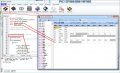
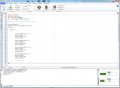
Screenshot with the code and the memory usage:
Screenshot_8.jpg
 
Top