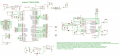
How far from industry standard is this schematic layout?

Thread Starter

TommyTwoThousand

Joined May 6, 2026
8
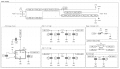
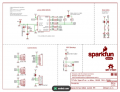
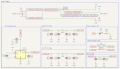
I'm learning a lot about circuit design and recently dove into power supplies. I found it difficult to follow after adding more elements to the design so I decided to redraw it like this:
power supply.png

Power connector on the left and power rails on the right with all the functional blocks needed to create them in between. I found it really easy to follow the path from input connector to power rails doing it this way. I also am new to everything I've sketched here so while I'm pretty sure I have the right blocks in place I am still not sure about the details.

This also lets me completely change any of the details in the block independently. Any of these blocks could get 10 times more complex without having to rip up or rearrange the others. Also some are probably overkill like the LED and choke but I wanted to do everything the same way.

This seems like its not even close to industry standard but it seems really useful to me as well. Is this similar to any other methods of drawing a complex circuit that I'm just unaware of? How else could I break down a complex circuit into functional blocks thats visually easy to follow?

Also any input on this design would be appreciated. It's for an analog video multiplexor PCB that I am designing. The mux chips require + and - 5V and there is a buffer on the output as well so I made the filtered power rails (+5VA and -5VA). The unfiltered +5V powers a GPIO expander and the choke seems to be recommended for filtering noise on analog video circuits. It might all be overkill but its helping me learn and I have tons of real estate on my board.
 

dl324

Joined Mar 30, 2015
18,310
I found it difficult to follow after adding more elements to the design so I decided to redraw it like this:
I find the connect-by-name approach to be very unappealing, particularly for understanding functionality. You might as well be reading the actual netlist (consisting of only component names, net numbers, and connectivity information). I also find colored schematics to be childish; as in a child gone wild with their colored crayons.

The direction of your connection arrows is non-standard (outputs should point out, inputs should point in). You have most of the components in the preferred vertical direction, yet you have C52, D1, and R39 on their sides (needlessly). Where are the other 38 resistors and capacitors to fill the numbering gaps?

I hope your style never ever becomes anything like a standard. I've seen some schematics for commercial parts that were almost as bad as yours.

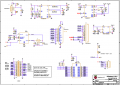
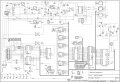
Here's a schematic for Arduino Uno. Lousy flow and in color:
1778337097272.png
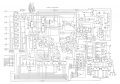
And Mega:
1778337174729.png
I imagine they're all similarly bad.

I saw another schematic that used the boxes/connect-by-name that you're using, also in color, but I don't recall what it was for.

Netlist fragment:
Code:
Version 4
SHEET 1 1460 840
WIRE 176 -112 32 -112
WIRE 336 -112 176 -112
WIRE 496 -112 336 -112
WIRE 640 -112 496 -112
WIRE 752 -112 640 -112
. . .
SYMBOL nmos 224 128 M0
WINDOW 3 58 54 Left 2
SYMATTR Value IRLZ44
SYMATTR InstName M1
SYMBOL nmos 288 128 R0
WINDOW 3 56 55 Left 2
SYMATTR Value IRLZ44
SYMATTR InstName M2
SYMBOL res 160 -96 R0
WINDOW 0 38 51 Left 2
SYMATTR InstName R1
SYMATTR Value 2k
SYMBOL res 320 -96 R0
WINDOW 0 40 53 Left 2
SYMATTR InstName R2
SYMATTR Value 2k
SYMBOL voltage 32 32 M0
WINDOW 123 0 0 Left 2
WINDOW 39 0 0 Left 2
SYMATTR InstName V1
SYMATTR Value 9
. . .
SYMATTR InstName R9
SYMATTR Value 10k
SYMBOL res 208 576 R0
WINDOW 0 38 53 Left 2
SYMATTR InstName R10
SYMATTR Value 100
SYMBOL npn 448 544 M0
WINDOW 0 29 38 Left 2
WINDOW 3 26 57 Left 2
SYMATTR InstName Q5
SYMATTR Value 2N3904
SYMBOL npn 480 464 R0
. . .
Also any input on this design would be appreciated.
The schematic is too messy for me to even bother trying to analyze.
 

Thread Starter

TommyTwoThousand

Joined May 6, 2026
8
The schematic is too messy for me to even bother trying to analyze.
So is the standard to just connect everything together in one big view? Are there any examples you can point me to for what's considered good practice?

Ultimately electronics is just a hobby for me but I'm a mechanical engineer as my profession so I do value good drawing style, even if it'll only ever be me reading it.
 

ElectricSpidey

Joined Dec 2, 2017
3,326
I don't think there is an "industry standard" but node naming is pretty common, especially where sub circuits are on a different page.

Personally, I find your example pretty easy to read.
 

dl324

Joined Mar 30, 2015
18,310
So is the standard to just connect everything together in one big view?
Yes. There's also using intelligent component placement to facilitate a proper flow (left-to-right and top-to-bottom).
Are there any examples you can point me to for what's considered good practice?
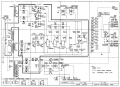
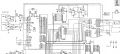
Here's a fairly decent example for a Leader LTC905 curve tracer:
1778338879810.png
I don't like how they drew the bridge rectifiers. And how they drew the switch wiring. Technically, wires shouldn't be drawn over symbols. But it's still easy to see what the connections are, so I'm okay with that variance (because the "correct" alternative would have been more difficult to follow). And I don't like how they drew the flip flop consisting of Q101 and Q102 (plus the identifiers are too far away from the transistors). Flip flops should be drawn with the transistors placed back-to-back; a non-standard flow used specifically for this case for easier recognition of functionality. And the lines for the grid designators (A-C, 1-4) are distracting.

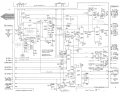
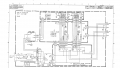
Here's a better example from a Tektronix 7704 scope with off-board connections:
1778339209019.png
About the only things I dislike are the ground symbols that don't point down and the staggered connections (vs crossing) like near Q2576. But the staggered connections were an accepted style. I think it was to address poor copying technology in the 1970's where connection dots could "disappear". I just analyze the circuitry in the vicinity and determine whether a connection dot was missing. The components placed in the non-preferred direction just make sense.
 
Last edited:

MrChips

Joined Oct 2, 2009
34,782
There are the two styles, fragment every function vs all connected into one schematic. I suggest that you seek a balance. Your objective is to show the overall flow of functions and signals while making it easy to follow. A lot depends on the overall complexity of the design. If the circuit can fit on one printed page, that would be my choice.

The same applies to software design and documentation. No function or subroutine should be larger than a printed page.
 

nsaspook

Joined Aug 27, 2009
16,302
...
The same applies to software design and documentation. No function or subroutine should be larger than a printed page.
Agree, if we are using a small print font.
1778342290448.png
The complexity of how to do one thing IMO should be the main determinant of function or subroutine source code size, not the number of characters on a page.
They can intersect but It's a guide, not a law.
 

Irving

Joined Jan 30, 2016
5,108
One point - you cannot have two names for the same Net. So your Bulk_In and Bulk_out will fail Electrical Rules Check (ERC) on most PCB layout packages - a PCB track can have only one name.

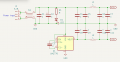
While I am a great advocate for functional breakdown of schematics this is a step too far - it's lost the flow and integrity of a clearly thought-out power filtering setup. Here's how I would draw it. Now the flow is obvious, its clear where the -5v rail comes from, and it shows the symmetry of the filtering. It needs no further embellishment. Additionally it starts to give clues as to how to lay the PCB out...

1778348414531.png
 

schmitt trigger

Joined Jul 12, 2010
2,082
To Irving’s post I say: Yes, yes and yes!
Did I forget to say yes? Well, yes!

Imagine that a schematic is a city’s map which you are unfamiliar with. Would you draw in said map the neighborhoods independently and disconnected from each others? Of course not, you would not be able to properly organize the optimal route from one block to another.
 

Irving

Joined Jan 30, 2016
5,108
To Irving’s post I say: Yes, yes and yes!
Did I forget to say yes? Well, yes!

Imagine that a schematic is a city’s map which you are unfamiliar with. Would you draw in said map the neighborhoods independently and disconnected from each others? Of course not, you would not be able to properly organize the optimal route from one block to another.
Thanks. I'm a great believer that the schematic should drive the PCB layout... in my book you should be able to look at a PCB and get a feel for the underlying schematic...
 

dl324

Joined Mar 30, 2015
18,310
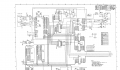
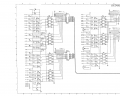
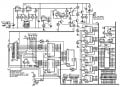
Here's a schematic I redrew (most of it) for an EPROM programmer:
w4v1RedrawCorrected.jpg
EDIT: correct schematic
Versus the original:
Board41schbw1b.jpg
 
Last edited:

MisterBill2

Joined Jan 23, 2018
27,462
I have not seen this many variations of circuit representations in a very long time. It is an intereting discussion indeed.!
But one detail seems to be missing: WHAT IS THE PURPOSE of the particular drawing???
There are approval drawings, Service drawings, AND those rather important Building and ASSEMBLING drawings.
Often times there may also, in the equipment use documents, be FUNCTIONAL FLOW drawings. and BLOCK DIAGRAMS.
Aside from that collection of actual circuit schematic drawings, there are connection detail drawings and MY NEMESIS: The dreaded WIRING DIAGRAMS!
Now back to the question in post #1: I found the drawing symbols to be close enough to standard to be totally acceptable! But the segmentation was rather uncommon, exceptpossibly for a system of modules produced by different vendors.
 

WBahn

Joined Mar 31, 2012
32,798
I'm learning a lot about circuit design and recently dove into power supplies. I found it difficult to follow after adding more elements to the design so I decided to redraw it like this:


Power connector on the left and power rails on the right with all the functional blocks needed to create them in between. I found it really easy to follow the path from input connector to power rails doing it this way. I also am new to everything I've sketched here so while I'm pretty sure I have the right blocks in place I am still not sure about the details.

This also lets me completely change any of the details in the block independently. Any of these blocks could get 10 times more complex without having to rip up or rearrange the others. Also some are probably overkill like the LED and choke but I wanted to do everything the same way.

This seems like its not even close to industry standard but it seems really useful to me as well. Is this similar to any other methods of drawing a complex circuit that I'm just unaware of? How else could I break down a complex circuit into functional blocks thats visually easy to follow?

Also any input on this design would be appreciated. It's for an analog video multiplexor PCB that I am designing. The mux chips require + and - 5V and there is a buffer on the output as well so I made the filtered power rails (+5VA and -5VA). The unfiltered +5V powers a GPIO expander and the choke seems to be recommended for filtering noise on analog video circuits. It might all be overkill but its helping me learn and I have tons of real estate on my board.
There is no "industry standard" that I am aware of. There are general conventions and, within subfields, those conventions can be effectively defacto standards.

The general idea is to keep in mind that you are communicating something to somebody. Your choices should be driven by what you are trying to communicate and who you are trying to communicate it to.

A schematic might be trying to communicate how a circuit works, or it might be trying to communicate how a circuit is implemented. In the first case, you aren't overly concerned with whether it is easy mapping the schematic to the physical layout on the PCB, but rather the functionality of the circuit. So your focus is on signal flow from one functional block to another. Your audience is someone that wants/needs to understand the design of the circuit. The other side is someone that isn't concerned with why the output of this opamp is connected to the junction of that resistor and that capacitor, they are primarily interested in being able to find those components/pins on the board and the trace that connects them. Here, the schematic should match the component layout and placement as much as possible and also have the wires on the schematic flow the routing on the PCB as much as reasonable, too.

A good example of the distinction between the styles is whether you show a quad opamp as four distinct opamps at different places in the schematic based on how they are used, or as a single block with the pins ordered they way they are on the physical package.

Some of your choices will be driven by what your CAD package is capable of (or not capable of).

Personally (and this reflects my background as primarily is IC designer in which my designs might contain millions of transistors), I prefer a hierarchical design approach as opposed to the multi-page flat design approach. I liken it very much to good software design in which each function should be representable on a single easily-viewed page at a level of abstraction that matches. If I need to know what is inside of a box, either to understand how it works or why it might not be working as expected, or whether map it to the physical implementation, I can do that and view it as a lower level of abstraction.

As others have commented, connecting components by label (net name) is generally to be avoided. It makes it difficult to work with the schematic regardless of what the purpose or who the audience is. Exceptions exist for truly global signals, such as power supplies, widely-used references and bias voltages, and similar. Having a handful of these signals be connected by label can greatly reduce the clutter in the schematic.
 

schmitt trigger

Joined Jul 12, 2010
2,082
Very good thread indeed!

The worst schematic I've seen in my life was that of a Kodak commercial photoprinter, the one used in large scale photolabs in the 1960s. It was all-tube, including some weird thyratrons.
Contained in an A0 blueprint there were something like 2000 components, all interconnected together.
 

ElectricSpidey

Joined Dec 2, 2017
3,326
For me it's never been a choice of which style to choose, but more where the threshold of complexity forces me to use the named node type.

Schematics like the lower one in post #15 would give me nightmares.
 

Jon Chandler

Joined Jun 12, 2008
1,589
2000 components, all interconnected together
Don't all the components sort of need to be interconnected together?

There are some pedantic opinions here but my few key points:

● You need to be able to see all the connections on a schematic. Separate blocks with net labels don't promote that. You may see [clock] at the micro and [clock] at one of the blocks, without seeing [clock] goes to five other places as well.

● Ground symbols are ALWAYS vertical the point down.

● Power symbols are ALWAYS vertical, positive symbols pointing up, negative symbols pointing down.

● Labels should not overlap anything, and be facing up if horizontal or consistent in direction if sideways.

● Traces should not go through component symbols, and should have dots at intersections.

● Signal flow should generally be upper left to lower right.

● Copious notes are always a good idea. The reason for doing something odd may be perfectly clear when you draw the schematic, but leave you scratching your head months or years later when you revisit the schematic.
 
Top