How can I get scaled cycloid curves?

Thread Starter

strantor

Joined Oct 3, 2010
6,875
there is a function in AutoCAD called "flatten" which breaks down spline entities into polylines with straight and arc segments (the result being a very close approximation of the original), which in turn are perfectly translatable into G-code. Look it up.
The AutoCAD explanation of the flatten command does not sound like what you described. Is there maybe another command by a different name?
https://knowledge.autodesk.com/supp...cles/how-to-flatten-a-drawing-in-autocad.html
Use the FLATTEN (not available in AutoCAD LT) command to change the Z values of all lines, arcs, and polylines to 0
Anyway, what you described, I'm not sure fits the bill. As this rack is (hopefully) to serve not only as a rack but as as load bearing linear guide, I think the tooth profiles should be as accurate as conceivably possible. That's why I wanted to get away from using splines. I don't trust splines to be as accurate as I think they should be. This is just a gut feeling; I might be wrong about that. And what you're describing sounds along those lines.

Or, actually what you're describing sounds like the opposite of that (turning splines into polylines). I chose to interpret it the other way because that's the way it made sense to me, because my script generates a polyline already. There are no splines in the file I posted.

Which way did you mean it?
 

cmartinez

Joined Jan 17, 2007
8,783
What I meant was that you could make a spline whose vertices go through each of your program's calculated points, and then flatten that spline in order to get a shape with a much cleaner geometry, and a lot less data points. I've worked on your dxf a little bit to try to show what I'm trying to say. Look at the dwg file I've attached.

Can you repost the file, this time with the pinion-roller included?
 

Attachments

shortbus

Joined Sep 30, 2009
10,049
@shortbus I think you're probably uniquely qualified to answer...
Don't know a thing about CAD. The only CAD I use is the old school one, Cardboard Aided Design.

Isn't what was the final thing you used to get to this point what I posted in the links?

How do you think this is going to be accurate for linear movement? Unless you have access to a CNC that can machine this then a CNC grinder to grind to size after heat treat. Even the thought of using a chain is prone to wide fluctuations in distance/linearity. Even a rolled thread ball screw would be more accurate.
 

Thread Starter

strantor

Joined Oct 3, 2010
6,875
I think I found the answer to my question. Partially in the CAM software and partially on the internet. The CAM software appears to be one who turns splines and NURBS into coordinates.

20200224_151207.jpg

https://wiki.mcneel.com/rhino/cncbasics

A typical problem is how to set up your files and do your CAM programming so that the machine executing your parts will work smoothly and efficiently with the data. Since most CNC controls only understand arcs and lines, any form that is not describable with these entities needs to be converted into something usable. Typical things that need converting are splines, i.e. general NURBS curves that are not arcs or lines, and 3D surfaces. Some desktop machine systems are not able to understand circular arcs either, so everything must be converted into polylines.

Splines can be broken up into a series of line segments, a series of tangent arcs, or a combination of both. You can imagine the first option as a series of chords on your spline, touching the spline on each end and having a certain deviation in the middle. Another way is to convert your spline into a polyline. The fewer segments you use, the coarser the approximation will be, and the more faceted the result. Going finer increases the smoothness of the approximation, but also dramatically increases the number of segments. You can imagine that a series of arcs might be able to approximate your spline within tolerance with fewer, longer pieces. This is the main reason for preferring arc conversion over simple polyline conversion, especially if you are working with older machines. With newer ones, there is less of a problem.

Imagine surfaces as the same kind of spline approximation, just multiplied many times in the across direction with a space between (usually called the stepover). In general, surfaces are done using all line segments, but there are situations where arcs or a combination of lines and arcs can also be used.

The size and number of segments are determined by the accuracy required and the method chosen, and will directly influence the execution. Too many short segments will choke some older machines, and too few will make a faceted part. The CAM system is usually where this approximation is done
My curiosity now (I'm going to try to find out by examining g-code output) is whether, if I use my script to generate the coordinates of the polyline, if the CAM will use those coordinates directly or if it will try to further subdivide or approximate and make accuracy even worse.
 

Thread Starter

strantor

Joined Oct 3, 2010
6,875
What I meant was that you could make a spline whose vertices go through each of your program's calculated points, and then flatten that spline in order to get a shape with a much cleaner geometry, and a lot less data points. I've worked on your dxf a little bit to try to show what I'm trying to say. Look at the dwg file I've attached.

Can you repost the file, this time with the pinion-roller included?
I am away from my computer at present but I will look at your changes and include the roller when I get back. I think I understand what you've done without seeing it, and if it's a better solution (sounds so), then I should be able to make my script generate splines instead of polylines.

Thank you
 

Thread Starter

strantor

Joined Oct 3, 2010
6,875
Don't know a thing about CAD. The only CAD I use is the old school one, Cardboard Aided Design.
Oh, I was mistaken. For all your posting about EDM I assumed you were a CNC guru. Maybe you are. Maybe my bad assumption is that CAD guru and CNC guru are the same guy.

Isn't what was the final thing you used to get to this point what I posted in the links?
I'm not sure what you're asking. I started out asking about cycloids, you posted about cycloids, the conversion has been about cycloids the whole time. Or you talking about something other than the curve geometry?

How do you think this is going to be accurate for linear movement? Unless you have access to a CNC that can machine this then a CNC grinder to grind to size after heat treat. Even the thought of using a chain is prone to wide fluctuations in distance/linearity. Even a rolled thread ball screw would be more accurate.
I have a CNC mill. I've never used it as anything other than a really expensive improvised plotter. I bought it a few years ago, ripped the 1980s guts out, retrofitted to LinuxCNC, put a sharpie in the spindle, and drew on some stuff just long enough to decided it needed a mechanical overhaul as well. Then I ripped it apart and it's been pieces ever since. I resumed putting it back together last month and it's pretty close to functional.

What I really need right now is a CNC plasma cutter. I need the CNC mill in working order to make the parts for it. That's what is driving this cycloidal rack business and the mill rebuild. I want the concept of the cycloidal rack to be good enough for any motion control application but I only need my cycloidal rack system to be good enough for a CNC plasma table. Even rolled ballscrews would be overkill. Assuming the cycloidal rack works like I think it will, I think I can make what I need on my CNC and won't need any heat treatment or CNC grinder. I'll just mill it out of mild steel.

If it works for my application, that's proof of concept. Then maybe it warrants the things you talked about, machined on equipment I dont have, to be suited for loftier purposes.
 

cmartinez

Joined Jan 17, 2007
8,783
I don't know if this helps, Strantor. But I've been successfully using a rack and pinion mechanism for what you're describing. But I implemented a preloaded hinged design which presses the pinion against the rack using an ordinary punch-die type spring. Which can be manually adjusted to the desired force. That mechanism has been working for 15 years now, and no noticeable wear can be seen on either the rack or the pinion.

4ea830f9-6e5e-488f-ac18-39b9ecd62d93.jpg


1d7b37bc-06eb-4929-88a1-c4d401eae548.jpg
 

Thread Starter

strantor

Joined Oct 3, 2010
6,875
I don't know if this helps, Strantor. But I've been successfully using a rack and pinion mechanism for what you're describing. But I implemented a preloaded hinged design which presses the pinion against the rack using an ordinary punch-die type spring. Which can be manually adjusted to the desired force. That mechanism has been working for 15 years now, and no noticeable wear can be seen on either the rack or the pinion.
That is a nice set up, however not exactly what I am going for. It appears as though your carriage is supported by roller bearings riding on round rods, and the rack and pinion is used only for thrust. What I am proposing replaces the roller bearings and the rod. So the pinion itself will be the load bearing wheel. The teeth of the rack will point upwards just as shown in all of the screenshots I've posted so far and the pinion will roll on top of it, supporting the weight of the carriage.

I am curious though, how your rack and pinion is not binding up when you have pressure forcing the pinion into the rack. Is that not a typical spur gear set up?
 

shortbus

Joined Sep 30, 2009
10,049
Oh, I was mistaken. For all your posting about EDM I assumed you were a CNC guru. Maybe you are. Maybe my bad assumption is that CAD guru and CNC guru are the same guy.
Not a guru in anything. CNC and EDM are two different things ,though the newer EDMs use CNC. I'm strictly a old style analog machinist.

If it works for my application, that's proof of concept. Then maybe it warrants the things you talked about, machined on equipment I dont have, to be suited for loftier purposes.
What makes the Nexen system work and work well is the precision built into it, precision from hardened and ground parts. That is how they can use the tooth profile they use, instead of a normal milled/hobbed gear tooth.

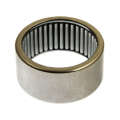
From your other forum talking about using U joint end caps as rollers, you do know about Torrington type needle bearings don't you? Open ended and no modification for your use.1582644628645.png
 

cmartinez

Joined Jan 17, 2007
8,783
I am curious though, how your rack and pinion is not binding up when you have pressure forcing the pinion into the rack. Is that not a typical spur gear set up?
The rack and pinion do not bind up because (although they're made from the same material (AISI 1045)) the pinion has been hardened to 45RC, and also because they're both normally lubricated with bearing grease. Also, their fabrication geometry is exact. That is, neither the pinion nor the rack are under/over cut, which is a normal practice when gears work with larger loads to allow for some play. A perfect example of that is the speed reducing gearbox present in all electric hand drills. And this machine does not work with large loads, even when considering the pre-loading spring.

In my design, the exactness of its geometry is important because that way one gets theoretically perfect motion linearity.
 

shortbus

Joined Sep 30, 2009
10,049
I sort of remember a build from years ago at CNCZone forum that used a cable wrapped on drum to move a plasma table. Sort of like what they used to do in ink jet printers. It was a cablle wrapped around a drum 5 or more times with a spring loaded pulley on the far end. The cable was a loop tied end to end, the far pulley kept the wraps tight on the drum so that one turn of the drum moved the table a known distance. The accuracy was dependent on the drum diameter accuracy and there was very little backlash involved.
 

cmartinez

Joined Jan 17, 2007
8,783
I sort of remember a build from years ago at CNCZone forum that used a cable wrapped on drum to move a plasma table. Sort of like what they used to do in ink jet printers. It was a cablle wrapped around a drum 5 or more times with a spring loaded pulley on the far end. The cable was a loop tied end to end, the far pulley kept the wraps tight on the drum so that one turn of the drum moved the table a known distance. The accuracy was dependent on the drum diameter accuracy and there was very little backlash involved.
That works well in short distances, but in long distances the cable behaves like a spring and wreaks havoc during motion. Especially during the start and stop events, when it tends to resonate. I speak from personal experience, having witnessed how a designer (it wasn't me, I swear) underestimated said effect, and the company lost tens of thousands redesigning and installing a rack and pinion mechanism to fix the problem.
 

Thread Starter

strantor

Joined Oct 3, 2010
6,875
I sort of remember a build from years ago at CNCZone forum that used a cable wrapped on drum to move a plasma table. Sort of like what they used to do in ink jet printers. It was a cablle wrapped around a drum 5 or more times with a spring loaded pulley on the far end. The cable was a loop tied end to end, the far pulley kept the wraps tight on the drum so that one turn of the drum moved the table a known distance. The accuracy was dependent on the drum diameter accuracy and there was very little backlash involved.
I also considered that. I found an Indian fellow who had come up with a pretty clever adaptation of the cable/capstan drive. Rather than wrap it around a drum, he wrapped it around a trapezoidal screw, the screw threaded into a fixed nut, and the whole thing (except the nut) was free to slide in/out. The result was that the cable always enters the capstan in the same spot and always exits in the same spot, and has no motive to roll over itself. I studied his design pretty thoroughly and I looked at the results he got from it. It "works" but I was thinking it's tragically "as good as it's going to get" with still much room for improvement. I read I think every forum thread there is on cable drive CNC and boiled it down to this: tight wires vibrate like guitar strings because guitar strings are tight wires, and vibrations dont play nice with CNC operations.
 

Thread Starter

strantor

Joined Oct 3, 2010
6,875
From your other forum talking about using U joint end caps as rollers, you do know about Torrington type needle bearings don't you? Open ended and no modification for your use.View attachment 199944
Yes that's a good option. With those I could use a straight bar for each roller and the bearing could be captive on the bar between the two plates. Then I would only need one bearing per bar instead of 2.
 

Thread Starter

strantor

Joined Oct 3, 2010
6,875
The rack and pinion do not bind up because (although they're made from the same material (AISI 1045)) the pinion has been hardened to 45RC, and also because they're both normally lubricated with bearing grease. Also, their fabrication geometry is exact. That is, neither the pinion nor the rack are under/over cut, which is a normal practice when gears work with larger loads to allow for some play. A perfect example of that is the speed reducing gearbox present in all electric hand drills. And this machine does not work with large loads, even when considering the pre-loading spring.

In my design, the exactness of its geometry is important because that way one gets theoretically perfect motion linearity.
Did you cut the rack and pinion yourself? If so, how? If not, where did you get it?
 

cmartinez

Joined Jan 17, 2007
8,783
Did you cut the rack and pinion yourself? If so, how? If not, where did you get it?
No, I didn't fabricate them myself. I had them made with a local workshop supplier. Most of the time I use 20° pitch 24 gear teeth. As a reference, the guy that makes them for me charged me $75 bucks for a 20 teeth pinion and about $200 per meter of rack about a year ago.
 
Last edited:

Thread Starter

strantor

Joined Oct 3, 2010
6,875
What I meant was that you could make a spline whose vertices go through each of your program's calculated points, and then flatten that spline in order to get a shape with a much cleaner geometry, and a lot less data points. I've worked on your dxf a little bit to try to show what I'm trying to say. Look at the dwg file I've attached.

Can you repost the file, this time with the pinion-roller included?
OK I've finally gotten around to complying with your request. Sorry, I've been on the road for work, and only replying to this thread from my phone during restroom breaks. I think I understand why you asked for a file with the pinion included. My geometry is wrong. The pinion doesn't fit. I don't know why. I'll have to look at it later.

cmar.PNG

I copied your geometry onto my original rack and I agree, it's a much nicer fit. I will try to find a way to make this happen in python so that there is no "and then go into AutoCAD and ______...." step.

I still don't understand the use of the "flatten" command. By the ACAD definition I conclude the purpose of this command is to "flatten" 3D geometry by setting all Z-coords to 0. I do not understand how your use of it results in what I find in the file. When I try it, I get no change in the "flattened" geometry - I conclude, because it's already flat (2D). Something you did simplified the geometry though. Are you using AutoCAD in English? Is there maybe a translation discrepancy in the terms they use? I've tried following your process and the results are in the attached file.
 

Attachments

Top