Help with the PIC18F45K22

Thread Starter

MTech1

Joined Feb 15, 2023
181
Hi everyone,

I'm new to designing boards and coding for microcontrollers and I could really use some help getting started with the PIC18F45K22. I'm hoping someone here can offer some guidance or point me in the right direction to find resources to learn from.

Specifically, I'm looking to design a board that can control a simple devices and I would like to use the PIC18F45K22 microcontroller for this project. However, I'm not quite sure where to begin with the design process or how to go about programming the microcontroller.

If anyone ( @JohnInTX ) has experience with designing boards and coding for the PIC18F45K22, MPLAB and PK3 I would really appreciate any advice or resources you could share with me. I'm eager to learn and I'm looking forward to getting started on this project.

Thank you so much for your help!
 

Attachments

Ian Rogers

Joined Dec 12, 2012
1,136
I use the PIC18f45k22 in several of my products...
What do you know? What exactly do you want to know!

These are > 5v devices unlike the k20, and has two serial ports.

Do you know any high level programming languages? Or are going low level assembler?
 

JohnInTX

Joined Jun 26, 2012
4,787
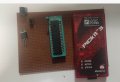
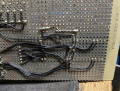
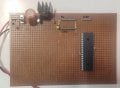
You are certainly doing it the hard way. There are many cheap PIC development boards out there with switches, LEDs, ICSP interface etc. Before hand wiring your first microcontroller project, I would look into some of those.

That said, I and many others hand wired early uCs and dozens after that so it can be done.
I would use a solderless breadboard instead of hand soldering on perforated board. You don't really need the ZIF socket since you will be programming the chip through ICSP with the PICKit 3.

Things to do more or less in order:
Decide what you want to do. Again, check out already built boards.
Research the chip to determine its power requirements, clock etc.
Decide on the minimal circuit to get the chip programmed and draw the schematic. Don't forget the 6 pin ICSP header for the PICKit 3. I would use the internal clock for now. Use CONFIG #pragmas to configure the chip to output the internal clock to OSC2 for monitoring.
Wire the circuit.
Apply power before plugging in the chip and verify correct voltages on the pins. Have a reliable power supply.
Open MPLABX and get it configured for the 18F45K22, PICKit 3.
Plug in the chip and verify that the PICKit 3 finds it in MPLAB. Fix any issues before proceeding.
Write a simple program that just initializes the ports to some pattern i.e. 010101010.
Measure the voltages on the port pins and verify highs and lows.

If you get that far, you'll be well on your way.

Microchip's development board. Includes schematics that may help:
https://ww1.microchip.com/downloads/en/DeviceDoc/41618A.pdf

Related thread here:
https://forum.allaboutcircuits.com/threads/pic-development-board-with-pk3.172494/

Good luck!

EDIT: Deleted incorrect supply voltage.
 
Last edited:

nsaspook

Joined Aug 27, 2009
16,251

Thread Starter

MTech1

Joined Feb 15, 2023
181

Thread Starter

MTech1

Joined Feb 15, 2023
181
You are certainly doing it the hard way.
I believe that hands-on experience is the most effective way for me to understand and I am eager to develop this skill.
I would greatly appreciate your guidance and expertise in this area.
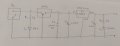
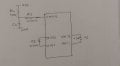
draw the schematic.
I will be using a 12V DC adapter to power the board, which will supply 5V DC to the board. I believe this voltage input will be sufficient to power the board

PSU.jpg

MCU.jpg
I want to ensure that I am using the appropriate components for power supply unit and MCU unit on board.
 

MaxHeadRoom

Joined Jul 18, 2013
30,562
Yes I have basic knowledge of c language
nothing special in mind. I had to select anyone so just purchased this one
I would try to interface LEDS, Switches, sensor and Display
Just thought it a little on the high end side for learning the ropes.
There are many tutorials out there on some of the basic PIC functions, one is Nigel Goodwin's tutorials, there is also someone who has converted his programs from assembly to C.
They cover making the development boards from simple Vero strip boards for prototyping.
They cover in detail some of the basic Picmicro functions that you are looking for , there is also the Gooligum tutorials also.
The Microchip site also has a wealth of info on development, the development boards are a little pricy, but they offer the schematics and code free for download that are included in the board themselves.
BTW, Microchip recommend a replacement now for the PIC you have,
Newer Device Available PIC18F45Q10
 

Ian Rogers

Joined Dec 12, 2012
1,136
Remember!
You gotta start somewhere. I believe the micro chosen will give you a good start.

You don't need a crystal or a MCLR resistor circuit as Microchip has these on board.
On "A N other site" we have a Nigel who has basic circuits all laid out.
His web site is :- http://www.winpicprog.co.uk/

The tutorials are all in asm but I have re-done them all in C
The board schematic here :- Nigel's PIC Tutorial Main Board Three (winpicprog.co.uk)
will suit that chip.

None of those tutorials are for that chip, but Mine are in C so much easier to port.
(1) Nigel Goodwin's tutorials in C | Electronics Forum (Circuits, Projects and Microcontrollers) (electro-tech-online.com)
 

nsaspook

Joined Aug 27, 2009
16,251
I have attached datasheet for devices
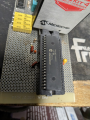
I'll be glad to help. I found an old board with a 40 pin DIP ZIF socket and the basic wiring for the 45(6)K22 series.
Will spend a little time checking it out with the 46K22 with old demo 25k22 software adapted to the 45(6) devices.

45
PIC PIC® XLP™ 18K Microcontroller IC 8-Bit 64MHz 32KB (16K x 16) FLASH 40-PDIP
46

PIC PIC® XLP™ 18K Microcontroller IC 8-Bit 64MHz 64KB (32K x 16) FLASH 40-PDIP

The 46 is the same chip with more memory.
1683305286394.png1683305311866.png
 

Thread Starter

MTech1

Joined Feb 15, 2023
181
It is important to ensure that the voltage levels are within the recommended range to avoid any damage. I wants to bring this measurement to your attention as this I have recently measured a voltage of 4.27 V between the VDD and VCC pins of both the microcontroller and VDD and VCC pins of (ICSP) connector.
 
Top