Help with LED timing IC project

Thread Starter

RC designer

Joined Feb 8, 2019
14
The ATTiny sounds fantastic. I'll go with that, plus the usb programmer, and I'll grab an assortment pack of resistors and get them here asap. Oh my gosh, I forgot about the smt resistors! So tiny, I could barely solder them! But I thought there was a little trick you guys did with some double sided tape? this sounds perfect for the model though. Ultra light weight. So if I'm clear, after calculating the resistors, I then only have to learn how to program the IC from the IDE (with the code you will help me create), and then wire to the correct pins and give it a go!? I might need a little hand holding during the arduino uploading and programming.
 

djsfantasi

Joined Apr 11, 2010
9,237
As far as the wiring and component values go, here is how I calculated everything.

OK. Given that you’re using a 7.4V LIPO, the following discussions describe the calculations necessary.

As mentioned in a previous post, the calculations are simple. But I’ll give specific examples as well as a generalized equation we can use.

I’m going to use several abbreviations, Here they are and what they mean

Vs – supply voltage

Vf – forward voltage for the respective LED

Il – LED current draw


First, note that the LEDs have varying current draw. They range from 15 to 20 mA. For purposes of this design, I could use 15mA for all. In practice you may want to run them at a lower current to save LED life. So, I’m going to use 12mA as the current draw for all LEDs. If you don’t like the brightness, you could experiment with one LED and a potentiometer and determine the desired brightness and associated resistance. Then measure the pot calculate the current draw. Then pick a standard resistor for your design.

But let’s start with a 12mA target and talk about the solid lights first.

The solid red has a Vf of 2.0V. I’ve picked a value between the typical and maximum values. To calculate the resistor value, use this formula:

1) R = (Vs – Vf)/Il

Or, R = (7.4 – 2)/0.012 = 450 ohms Use a 470mohm resistor as it’s the next best standard value. (See http://www.rfcafe.com/references/electrical/resistor-values.htm) The total current draw with be 0.012 amps.

The solid green has a Vf of 2.5V. Using equation 1 again, we get

R = (7.4-2.5)/0.012 = 408.3 ohms. Use a 430 ohm resistor for the same reason. The total current draw with be 0.012 amps.

The five white LEDs present a different problem. If we were to connect each LED with a resistor, we would draw 0.060 amps. Remember the battery? We want to minimize the total current draw. And it can be done by lighting the LEDs in a parallel/serial combination. So, we could wire all the white LEDs in parallel with their own resistor. Or, we can wire two LEDs in parallel with one resistor. (if you could use 6 instead of 5 LEDs, it is a little simpler.) So, for a resistor in this type of wiring, we use the next equation

2) R = (Vs – n*Vf)/Il

So, for your model, R = (7.4 – (2*3.1))/0.012 = 100 ohms. A 100 ohm is a standard value. You’ll need three, one for each pair of white LEDs. The total current draw is three time Il (0.012) or 0.036 amps. This is important.


Now on to the beacon. You have two red LEDs. The best way to connect them is the same way we connected one series string of the white LEDs. Using equation 2 again, we get

R = (7.4 – 2*2.0)/0.012 = 283.3 ohms. The closest standard value is 300 ohms. The total current draw is 0.012 amps.

And we’ve already calculated the resistor for a series of two white LEDs. Its 100 ohms.

With all these calculations, we know the total current draw.

Solid red – 12mA

Solid green – 12mA

Solid white – 36mA

Beacon red – 12mA

Strobe white – 12mA

The solid LEDs draw a total of 60mA. The beacon and strobe draw 24mA. We are good! I checked the current draw which the ATTiny can supply per pin and in total. We will use two pins and each draws 12mA. Well below the recommended draw of 20mA. The chip can supply 60mA and we are drawing 24mA. The good news is that we won’t require any external circuitry

You’ll need one 470 ohm, one 430 ohm, four 100 ohm and one 300 ohm resistor, for a total of six resistors.

So, you’d wire the solid LEDs and their circuitry to the power source. And you’d wire the ATTiny85 chip to power as well.

The strobe and beacon lights will have their cathode wired to the power supply ground.

Then connect the beacon LEDs to pin 5 of the ATTiny85 and the strobe to pin 4. These are the chip numbers. I mention this because as far as programming, they are referred to as pin 0 (5) and pin 1 (6). Confusing, but as long as you remember the mapping, you’ll be ok.

Now on to the code.


Here is a quick sketch I wrote, to flash both strobes and beacons per you spec. Note that the Arduino loop() function automatically repeats. Hence, the code keeps track of when each set of LEDs should flash and turns them on/off as appropriate. It does this indepent of what the other LEDs are doing.

C:
const int beaconPin = 0;
const int strobePin = 1;

void setup() {
  // put your setup code here, to run once:
  pinMode(beaconPin,OUTPUT);
  pinMode(strobePin,OUTPUT);
}

void loop() {
  // put your main code here, to run repeatedly:
  static long beaconStart = 0;
  static long beaconEnd = 0;
  static int beaconRepeat = 0;
  static long strobeStart = 0;
  static long strobeEnd = 0;
  static int strobeRepeat = 0;
  long now;

  now = millis();

  if (now > beaconStart && (beaconRepeat == 0 || beaconRepeat == 2)) {
    digitalWrite(beaconPin, HIGH);
    beaconEnd = now + 1000;
    beaconRepeat +=1;
  }
  if (now > beaconEnd && beaconRepeat == 1) {
    digitalWrite(beaconPin, LOW);
    beaconStart = beaconEnd + 300; // .3 seconds between flashes
    beaconRepeat +=1;
  }
  if (now > beaconEnd && beaconRepeat == 3) {
    digitalWrite(beaconPin, LOW);
    beaconStart = now + 1000;
    beaconRepeat = 0;
  }

  if (now > strobeStart) {
    strobeEnd = millis() + 1000;
    digitalWrite(strobePin, HIGH);
  }
  if (now > strobeEnd) {
    strobeStart = now + 1000;
    digitalWrite(strobePin, LOW);
  }
}
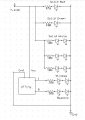
I've also attached a schematic for you.
Airplane II.JPG
 
Last edited:

Thread Starter

RC designer

Joined Feb 8, 2019
14
This is absolutely fantastic! I don't know how to thank you enough for all of your time spent creating this post! This is more help than I expected to get anywhere, and for this, it will be so much easier and save so much time. Thanks again. So I have the stuff on order and it should all be here on thursday. I'll plan on wiring it up and giving it a shot! I will post updates here and show the progress. Thanks kindly!
 

djsfantasi

Joined Apr 11, 2010
9,237
One more thing that’s bothering me. I’d use an 8 pin DIP socket in the plane. That way if we need to modify the program, it’ll be easy to remove the chip, reprogram it and put it back in.
 

djsfantasi

Joined Apr 11, 2010
9,237

Thread Starter

RC designer

Joined Feb 8, 2019
14
So I'm actually planning on using a BEC circuit to power the lights? I can set it to 5v. Got the chip and resistors yesterday! Came down with nasty cold.. can barely lift a pencil. Or a soldering iron for that matter. Hoping to feel better by this evening so I can get to it. So excited.
 

djsfantasi

Joined Apr 11, 2010
9,237
So I'm actually planning on using a BEC circuit to power the lights? I can set it to 5v. Got the chip and resistors yesterday! Came down with nasty cold.. can barely lift a pencil. Or a soldering iron for that matter. Hoping to feel better by this evening so I can get to it. So excited.
Ok! We’ll still need to recalculate the beacon and strobe resistors and likely will need to wire them in parallel (each with its own resistor) instead of serial. They’ll still work off one pin. I’ll update this thread this afternoon. You can still connect the solid LEDs directly to the battery.
 

djsfantasi

Joined Apr 11, 2010
9,237
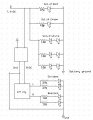
Here's my recalc of the beacon and strobe LED resistors. By using the BEC, there is only 5V for the lights. Two in series require more volts than available, so now they are paralled. Since you likely still have the 7.4VDC from the battery for the solid lights, I left that as is, since the current draw can be minimized at the higher voltage. See the updated schematic. THe unlabelled box is your BEC.
Airplane III.JPG
 

Thread Starter

RC designer

Joined Feb 8, 2019
14
Fantastic!!! getting set up to wire now. Just a quick question however- I ordered an assortment set of smt resistors. The numbers on them seem to be different, at least I think. They are all 4 digits. 5103 for example. Am I in the correct range? How do I know which ones are the 160's let's say? I can see that the individual strips are labeled 10R, 75K, 10K, etc.. how does this translate?
 
Last edited:

Thread Starter

RC designer

Joined Feb 8, 2019
14
Ok gentleman! I am finished, and everything is working as well as I had hoped! Figured out the resistor values according to DJS's schematic, wired em' up to the RC system, installed the library for the ATTiny85 (had to install drivers), loaded the code written by DJS, and in business! I took a good look at the code to see if I could figure out how to adjust the timing, and this was no problem. I changed it up a bit to match the perfect scale realism. Guys, thanks so much for your help with this. As basic as it is, I'd been needing to accomplish this for at least a couple years, and thanks to you, it's done in a short couple of weeks. When I get the next version of the model airframe all finished up with the new lighting system installed, I will pay a visit to this thread to post some pics and video :)

Also, I should mention just for the record- the sparkfun website has a full blown walk thru on how to install drivers, install libraries, and all the way up to loading code and programming with arduino. This was huge help for me. This is where I was lost. Here's the link for anyone in the future who might need that assistance- https://www.sparkfun.com/products/11801

Cheers!
Broc
 
Top