Help creating a pcb

Thread Starter

Hadaak

Joined Jul 17, 2015
52
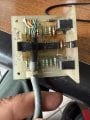
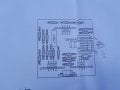
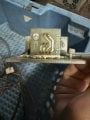
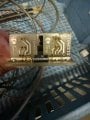
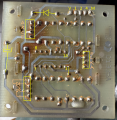
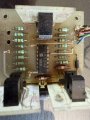
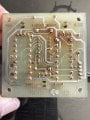
Hi guys. First post here. Anybody willing to help with creating a schematic for this board. One of the photoelctric switches is behaving strangely. It stays closed. This is probably due to some of the resistors which look fried. I thought why not create a new board. Looks simple and would be a breeze to draw for an experienced person but I have never done it. I can try but that will take me some time to learn. Any help would be greatly appreciated. Thanks.
 

Attachments

panic mode

Joined Oct 10, 2011
4,864
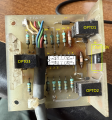
it all starts with taking good pictures and then photoshopping... so cut the ziptie and move cable out of way. gently clean board and components to see values. then do something like this:

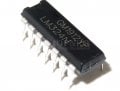
i like to paste IC pinout into picture. then you see that pin4 must be positive. this then determines polarity of the diode as well. with this it is easy to see that V is positive supply, M is chassis ("masse").

1746127583529.png

the blue image shows different version of board - parts are arranged differently but... it shows component values. so burned resistor seem to be current limiting for optos (1k value)
1746127646681.png
 

Thread Starter

Hadaak

Joined Jul 17, 2015
52
Looking good guys thanks for the feedback and the help. I will start working on it. I will add more info as I know what is expected from the 3 switches.
 

panic mode

Joined Oct 10, 2011
4,864
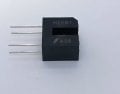
and pretty sure this is pinout of your optos because LED must be on all the time and EC polarity must match the supply rails
1746131196104.png
 

Thread Starter

Hadaak

Joined Jul 17, 2015
52
So the opto leds are all on when board is powererd. Opto 1 is the one which stays open when you block led light. This stuck position (2) prevents the other positions from being reached. The board does get hot too near that opto. The optos are used to signal 3 positions based on a combination of the opto leds on/off. The board uses 24v dc power coming from the motherboard. So I either fix the board first by replacing the dead resisters then create a new one to have some spare or go ahead and make a new one right away. I think I will first try to repair this board. I will need help with the resister values based on the new board and the other working optos. I will power the board using an external 24 dc power supply and start from there.

edit: ok for the 1k resister. I will compare with the others and replace it. I have some lying around. Thanks.
 
Last edited:

kami100

Joined Apr 30, 2025
6
Hi guys. First post here. Anybody willing to help with creating a schematic for this board. One of the photoelctric switches is behaving strangely. It stays closed. This is probably due to some of the resistors which look fried. I thought why not create a new board. Looks simple and would be a breeze to draw for an experienced person but I have never done it. I can try but that will take me some time to learn. Any help would be greatly appreciated. Thanks.
  • Component Identification:
    • Please share the part numbers from the ICs and any markings on the damaged resistors or other components.
    • If you have a multimeter, check the resistors that are still readable and trace the connections to help reverse-engineer the circuit.
  • Rebuild or Replace:
    • If you're up for rebuilding the schematic in KiCad or EasyEDA, I can help you draw it step-by-step.
    • Alternatively, if this board is part of a common sensor control system, we might find a ready-made schematic online once we know the ICs.
 

Thread Starter

Hadaak

Joined Jul 17, 2015
52
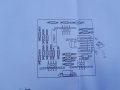
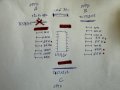
So I did a check of the resistors and made up this sketch. Opto A is the one which sticks open when I first test it putting a piece of paper in its slot. I have to power off the board and power it back again to get it to close again. There are 3 burnt resisters (in red) which show 1k ohm. Some resisters look like they have the same color coding but do show 65k/66k ohm values. I will have to double check the color coding.
how the board works:
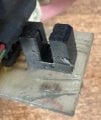
The board has a kind of ruler going through the optos. One of the optos is used for searching the positions. When it’s open (led blocked) the machine moves up or down until the required position is reached using the other optos. The problem is when the opto number A is opened (led blocked) the machine stops as this blocks reading any other position.
 

Attachments

Last edited:

MrChips

Joined Oct 2, 2009
34,627
How to reverse engineer a PCB

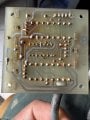
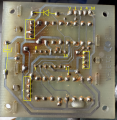
1) Begin with clear, well focused photographs of both sides of the board. Remove or shift any cabling that would obscure any board traces or components. Where possible, in addition to above, take photographs of the PCB with light shining from behind the board. This would allow you to see traces as viewed through the board.

2) Use a PCB CAD program with schematic capture feature to layout the components just as they appear on the board. Connect all traces as they appear in the photographs. Label each component with proper ID and value.

3) Rearrange the layout to show a functional circuit schematic.
 

crugorocks

Joined May 1, 2025
31
WS2815 can draw about 60mA per LED at full white brightness (R+G+B on). For 630 LEDs, that's a theoretical 37.8A at 12V = 450W (approx). You rarely hit max power in real-world usage. You can choose a 200W power supply.
 

MrChips

Joined Oct 2, 2009
34,627
The circuit schematic is simple and straight forward. It consists of three identical opto-interrupters and three comparators.
I will have it ready tomorrow.

The 1kΩ resistors are burning out because the supply voltage is too high, in my opinion. There is a third 1kΩ resistor hidden underneath the cabling.
 

Thread Starter

Hadaak

Joined Jul 17, 2015
52
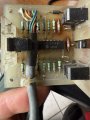
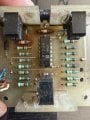
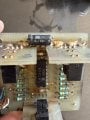
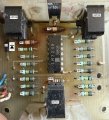
Thanks MrChips. Very much appreciated. Here are more pics with cable ziptie removed. I will add dimensions tomorrow. The board has a ruler going through it to match 3 positions expected by the motherboard. I will add pics tomorrow. The voltage on the three wires going back to the motherboard is 23v. Not sure if the motherboard expects -23v or + 23v. When I block the LED on the optos I see 23v on those three wires. The voltage coming to this board is 23-24v.
 

Attachments

MrChips

Joined Oct 2, 2009
34,627
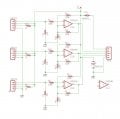
Here is the circuit schematics.

Each section of the LM324N op amp is configured as an analog comparator. The non-inverting input is biased to 1/2 Vcc and positive feedback is applied from the output to provide hysteresis.

Vcc on pin-4 and GND on pin-11 are not shown.

The "ruler" slides in OPTO2 and OPTO3 to give quadrature signals. These are two signals out of phase to provide UP/DOWN information on relative movement.

You don’t need to make a new board. You just need to prevent the resistors from burning out and replace any components that are bad.

The functioning of all the components on this board can be verified easily with an oscilloscope. You should be able to observe changing voltages from the output of each opto-interrupter and comparator. If all you have is a voltmeter, you would be able to measure a change of voltage when the opto-interrupter is blocked.

AAC_Hadaak.jpg
AAC_Hadaak_2.jpg
 

Thread Starter

Hadaak

Joined Jul 17, 2015
52
Thank you MrChips. I will go through this and report back. I did buy a mini oscilocscope but have never had the time to learn how to use it. I will use the voltmeter for now. The issue I am having with the board is opto3 in your picture gets stuck once it is blocked. I don’t know if that is due to the burnt resisters which still show 1k ohm even if they look toast. I will start by replacing them. Or is it possible the LM324N is the one misbehaving? Can resisters be toast and still show thre expected resistance value?
 

MrChips

Joined Oct 2, 2009
34,627
Analyze one channel and measure voltages with the opto-interrupter unblocked and blocked.
You can compare channels or you can focus on channel 3 (OPTO3) alone as follows:

Measure the voltage across R8 (1kΩ), This will allow you to calculate the current through the LED in the opto-interrupter.
Measure the voltage across R7 (10kΩ) with OPTO3 unblocked and then blocked. The opto receiver is in common collector mode. With the opto unblocked, the transistor is conducting. You should get close to Vcc.
With the opto blocked, the transistor is cut-off. You should get 0V.

Next, move on to the output of the op amp at pin-14 or R3 (100kΩ).
Firstly, measure the voltage across R4 (or pin-12 to GND) for unblocked and blocked. The voltage should be about 1/2 Vcc modified by the effect of positive feedback from the output via R3.

Then measure the voltage at R3 and pin-14 node with respect to GND.
The opto signal goes to the inverting input of the op amp.
Thus when the opto is unblocked, the input signal is HIGH and the op amp output is LOW.
If the op amp output is stuck high, the voltage measurements at the op amp inputs should indicate which component is bad.
 
Top