hi C,
One reason why your results are hit/miss, you are sending "0" 0x0d, 0xoa ie: "0"<crlf>.
But you are only reading one byte at the receiver, leaving 0x0d,0x0a in the rx buffer.
I'm still working on the revised program.
E
hi C.
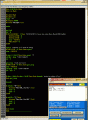
Try these two Basic programs [ currently set for SIM ], they work OK in Sim.
Make sure both TX and RX programs are either set for Sim or PIC.
The advantage of this method is that the number of Commands can be easily increased.
E EDIT:
To Send to RXR
In Simulation the ? is seen as a LF
$0? or
$1?
The PIC RXR code will detect either the ? or LF as a end of msg terminator.
[No need to edit the code]
hi C.
Try these two Basic programs [ currently set for SIM ], they work OK in Sim.
Make sure both TX and RX programs are either set for Sim or PIC.
The advantage of this method is that the number of Commands can be easily increased.
E EDIT:
To Send to RXR
In Simulation the ? is seen as a LF
$0? or
$1?
The PIC RXR code will detect either the ? or LF as a end of msg terminator.
[No need to edit the code]
Hi E,
Thanks, I'm just working through them both.
Glad you sent the EDIT
In PCB should it be:
main:
If button = 1 Then 'BUTTON NOT PRESSED
rled = 0
yled = 1
Hserout "$0", CrLf
Endif
WaitMs 500
If button = 0 Then 'BUTTON PRESSED
rled = 1
yled = 0
Hserout "$1", CrLf
Endif
WaitMs 500
Goto main
OR'------------------------------------------------------------------------------------
main:
If button = 1 Then 'BUTTON NOT PRESSED
rled = 0
yled = 1
Hserout $0, CrLf
Endif
WaitMs 500
If button = 0 Then 'BUTTON PRESSED
rled = 1
yled = 0
Hserout $1, CrLf
Endif
WaitMs 500
Goto main
When you say two clips the same, are you refering to #23, If so one has quotation marks, "$1" the other $1 or is it "$1?" or "$1LF" or no quotation marks at all?
hi C,
I assume the TX and RX are on the same channel.? and that channel is not being used by some other local persons TX/RX.?
Also the Baud rates are the same, I use 9600.?
I have my Power at P8, which is the highest specified power.
hi C,
I assume the TX and RX are on the same channel.? and that channel is not being used by some other local persons TX/RX.?
Also the Baud rates are the same, I use 9600.?
I have my Power at P8, which is the highest specified power.
hi C.
Pleased to hear it works OK.
If required you can now add more commands to the TX msg and decode them in the RX.
eg:
TX = $01<crlf> ' the state of two different p/b's
RX, check the str1(2) and str1(3) array locations and set LEDs' On Off, etc...
OK.?
E
If str1(2) = "0" Then
Hserout "Red Off,,,Yw On: ", CrLf
rled = 0
yled = 1
Endif
If str1(2) = "1" Then
Hserout "Red On,,,Yw Off: ", CrLf
rled = 1
yled = 0
Endif
If str1(3) = "0" Then
Hserout "Green Off,,,Blue On: ", CrLf
rled = 0
yled = 1
Endif
If str1(3) = "1" Then
Hserout "Green On,,,Blue Off: ", CrLf
rled = 1
yled = 0
Endif
E
hi C.
Pleased to hear it works OK.
If required you can now add more commands to the TX msg and decode them in the RX.
eg:
TX = $01<crlf> ' the state of two different p/b's
RX, check the str1(2) and str1(3) array locations and set LEDs' On Off, etc...
OK.?
E
If str1(2) = "0" Then
Hserout "Red Off,,,Yw On: ", CrLf
rled = 0
yled = 1
Endif
If str1(2) = "1" Then
Hserout "Red On,,,Yw Off: ", CrLf
rled = 1
yled = 0
Endif
If str1(3) = "0" Then
Hserout "Green Off,,,Blue On: ", CrLf
rled = 0
yled = 1
Endif
If str1(3) = "1" Then
Hserout "Green On,,,Blue Off: ", CrLf
rled = 1
yled = 0
Endif
E
Hi E,
I'm now thinking about many uses, better stop for now.
I'll come back to this later, as I'm recalling the Tracker with comma positions too.
Cheers, C.
Hi E,
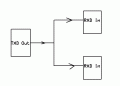
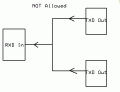
I have some switching components in a 'basket' that will switch between two inputs into one, then I re-read your message.
As it is the RX that needs two inputs, I don't need to buy the switches, good!
Thanks, C
hi C,
Have you considering using a Software serial input, using Oshonsoft Basic.?
I have used the Hardware and another Software Uart on a number of PIC projects
Clip from Manual;
DEFINE SEROUT_DELAYUS = 5000
SEROUT PORTC.6, 1200, "Hello world!", CrLf
DIM I AS BYTE loop:
SERIN PORTC.7, 9600, I
SEROUT PORTC.6, 9600, "Number: ", #I, CrLf
GOTO loop

 Facebook
 Google
 GitHub
 Linkedin