GSM2 CLICK with an arduino uno

Thread Starter

kamel2913

Joined Mar 6, 2015
43
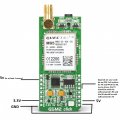
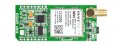
Hi guys, I'm new at the arduino world, I have bought an arduino uno and a GSM2 click board, the problem is that I don't know how to send an SMS via this card using the arduino, I couldn't find some good code exemples for this, and in the codes exemples I have found, some use the library #include <GSM.h > and others use #include <SoftwareSerial.h> also some of them use the IMEI of the board in the arduino code some don't use it, which makes me so confused, also it's says that I should use a 3.3V to supply the GSM board but in this web site they used both 3.3v and 5v.
I will be very happy if someone could help me, by telling how to intialize the GSM2 click board on the arduino and which library I should use? when should I write the IMEI in the arduino code? which pin should I use for the transmission? which PINs should I use for power supply, and any code exemple for sending an SMS on event will be very helpful.
thanks for reading and sorry for my English.
img1_28856_1453730270.jpg
 

Thread Starter

kamel2913

Joined Mar 6, 2015
43
It seems to be a new product and you are in the envious position of being the pioneer.

Does this library help?
https://libstock.mikroe.com/projects/view/535/gsm2-click-library

Manual
Thanks man very much, the manuel helped very very much, there's a PIN in the GSM2 CLICK board named PWK, this pin need to be ON for at least one second so the GSM2 board can work,I didn't know this before, so I couldn't comunicate with the GSM2 click even with AT commands. I wish you happiness!
 

Thread Starter

kamel2913

Joined Mar 6, 2015
43
please Kamel2931 if you have a solution or a code please show it here i need it the sooner because i'm working with the same GSM
Hi there, yes sure, I will tell you all what you need.
I just hope that you understand my English.
First you need to initialize the library and the TX, RX PINs:

Code:
#include <SoftwareSerial.h>
const int RX=2; // init des PINs RX & TX.
const int TX=3;
SoftwareSerial mySerial(RX,TX);
then if you want for exemplet o send an SMS:
you need to use this code in the void setup:
Code:
Serial.begin(9600);  //
delay(10);
mySerial.begin(9600);  //
delay(10);
mySerial.println("AT+CMGF=1");// configuration de GSM pour l'envoi des SMSs
delay(1000);
then this code in void loop:
Code:
while(mySerial.available()) {
Serial.write(mySerial.read()); // this is optional so you can see your AT commands in serial monitoring.
}
then put your condition...and write for exemple sendSMS()...so it will go to the loop of sending SMS when the condition is true.
and then put this code as another loop you an call it sendSMS(){ :
Code:
void sendSMS() {
mySerial.println("AT+CMGS=\"+****************\"");// the number that you want to send him the SMS.
delay(500);
mySerial.println("your message here");
( mySerial.println(var );//in case you want to send a variable var, you don't have to use the "" )
mySerial.write( 0x1a ); // ctrl+Z character ( for ening the message)
delay(500);
}
I hope that will help you, I hope I didn't forget any instruction, in case you want to use GPRS, it also possible and you can use HTTP GET POST request, if you get any problem please feel free to ask.
 

Attachments

Last edited:
Hi there, yes sure, I will tell you all what you need.
I just hope that you understand my English.
First you need to initialize the library and the TX, RX PINs:

Code:
#include <SoftwareSerial.h>
const int RX=2; // init des PINs RX & TX.
const int TX=3;
SoftwareSerial mySerial(RX,TX);
then if you want for exemplet o send an SMS:
you need to use this code in the void setup:
Code:
Serial.begin(9600);  //
delay(10);
mySerial.begin(9600);  //
delay(10);
mySerial.println("AT+CMGF=1");// configuration de GSM pour l'envoi des SMSs
delay(1000);
then this code in void loop:
Code:
while(mySerial.available()) {
Serial.write(mySerial.read()); // this is optional so you can see your AT commands in serial monitoring.
}
then put your condition...and write for exemple sendSMS()...so it will go to the loop of sending SMS when the condition is true.
and then put this code as another loop you an call it sendSMS(){ :
Code:
void sendSMS() {
mySerial.println("AT+CMGS=\"+****************\"");// the number that you want to send him the SMS.
delay(500);
mySerial.println("your message here");
( mySerial.println(var );//in case you want to send a variable var, you don't have to use the "" )
mySerial.write( 0x1a ); // ctrl+Z character ( for ening the message)
delay(500);
}
I hope that will help you, I hope I didn't forget any instruction, in case you want to use GPRS, it also possible and you can use HTTP GET POST request, if you get any problem please feel free to ask.
sorry sir to reply with another account since i have problems to login with the previous one
and thank you very much for the help, i made the connections and I understand the code but till now I didn't have an antenna so i'll wait to buy it these days and test if it works
just a small question: for the phone number is it mandatory to start with "+" sign, i guess this is just for international calls? isn't it?
again thank you very much and sorry for the annoyance, if I face some troubles I'll tell because I really need this part in my final project
 

Thread Starter

kamel2913

Joined Mar 6, 2015
43
sorry sir to reply with another account since i have problems to login with the previous one
and thank you very much for the help, i made the connections and I understand the code but till now I didn't have an antenna so i'll wait to buy it these days and test if it works
just a small question: for the phone number is it mandatory to start with "+" sign, i guess this is just for international calls? isn't it?
again thank you very much and sorry for the annoyance, if I face some troubles I'll tell because I really need this part in my final project
okay, you're welcome, one more thing just try to aviod powering up the GSM2 click with out the anetnna please, and for the +, yes you're right, hoenstly I have never tried it without the + and the international indicator, ok I hope everything will work andI will be glad to help you.
 

NourElHouda

Joined Mar 28, 2017
3
okay, you're welcome, one more thing just try to aviod powering up the GSM2 click with out the anetnna please, and for the +, yes you're right, hoenstly I have never tried it without the + and the international indicator, ok I hope everything will work andI will be glad to help you.
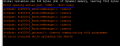
Actually I've tried the code and the problem happened when I tried to upload it to the arduino always a message like the one in the picture appeared I really do not know what's the problem with the serial port taking into consideration that it works pretty well when I use it with RFID reader if you have any idea about this please tell
ps:I've read some posts in the net saying that the jumper must be soldered to 5V on the GSM board
 

Attachments

Thread Starter

kamel2913

Joined Mar 6, 2015
43
Actually I've tried the code and the problem happened when I tried to upload it to the arduino always a message like the one in the picture appeared I really do not know what's the problem with the serial port taking into consideration that it works pretty well when I use it with RFID reader if you have any idea about this please tell
ps:I've read some posts in the net saying that the jumper must be soldered to 5V on the GSM board
Hi there, I usualy get this message when I open Serial monitor before uploading the programme, and for the jumper, It worked for me with 3.3V, I recommand you to let it at 3.3V.
 
Hi there, I usualy get this message when I open Serial monitor before uploading the programme, and for the jumper, It worked for me with 3.3V, I recommand you to let it at 3.3V.
I would thank you very much about your help every thing work well, the problem I guess was in the used arduino pins, I change the connection then it worked because the sketch was not able to be uploaded, the serial port didn't work
Thank you again a lot, I appreciate
 
Top