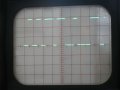
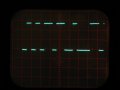
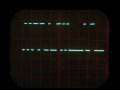
Can you please show a screenshot of the 'scope waveform, so we can see bit width?
There should be a stop/start bit pair every 10 or 11 bits, so with the right H resolution on the 'scope we should be able to tell you the baudrate with some certainty.
Can you please show a screenshot of the 'scope waveform, so we can see bit width?
There should be a stop/start bit pair every 10 or 11 bits, so with the right H resolution on the 'scope we should be able to tell you the baudrate with some certainty.
I don't know what that means, but I can say, that with my oscilloscope I get two lines 3ish volts apart, that show a signal but no detail. I can't see any vertical lines. To actually get a square wave of any kind, I have to set it to delay. I suppose, if I triggered it better, that might give me a square wave starting at the beginning, but I'm not sure.
total time for both bytes (19 full bits) is 8.6 Hdiv, so assuming your 'scope was at 50uS/Hdiv (and the cal knob clicked off) that is;
8.6 * 50uS = 430uS
per bit = 430 / 19 = 22.63uS
baudrate = 1sec/22.63uS = 44189 baud
The baudrate does not sound right, so I think your 'scope Hcal was not clicked off, or your 'scope is badly out of calibration.
Maybe the real baudrate is 56k?
Regarding the data, there is clear evidence of periods of 1,2 and 3 bits length so that is fine.
Also the 0start and 1stop bits match as they should, so we know what the two bytes are. (It would still be nice to see 4 or 5 bytes, if you can so a shot at 20uS/Hdiv.)
The fact that the first byte is a non-ascii value of 181 decimal seems to indicate that the data output is not ascii text data but is some type of raw binary data. That does seem to match your earlier putty screen where high byte values (>=128) will show as blocks as there is no valid ascii char.
With 4 or 5 bytes we can tell more, and please check your 'scope Hcal knob!
total time for both bytes (19 full bits) is 8.6 Hdiv, so assuming your 'scope was at 50uS/Hdiv (and the cal knob clicked off) that is;
8.6 * 50uS = 430uS
per bit = 430 / 19 = 22.63uS
baudrate = 1sec/22.63uS = 44189 baud
The baudrate does not sound right, so I think your 'scope Hcal was not clicked off, or your 'scope is badly out of calibration.
Maybe the real baudrate is 56k?
Regarding the data, there is clear evidence of periods of 1,2 and 3 bits length so that is fine.
Also the 0start and 1stop bits match as they should, so we know what the two bytes are. (It would still be nice to see 4 or 5 bytes, if you can so a shot at 20uS/Hdiv.)
The fact that the first byte is a non-ascii value of 181 decimal seems to indicate that the data output is not ascii text data but is some type of raw binary data. That does seem to match your earlier putty screen where high byte values (>=128) will show as blocks as there is no valid ascii char.
With 4 or 5 bytes we can tell more, and please check your 'scope Hcal knob!
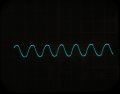
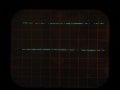
For the watch xtal first photo i see about 7.9 Hdiv for 6 full cycles;
20uS/Hdiv * 7.9 = 158uS
158uS /6 cycles = 26.333uS period
1sec/26.333uS = 37975 Hz
Assuming the watch xtal is a typical 32768 hz model, your scope is showing 37975 / 32768 or 1.159 (instead of 1).
So your scope reads 15.9% fast! Remember that number.
So my last post i said your baudrate worked out at 44189 baud, since your scope reads 15.9% fast that is
44189 / 1.159 = 38126 actual baudrate.
Something still seems a bit funky? 38kbaud?
ahah, google found this;
"Standard baud rates supported by most serial ports: 110; 300. 600; 1200. 2400;
4800. 9600; 14400. 19200; 28800. 38400; 56000."
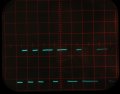
Now the other photos are my mistake, I wanted to see 4 or 5 bytes, which is the other way from 50uS; ie; 100uS not 20uS. Sorry about that!
For the watch xtal first photo i see about 7.9 Hdiv for 6 full cycles;
20uS/Hdiv * 7.9 = 158uS
158uS /6 cycles = 26.333uS period
1sec/26.333uS = 37975 Hz
Assuming the watch xtal is a typical 32768 hz model, your scope is showing 37975 / 32768 or 1.159 (instead of 1).
So your scope reads 15.9% fast! Remember that number.
So my last post i said your baudrate worked out at 44189 baud, since your scope reads 15.9% fast that is
44189 / 1.159 = 38126 actual baudrate.
Something still seems a bit funky? 38kbaud?
ahah, google found this;
"Standard baud rates supported by most serial ports: 110; 300. 600; 1200. 2400;
4800. 9600; 14400. 19200; 28800. 38400; 56000."
Now the other photos are my mistake, I wanted to see 4 or 5 bytes, which is the other way from 50uS; ie; 100uS not 20uS. Sorry about that!
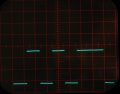
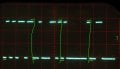
I doodled on your screenshot, to show start0 and stop1 bits in yellow. bytes are separated by vertical green lines.
Rich (BB code):
s10101101 = 10110101 = 181
s01000110 = 01100010 =  62
s10000000 = 00000001 =   1
s01100000 = 00000110 =   5  (guessing last serial bit, seems to be 0?)
The good news is that the data is being captured well by your scope, and is triggering on the startbit of the first byte.
The bad news is that it is not ascii data NMEA sentences, it seems to be raw binary.
Re the baudrate the first 3 bytes (30 bits) is 6.7 Hdiv, which works out at 38600 baud (allowing for your scope hcal error). So I think we can be sure this is raw binary data at 38400 baud.
I doodled on your screenshot, to show start0 and stop1 bits in yellow. bytes are separated by vertical green lines.
Rich (BB code):
s10101101 = 10110101 = 181
s01000110 = 01100010 =  62
s10000000 = 00000001 =   1
s01100000 = 00000110 =   5  (guessing last serial bit, seems to be 0?)
The good news is that the data is being captured well by your scope, and is triggering on the startbit of the first byte.
The bad news is that it is not ascii data NMEA sentences, it seems to be raw binary.
Re the baudrate the first 3 bytes (30 bits) is 6.7 Hdiv, which works out at 38600 baud (allowing for your scope hcal error). So I think we can be sure this is raw binary data at 38400 baud.
I think this is bringing out the detective in you You seem to be able to find more than I could imagine.
As I said I installed the Ublox 'ucenter' It's a bit complicated to just jump into, but I clicked around and clicked the NMEA button. I'm not sure what i've actually done really.
Anyway, all the screen shots of putty I've been posting are from a vista laptop, here is another:
Then I tried it with a Linux laptop and putty shows it all working. I have no idea why, or if it would have always worked!
The first thing I can say from my first try, is that the LEA-6H doesn't seem so different from the NEA-6M. When I take it outside it takes a similar time to lock on to satellites, when I bring it inside it loses it's lock, where the NEO6M seemed to stay locked on. Standing still, the numbers change quite a bit, I'll do some more tests, to clarify.
EDIT: I now have both GPS units, working on both computers, in putty, and on Eric's program. There are too many variables to mention without it being confusing.
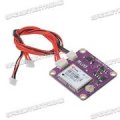
I Just received one of these NEO-6M GPS units from ebay;
Is that the same as you are using? I just plugged 3 leads into a TTL->USB dongle like this;
and it reads fine at 9600 baud 8N1 serial into the PC. Time to lock was pretty good, after the initial cold start and eeprom writing. The tiny onboard "battery" is a supercap i think, based on the discharge rate.
I didn't test how long it holds hotstart info for, but it was ok after 1 minute. Because it's not a proper battery you will be up for coldstarts if you leave it unpowered for too long.
Mine sees 10-11 satellites indoors, and uses 6 to 9. That was after an hour to warm up and lock on well. Not bad for under a tiled roof with aluminium sarking and brick walls.
I Just received one of these NEO-6M GPS units from ebay;
Is that the same as you are using? I just plugged 3 leads into a TTL->USB dongle like this;
and it reads fine at 9600 baud 8N1 serial into the PC. Time to lock was pretty good, after the initial cold start and eeprom writing. The tiny onboard "battery" is a supercap i think, based on the discharge rate.
I didn't test how long it holds hotstart info for, but it was ok after 1 minute. Because it's not a proper battery you will be up for coldstarts if you leave it unpowered for too long.
Mine sees 10-11 satellites indoors, and uses 6 to 9. That was after an hour to warm up and lock on well. Not bad for under a tiled roof with aluminium sarking and brick walls.
The problems we've been having lately, are from the LEA-6H, that I'm comparing it with. See photo. A bit more expensive. I'll let you know what the results are.
As mentioned before, they are both working ok now.
I'm away at a model flying show for a few days, and I've been keeping data records of journeys. There is a problem however! I added a longer GPS to PIC lead, (which may be causing a timing delay?) so that I could tape the GPS to the Van roof. Here is a section of data: attached. Do you know why it stops single sentences and joins them all together after a short while?
The obvious difference is that the line gets more characters.
I think there is a software bug that limits characters (maybe limits to buffer size?) then it is not getting the CR LF pair to make a new text line because they have been truncated.
You can see the checksum has been truncated too, from *xx to *x before the next $GP tag.
hi,
The buffer size is 80, the longest $GPGGA is 72 including the CR and LF codes.
Any unintentional buffer over run causes a buffer restart at the next '$' sync character.
Note it only happened after the OP had extended the Neo to PIC cable length and mounted the Neo on the van roof and it could be picking up vehicle noise.!
If you recall the Neo is sending 3.3V serial data and the PIC is operating at 5V, so there is a reduced noise margin on the PIC RXD input.
How long and what type of cable extension did you use.??
hi,
The buffer size is 80, the longest $GPGGA is 72 including the CR and LF codes.
Any unintentional buffer over run causes a buffer restart at the next '$' sync character.
Note it only happened after the OP had extended the Neo to PIC cable length and mounted the Neo on the van roof and it could be picking up vehicle noise.!
If you recall the Neo is sending 3.3V serial data and the PIC is operating at 5V, so there is a reduced noise margin on the PIC RXD input.
How long and what type of cable extension did you use.??
hi C,
I would use at least a twisted pair, say 2 to 3 turns per inch, for RXD and 0V together or some decent screened cable.
Vehicle ignitions can be very electrically 'noisy' which may cause problems with PIC and Neo6 operation.
hi,
The buffer size is 80, the longest $GPGGA is 72 including the CR and LF codes.
Any unintentional buffer over run causes a buffer restart at the next '$' sync character.
Note it only happened after the OP had extended the Neo to PIC cable length and mounted the Neo on the van roof and it could be picking up vehicle noise.!
...
Hmm. I've seen serial data comms corrupted my noise and cabling issues etc, but have never seen it cause this symptom of every byte being perfectly transmitted, and always truncating the data after exactly 75 perfect bytes every time!
Hmm. I've seen serial data comms corrupted my noise and cabling issues etc, but have never seen it cause this symptom of every byte being perfectly transmitted, and always truncating the data after exactly 75 perfect bytes every time!
hi Roman,
I have tried to corrupt the TXD data flow and it quickly recovers, I will wait and see what the OP finds and if necessary modify the demo program.
The 4 core old phone cable from the Neo6 mounted on top of his van to the PIC located inside of the van, especially with the 3.3V to 5V serial data is prone to problems.
Its possible the van's electrical noise, if the van is at a constant speed is sync'ing the serial data stream.
Note: it never happened until he mounted the Neo6 on top of his van.
Lets see what he reports back and take if from there.

 Facebook
 Google
 GitHub
 Linkedin