GPS NMEA antenna aiming tracker.

Thread Starter

camerart

Joined Feb 25, 2013
3,840
Was that the program in post 207.? [CamPadUart1.txt]

EDIT:
Just downloaded that program, it works fine for me in simulation.?

When you say it goes round and around in the main loop, its supposed to do that until you press a key or send it a message.
E
Hi Eric,

Yes, that program.

You may remember I use the TRISs as comments to check connections etc, but the keypad wasn't changed. It is now and it's working in SIM and CIRCUIT.

Ah yes, of course it goes round and round:rolleyes: I'm not that used to interrupts yet:confused:

C.
 
Last edited:

Thread Starter

camerart

Joined Feb 25, 2013
3,840
In the simulator, pasting a '$sentence' in to the UART shows on the LCD ok.

On the circuit a square wave shows at pin 26 (Oscilloscope), but nothing on the LCD.

Any ideas please?

Camerart.
 

ericgibbs

Joined Jan 29, 2010
21,459
In the simulator, pasting a '$sentence' in to the UART shows on the LCD ok.

On the circuit a square wave shows at pin 26 (Oscilloscope), but nothing on the LCD.

Any ideas please?

Camerart.
Did you change the '?' end of message terminator to 0x0A in the interrupt before you programmed the PIC.?
 

Thread Starter

camerart

Joined Feb 25, 2013
3,840
Did you change the '?' end of message terminator to 0x0A in the interrupt before you programmed the PIC.?
Hi E,

The CamPad_Uart1.bas is not working in SIM or Circuit. The keypad is ok in both.

I tried changing to 18F452, also the [Define SIMULATION_WAITMS_VALUE = 1] has been commented in and out, and I changed "?"/0x0A for SIM/Circuit.

If it works in your SIM, I'll try again.

C
 

ericgibbs

Joined Jan 29, 2010
21,459
The CamPad_Uart1.bas is not working in SIM or Circuit. The keypad is ok in both.
hi,
I have again downloaded the program from AAC which I posted for you, it works fine in Simulation and a PIC.

Just in case you have a corrupt copy of the program, I have re-posted it here as CamPad_Uart1V.txt [ added the V to identify it]

Compile the program on your PC and post back here a copy of the Hex file that the compiler creates.
I can load and check that your Oshonsoft is compiling OK.

What delay is your Oshonsoft UART Hardware Tool delay times set too.?
I have set mine to 50.


E
 

Attachments

Thread Starter

camerart

Joined Feb 25, 2013
3,840
hi,
I have again downloaded the program from AAC which I posted for you, it works fine in Simulation and a PIC.

Just in case you have a corrupt copy of the program, I have re-posted it here as CamPad_Uart1V.txt [ added the V to identify it]

Compile the program on your PC and post back here a copy of the Hex file that the compiler creates.
I can load and check that your Oshonsoft is compiling OK.

What delay is your Oshonsoft UART Hardware Tool delay times set too.?
I have set mine to 50.


E
Hi Eric,

It's working in SIM, but not in circuit, so I think the Oshonsoft is compiling ok. I have attached the HEX file of CamPad_Uart1V-1

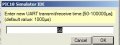
Regarding 'delay': is your Oshonsoft UART Hardware Tool....' See attachment is this what you mean?

I have corrected and added some of my comments on V and attached it CamPad_Uart1V-1 B. Can you check it and if it's ok, use it please, as it helps me keep up with details.

C.
 

Attachments

ericgibbs

Joined Jan 29, 2010
21,459
hi,
I have checked your hex file in Oshonsoft it runs OK, for LCD and Uart.
What was the reason it did not work for you when you first tried it.???

I have also run the post #225 program in a PIC for over 2 hours, using a 2nd PC to send a GPS message every second, no problems at all.

I will look at your edited program B.txt

E
 

Thread Starter

camerart

Joined Feb 25, 2013
3,840
hi,
I have checked your hex file in Oshonsoft it runs OK, for LCD and Uart.
What was the reason it did not work for you when you first tried it.???

I have also run the post #225 program in a PIC for over 2 hours, using a 2nd PC to send a GPS message every second, no problems at all.

I will look at your edited program B.txt

E
Hi E,

I think the problem could be the way I open programs and in which order. One mistake I keep making is: Right click on a program and choose open with, seems to open the last program that was opened by that application. I've been caught by that a lot of times.

Another way is: open a program 'compile' then remember I need 'say' the UART tool, and it opens, but not properly?

In the 'B' program, I corrected the TRIS comments, and added a reminder about the delay at the beginning of the program and the "?" for the UART. Plus deleted some 'symbols'

Cheers, C
 

Thread Starter

camerart

Joined Feb 25, 2013
3,840
hi,

I have also run the post #225 program in a PIC for over 2 hours, using a 2nd PC to send a GPS message every second, no problems at all.

E
Hi Eric,

I can try that! Did you use a USB to TTL converter? What program did you use to send the data?

C.
 

ericgibbs

Joined Jan 29, 2010
21,459
Hi Eric,

I can try that! Did you use a USB to TTL converter? What program did you use to send the data?

C.
hi C,
Both my desktop PC's have an RS232 output, you can buy a RS232 9pin PC card for occasions when working with RS232. The 2nd PC sends RS232 GPS strings to the PIC. My PIC project board has MAX232 in the RS232 line.
If you prefer you could use USB/UART converter.

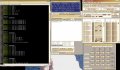
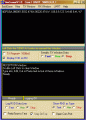
The Program is my own, refer image.

How are you inputting to the PIC the GPS data.??

E
 

Attachments

Thread Starter

camerart

Joined Feb 25, 2013
3,840
hi C,
Both my desktop PC's have an RS232 output, you can buy a RS232 9pin PC card for occasions when working with RS232. The 2nd PC sends RS232 GPS strings to the PIC. My PIC project board has MAX232 in the RS232 line.
If you prefer you could use USB/UART converter.

The Program is my own, refer image.

How are you inputting to the PIC the GPS data.??

E
Hi E,

I only have USBs. I have two laptops with putty. I have two 'UART USB' converters.

I'm not experienced in connecting, but I had the GPS module connected into a USB which showed on Putty.

I am testing with GPS module connected through a MAX232 into PIN 26 RX on the PIC.

C
 

ericgibbs

Joined Jan 29, 2010
21,459
hi,
Are you able to transfer test data between your two PC's via the converters.?
Check that you have set up the USB/RS converters correctly.??

E
 

Thread Starter

camerart

Joined Feb 25, 2013
3,840
hi,
Are you able to transfer test data between your two PC's via the converters.?
Check that you have set up the USB/RS converters correctly.??

E
Hi E,

I can see 3V square wave on an Oscilloscope, and each different key presses on the keyboard shows a different shape.

This also show as 4V + at pin26 Rx on the PIC.

I haven't figured out how to send a sentence yet on Putty. Or repeat it once/sec.

No signs on circuit LCD!

C
 

ericgibbs

Joined Jan 29, 2010
21,459
The fact you cannot see anything on the LCD and the UART suggests you have a wiring problem or the prommer is not programming the PIC correctly. etc......

What wiring changes have you made since the other day, you did say is was working.

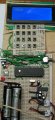
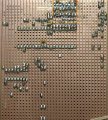
Post a layout photo showing the wiring
E
 

Thread Starter

camerart

Joined Feb 25, 2013
3,840
The fact you cannot see anything on the LCD and the UART suggests you have a wiring problem or the prommer is not programming the PIC correctly. etc......

What wiring changes have you made since the other day, you did say is was working.

Post a layout photo showing the wiring
E
Hi E,

I have had the GPS module connected directly to PIN 26, but now it goes through a MAX 232. It has always showed a signal, 3.3V then 4v+ at PIN 26.

I cut out the old keypad wiring, when I added mine, along with the MAX232, when I sent photos of the keypad working, since then I haven't changed the wiring.

If I change any wiring, I will also change the TRIS comments on my version of the program. The version with a 'B' is correct to the existing wiring.

Could there be a problem with you using 18F452 and I'm using 18F4520?

The UART works in the SIM but has never worked in the circuit.

Cheers, Camerart.
 

Attachments

ericgibbs

Joined Jan 29, 2010
21,459
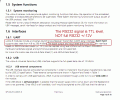
If the GPS module is outputting TTL levels of RS232 signals, you should not have a MAX232 in series with the RX input pin #26.

What is connected to the RXD pin #26 of the PIC other than the GPS module.?

The program is ok in 18F452 and 18F4520, I did state this earlier.?

E

EDIT:
This clip is from the GPS module manual.
 

Attachments

Last edited:

THE_RB

Joined Feb 11, 2008
5,438
GPS PCB modules output TTL serial by default, unless it is a large older style module with a level converter IC on its PCB.

I've got a Ublox 6 module and it outputs TTL signal levels, which can connect directly to the PIC USART RX pin.

You don't need a RS232 level converter OR a data inverter. (just backing up what EricGibbs said).
 

Thread Starter

camerart

Joined Feb 25, 2013
3,840
I have everything thing here to get it going: 2 different GPS modules on their way to me, a programming alternative, instructions for Putty and a meter.

Leave it with me.

Camerart.
 

Attachments

ericgibbs

Joined Jan 29, 2010
21,459
I have everything thing here to get it going: 2 different GPS modules on their way to me, a programming alternative, instructions for Putty and a meter.

Leave it with me.

Camerart.
hi C,
The latest Oshonsoft Basic program now has all Coord to Polar maths, using Oshonsoft floating point maths, with a 6 decimal place resolution.

It is currently on test in a programmed PIC, using a 2nd PC which is sending incremental GPS message data, at a 1 second rate.

The calculated Range, Azimuth and Altitude of the Remote point is being displayed on the LCD and also being echoed back to the sending PC.

Running for over an hour no problems.

Lets know when you have your hardware working.

E
 

Thread Starter

camerart

Joined Feb 25, 2013
3,840
hi C,
The latest Oshonsoft Basic program now has all Coord to Polar maths, using Oshonsoft floating point maths, with a 6 decimal place resolution.

It is currently on test in a programmed PIC, using a 2nd PC which is sending incremental GPS message data, at a 1 second rate.

The calculated Range, Azimuth and Altitude of the Remote point is being displayed on the LCD and also being echoed back to the sending PC.

Running for over an hour no problems.

Lets know when you have your hardware working.

E
Hi C,

That's great! I'm getting to the point where I will have to make the opto disks, and the tracker itself.

I'll let you know if anything happens UART wise.

Cheers, Camerart.
 
Top