GPS NMEA antenna aiming tracker.

THE_RB

Joined Feb 11, 2008
5,438
One method is to wrap all the keypad row-driving and column reading into a neat function that returns one value; new_key (the key which is pressed).

Then call that function as part of a loop, say every 1mS. Each time, if new_key==last_key then you increment a debounce count. If not, clear the debounce count.

Then after 20 good reads where new_key==last_key, you know the key was pressed for sure.

The same debounce count will work for "no key" too.
 

Thread Starter

camerart

Joined Feb 25, 2013
3,842
One method is to wrap all the keypad row-driving and column reading into a neat function that returns one value; new_key (the key which is pressed).

Then call that function as part of a loop, say every 1mS. Each time, if new_key==last_key then you increment a debounce count. If not, clear the debounce count.

Then after 20 good reads where new_key==last_key, you know the key was pressed for sure.

The same debounce count will work for "no key" too.
The_RB,

Your suggestion is written in 'C' I think, like the other suggestion, and I only know Basic, so I will have to try later, or use my suggestion with 4X Buttons, that I might be able to program.

Thanks, Camerart.
 

ericgibbs

Joined Jan 29, 2010
21,460
hi C,
I have written for you, in Oshonsoft Basic and tested in PIC a keypad routine, for a 16 keypad.
Its an 'on key' interrupt driven routine.

Have you finally decided on a 16 or 4 key pad module.?

E
 

Thread Starter

camerart

Joined Feb 25, 2013
3,842
I've been working on the signal inputs. The attached program has most of the inputs working.

The GPS connected to PIN 26 RX, in the simulator, and circuit. In the SIM the LCD shows, at first 'TEST', then the '$GPGGA sentence' but only 'TEST' shows in the LCD on the circuit. I've passed the GPS signal through a MAX 232, and a signal is showing of 0-5V, at the pin. (The GPS also shows in Putty)

Any ideas why it's not showing on the LCD

Camerart.
 

Attachments

ericgibbs

Joined Jan 29, 2010
21,460
hi C,
If you recall I used a '?' character as an End of Message terminator, so that you could avoid having to enter a LF character using Oshonsoft when simulating.

I would suggest while debugging the UART, dont call the gosub get_button and stop clearing the LCD in that loop.

E.

Rich (BB code):
On High Interrupt
Save System

PIR1.RCIF = 0
Toggle led

Hserin chr
If chr = "$" Then  'start
rxi = 0
Endif

str1(rxi) = chr
rxi = rxi + 1

If chr = "?" Then  'temp LF 'change the '? to 0x0a 

For txi = 1 To rxi
Hserout str1(txi)
Lcdout str1(txi)
Next txi
Endif

Resume
 

Thread Starter

camerart

Joined Feb 25, 2013
3,842
hi C,
I have written for you, in Oshonsoft Basic and tested in PIC a keypad routine, for a 16 keypad.
Its an 'on key' interrupt driven routine.

Have you finally decided on a 16 or 4 key pad module.?

E
Hi Eric,

I only came up with the 4 key idea, in case you were having difficulties with the keypad 'C' problem.

The 16 key Keypad is much better and a welcome addition to this and future projects, Thank you.

Camerart.
 

ericgibbs

Joined Jan 29, 2010
21,460
hi C,
This Oshonsoft basic 16KeyPad program works fine in a PIC.
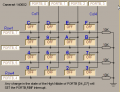
You MUST connect your 16 keys as in the posted image.
[you can use alternative key top labels, but the program will need to reflect these changes]
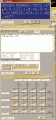
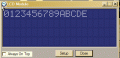
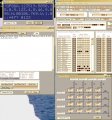
The images show screen clips of the LCD and Uart and Pad.
Change the .txt extension to .bas in order to Run the program in the simulator

A Key press will generate an Interrupt and the character will be displayed on the LCD. To enable simple testing, pressing the 'F' key will Clear the LCD.

Included in the ISR routine is the UART interrupt, so when the UART receive Interrupt is SET the GPS message will be received, then displayed on the LCD. [ for testing ONLY the received message is shown on the Oshonsoft UART Tool]

NOTE:

Its recommended that you have a UART 'receiver time out' , so that the program can exit the ISR in the event of a reception failure and a missing EOT character. [CR/LF or LF]

E
 

Attachments

Thread Starter

camerart

Joined Feb 25, 2013
3,842
hi C,
If you recall I used a '?' character as an End of Message terminator, so that you could avoid having to enter a LF character using Oshonsoft when simulating.

I would suggest while debugging the UART, dont call the gosub get_button and stop clearing the LCD in that loop.

E.

Rich (BB code):
On High Interrupt
Save System

PIR1.RCIF = 0
Toggle led

Hserin chr
If chr = "$" Then  'start
rxi = 0
Endif

str1(rxi) = chr
rxi = rxi + 1

If chr = "?" Then  'temp LF 'change the '? to 0x0a 

For txi = 1 To rxi
Hserout str1(txi)
Lcdout str1(txi)
Next txi
Endif

Resume
Hi Eric,

Am I correct? When testing in the simulator cut and paste the $sentence including the ? using: If chr = "?" Then, in the circuit, then when testing in the circuit change the program to: If chr = 0x0a then.

C
 

Art

Joined Sep 10, 2007
806
If your rows and columns were consecutive pins your keypad routine could be more like (in rough BASIC):

Rich (BB code):
'
FOR row = 0 TO 3
FOR col = 0 TO 3
portb.col+4 = 1
IF port.row = 1 THEN
key = row*col
' key = key + $30 ' add hex 30 to convert from real to an ascii value if desired
ENDIF
portb.col+4 = 0
NEXT
NEXT
 

ericgibbs

Joined Jan 29, 2010
21,460
Am I correct? When testing in the simulator cut and paste the $sentence including the ? using: If chr = "?" Then, in the circuit, then when testing in the circuit change the program to: If chr = 0x0a then.
hi,
Yes,, the GPS end of text 'EOT' [message] is CR LF ie: 0x0D 0x0A [ in deci #13 then #10 ]

E
 

Thread Starter

camerart

Joined Feb 25, 2013
3,842
If your rows and columns were consecutive pins your keypad routine could be more like (in rough BASIC):

Rich (BB code):
'
FOR row = 0 TO 3
FOR col = 0 TO 3
portb.col+4 = 1
IF port.row = 1 THEN
key = row*col
' key = key + $30 ' add hex 30 to convert from real to an ascii value if desired
ENDIF
portb.col+4 = 0
NEXT
NEXT
ART,

I'll try Eric's suggestion first, then if that fails, I'll try yours.

Thank you.

C.
 

Thread Starter

camerart

Joined Feb 25, 2013
3,842
hi C,
This Oshonsoft basic 16KeyPad program works fine in a PIC.
You MUST connect your 16 keys as in the posted image.
[you can use alternative key top labels, but the program will need to reflect these changes]
The images show screen clips of the LCD and Uart and Pad.
Change the .txt extension to .bas in order to Run the program in the simulator

A Key press will generate an Interrupt and the character will be displayed on the LCD. To enable simple testing, pressing the 'F' key will Clear the LCD.

Included in the ISR routine is the UART interrupt, so when the UART receive Interrupt is SET the GPS message will be received, then displayed on the LCD. [ for testing ONLY the received message is shown on the Oshonsoft UART Tool]

NOTE:

Its recommended that you have a UART 'receiver time out' , so that the program can exit the ISR in the event of a reception failure and a missing EOT character. [CR/LF or LF]

E
Hi Eric,

I assume I use the 1K resistors as the 1st image (Image 3 doesn't have them)

C
 

ericgibbs

Joined Jan 29, 2010
21,460
Why would you fit the 1K's when my circuit doesn't show them.?

I'll try Eric's suggestion first, then if that fails, I'll try yours.
BTW:
The demo code I have posted for the Keypad and Uart does work in a PIC, they are not suggestions. If it 'fails' the problem is at your end, so trying an alternative will not fix the problem.

I use a second PC to transmit the GPS message to the PIC, which it then displays on the LCD and then Echo's back to the PC via the UART.

I am only submitting working demo subroutines for you to integrate into your program, the routines will require minor changes.

E
 

Thread Starter

camerart

Joined Feb 25, 2013
3,842
Why would you fit the 1K's when my circuit doesn't show them.?


BTW:
The demo code I have posted for the Keypad and Uart does work in a PIC, they are not suggestions. If it 'fails' the problem is at your end, so trying an alternative will not fix the problem.

I use a second PC to transmit the GPS message to the PIC, which it then displays on the LCD and then Echo's back to the PC via the UART.

I am only submitting working demo subroutines for you to integrate into your program, the routines will require minor changes.

E
Hi Eric,

Image 1 of #207 has 8 resistors, and image 3 has only 4, I thought I would check first. I won't add the 1Ks.

I appreciate that 'ART' and 'THE_RB', have kindly spent time writing out there de-bounce routines, and I wanted to say to them, that I would try yours first. I'm sure it will work.

Camerart.
 

ericgibbs

Joined Jan 29, 2010
21,460
Hi Eric,

Image 1 of #207 has 8 resistors, and image 3 has only 4, I thought I would check first. I won't add the 1Ks.

I appreciate that 'ART' and 'THE_RB', have kindly spent time writing out there de-bounce routines, and I wanted to say to them, that I would try yours first. I'm sure it will work.

Camerart.
hi C,
It must be confusing to you in getting so many options for doing the same operation.

I think it would be best if I you decide which option you are going to use, in the meantime I will just follow the thread.

E
 

Thread Starter

camerart

Joined Feb 25, 2013
3,842
hi C,
It must be confusing to you in getting so many options for doing the same operation.

I think it would be best if I you decide which option you are going to use, in the meantime I will just follow the thread.

E
Hi E,

I'm working with your option, thank you.

I may be some time:)

Camerart.
 

Thread Starter

camerart

Joined Feb 25, 2013
3,842
Hi,

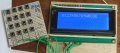
After a mornings nightmare failing to wire up the old keypad, I had an afternoon dream of making a new keypad as the drawing, and it worked first time, thanks, Eric.

C.
 

Attachments

ericgibbs

Joined Jan 29, 2010
21,460
Hi,

After a mornings nightmare failing to wire up the old keypad, I had an afternoon dream of making a new keypad as the drawing, and it worked first time, thanks, Eric.

C.
hi C,
Thats great news.:)

Let me know when you need help debugging the next stage.

Eric
 

Thread Starter

camerart

Joined Feb 25, 2013
3,842
hi C,
Thats great news.:)

Let me know when you need help debugging the next stage.

Eric
Hi Eric,

Occasionally more than one letter appears on the LCD, when keying, but it's intermittent.

There are two toggles PORTD.1 and PORTA.1 are they your test toggles, because there isn't anything connected to those pins?

When I tested the last program you sent, I didn't try it in the simulator. Today I tried it for debugging the UART/USART? and it doesn't work in the SIM. I tried changing to 18F452 also. It goes round and round the main loop.

C.
 

ericgibbs

Joined Jan 29, 2010
21,460
When I tested the last program you sent, I didn't try it in the simulator. Today I tried it for debugging the UART/USART? and it doesn't work in the SIM. I tried changing to 18F452 also. It goes round and round the main loop.
Was that the program in post 207.? [CamPadUart1.txt]

EDIT:
Just downloaded that program, it works fine for me in simulation.?

When you say it goes round and around in the main loop, its supposed to do that until you press a key or send it a message.
E
 

Attachments

Last edited:
Top