GPS NMEA antenna aiming tracker.

Thread Starter

camerart

Joined Feb 25, 2013
3,838
Hi,

I don't think my keypad is like the ones you have pointed out, it's rather odd, as you can see from the attachment I posted. If you agree it's different, I have lots of mini push buttons, I could easily make a keypad on the circuit board. If we have a menu and use the 8 pins of PORTB (Push to GND) to choose 0-7 choices from the NMEA types GGA, RMC etc. Then by taking combinations of 0-7 to type the rest of the sentence.

C
 

ericgibbs

Joined Jan 29, 2010
21,458
Hi,

I don't think my keypad is like the ones you have pointed out, it's rather odd, as you can see from the attachment I posted. If you agree it's different, I have lots of mini push buttons, I could easily make a keypad on the circuit board. If we have a menu and use the 8 pins of PORTB (Push to GND) to choose 0-7 choices from the NMEA types GGA, RMC etc. Then by taking combinations of 0-7 to type the rest of the sentence.

C
hi,
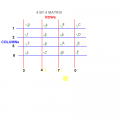
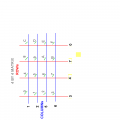
Your keypad is not 'odd', I used your text to draw this matrix.

A picture is worth a thousand words.:rolleyes:

E
 

Attachments

Thread Starter

camerart

Joined Feb 25, 2013
3,838
hi
Example #5 should work from the link, its not debounced in software but you could add some switch debouncing.

E
Hi

I've used #5 in the Oshonsoft examples. I've changed the Keypad connection PORT to B, as I had already connected it up this way, with resistors as the diagram.

I think I have transposed it correctly (It wasn't easy), but I will only know by testing it. #5 uses LEDs to show it working, but I don't now have a spare complete port left, so I would like to be able to print the digits to the LCD, is this possible?

C
 

ericgibbs

Joined Jan 29, 2010
21,458
hi,
You can either initialise the LCD or UART, to display the keycodes ,I prefer the UART as it gives a hard copy.

Post you existing program for the Pad and I will look.

E
 

Thread Starter

camerart

Joined Feb 25, 2013
3,838
hi,
You can either initialise the LCD or UART, to display the keycodes ,I prefer the UART as it gives a hard copy.

Post you existing program for the Pad and I will look.

E
Hi E,

I have transposed the example from Oshonsoft, and hopefully, it now matches my circuit connections.

If you initialise the LCD, should it then show on the circuit LCD? That would be best for testing I think.

C
 

Attachments

ericgibbs

Joined Jan 29, 2010
21,458
hi C,
I have modified your program and pad pin assignments.
It would never work as it was. You cannot display BCD characters on the LCD, they must be ASCII.

I have used the lower nibble of the PORTB as the read value of the keypad.
and the upper nibble as the column driver

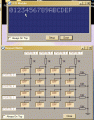
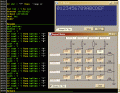
Set up your keypad Tool as per this image

I have never seen the front of your keypad, so the lettering maybe different, just change the button assignments to suit.

Eric
Remove the .txt extension from the program name.
 

Attachments

Last edited:

Thread Starter

camerart

Joined Feb 25, 2013
3,838
hi C,
I have modified your program and pad pin assignments.
It would never work as it was. You cannot display BCD characters on the LCD, they must be ASCII.

I have used the lower nibble of the PORTB as the read value of the keypad.
and the upper nibble as the column driver

Set up your keypad Tool as per this image

I have never seen the front of your keypad, so the lettering maybe different, just change the button assignments to suit.

Eric
Remove the .txt extension from the program name.
Hi Eric,

Your set up works in the SIM, after changing to my keypad layout, but not on the circuit.

I'm trying to 'see' a voltage at the COL pins of PORTB on an Oscilloscope, but even though there is a small switching voltage, it doesn't seem a high enough voltage.

Thanks for your programming.

C.
 

ericgibbs

Joined Jan 29, 2010
21,458
Hi Eric,

Your set up works in the SIM, after changing to my keypad layout, but not on the circuit.

I'm trying to 'see' a voltage at the COL pins of PORTB on an Oscilloscope, but even though there is a small switching voltage, it doesn't seem a high enough voltage.

Thanks for your programming.

C.
hi,
Would you post a copy of your revised program and if possible a photo of the wiring layout
.
E
 

Thread Starter

camerart

Joined Feb 25, 2013
3,838
hi,
Would you post a copy of your revised program and if possible a photo of the wiring layout
.
E
Hi E,

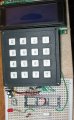
The keypad is connected directly to the first 8 copper strips. Resistors on 40,37,36,33 span cut tracks. 39,38,35,34 resistors connect the pins to Gnd.
The LCd is working ok, in previous programs.

Camerart.
 

Attachments

ericgibbs

Joined Jan 29, 2010
21,458
hi C,
What is the link for on the PIC pins 26 and 27 for.??

You have ignored all of my last working keypad program and edited it back to something that will not work.!

There is no point in me debugging your programs if you just edit out my changes, I am sorry I cannot work this way.

Eric

EDIT:

Resistors on 40,37,36,33 span cut tracks. 39,38,35,34 resistors connect the pins to Gnd
.

Double check these connections,
pins 40,37,36,33 are the Rows ie: inputs connected to 0V via 10K's
Pins 39,38,35,34 are are the column drivers, via the 1k's
 

Attachments

Last edited:

Thread Starter

camerart

Joined Feb 25, 2013
3,838
hi C,
What is the link for on the PIC pins 26 and 27 for.??

You have ignored all of my last working keypad program and edited it back to something that will not work.!

There is no point in me debugging your programs if you just edit out my changes, I am sorry I cannot work this way.

Eric
Hi Eric,

I'm embarrassed! For me this is quite complicated, with so many combinations. Please don't get frustrated.

I think my mistake was to connect the Keyboard before getting the Keypad to work in the SIM.

If I go back to #169, which works in the SIM, then re-wire the keypad to match. Is this correct?

Camerart.
 

ericgibbs

Joined Jan 29, 2010
21,458
Hi Eric,

I'm embarrassed! For me this is quite complicated, with so many combinations. Please don't get frustrated.

I think my mistake was to connect the Keyboard before getting the Keypad to work in the SIM.

If I go back to #169, which works in the SIM, then re-wire the keypad to match. Is this correct?

Camerart.
hi,
Look at my EDIT on the last post #173 your Keypad connections are wrong.

Change the resistors and cut tracks and retry.
Eric
 

Thread Starter

camerart

Joined Feb 25, 2013
3,838
hi C,
What is the link for on the PIC pins 26 and 27 for.??
Hi E,

This isn't a link, it's an RX connecting test pin. I've been testing transmitters and receivers, trying to get the GPS to be more mobile. One of the tests was to see if the GPS works on the RX pin, it didn't.

C
 

ericgibbs

Joined Jan 29, 2010
21,458
hi C,
If you have not already made the changes to the keypad resistors, you could try changing the PORTB assignment pins, change the PORTB '0's to 1
and PORTB '1''s to 0. this will swap the Rows and Cols and it will mean editing the get_key button values to make them match the button lettering.

Lets know what you decide.:)
Eric
 

Thread Starter

camerart

Joined Feb 25, 2013
3,838
hi C,
If you have not already made the changes to the keypad resistors, you could try changing the PORTB assignment pins, change the PORTB '0's to 1
and PORTB '1''s to 0. this will swap the Rows and Cols and it will mean editing the get_key button values to make them match the button lettering.

Lets know what you decide.:)
Eric
Hi E,

It's been like Bletchley park here this morning:)

Once I turned your keypad sketch on it's side and mine also, then juggle the PORTs and key designations, it now works. See attachment for changes.

Key 'C' doesn't work, but I think that is something else.

I have to keep switching on and off until it starts properly.

Before, you mentioned key bounce! When it starts there is a 'C' on the LCD, then as I release the key, a 'C' is printed on the LCD
 

Attachments

ericgibbs

Joined Jan 29, 2010
21,458
hi,
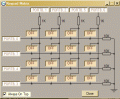
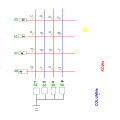
This image shows the connections as I saw it.

I will check your latest program.
[any chance you could use shorter file names, I only have a 22inch screen].:)

E

EDIT:
I have edited the button assignments to show your keypad changes.
Can you confirm that its the same as you have.?
 

Attachments

Last edited:

John P

Joined Oct 14, 2008
2,063
I don't understand the need for added resistors in this keypad circuit. I use keypads with PIC processors all the time, and I always set them up so the built-in pullups can do the job. But then I do have a tendency to fight to keep every additional component off the board!
 
Top