GPS NMEA antenna aiming tracker.

Thread Starter

camerart

Joined Feb 25, 2013
3,838
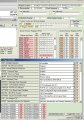
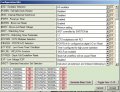
How is the oscillator configured?
Show us the osccon register.
It should be HS-crystal and PLL not enabled.
You might need a series resistor between crystal and osc2-pin, see the docs.
JJW,

I assume that if the config settings are HS, then PLL is not enabled?

I added 330 ohm Rs, between OSC2 pin and XTL, but no 'singing'

I have 20 MHz low profile XTL and 22pF ceramic disk caps at the moment.

Camerart.
 

Attachments

jjw

Joined Dec 24, 2013
823
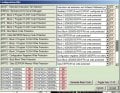
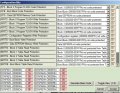
I am not sure about the PLL, but can you show all configuration bits, your attachment shows only a part of them.
 

THE_RB

Joined Feb 11, 2008
5,438
...
Can someone remind me how I entered the NMEA sentence, please. Is it into the UART or serial module? The serial module always shuts down the simulator, the UART reports 'UART receiver is not enabled'.
...
Not sure about your simulator, but the NMEA serial data from the GPS module connects to the RX input of the PIC USART. And the two grounds also need to be connected.

In the PIC (and in the simulator I guess) you need to turn the USART module on and configure its baudrate. The PIC datasheet has a chapter that explains all that in step by step form. :)
 

Thread Starter

camerart

Joined Feb 25, 2013
3,838
Not sure about your simulator, but the NMEA serial data from the GPS module connects to the RX input of the PIC USART. And the two grounds also need to be connected.

In the PIC (and in the simulator I guess) you need to turn the USART module on and configure its baudrate. The PIC datasheet has a chapter that explains all that in step by step form. :)
The_RB,

I misled you! Sorry. I meant in the Oshonsoft simulator, for testing, I had to cut and paste an example NMEA sentence, into the USART I think, then in simulation print the data on the simulation LCD. At the moment the SIM reports 'UART receiver is not enabled'

Camerart.
 

ericgibbs

Joined Jan 29, 2010
21,458
hi C,
Try this.
Its a Copy of a post I made for you on another forum site.

NOTE : I have terminated the string with a '?' character as a temporary substitute for the LF [ saves using the send hex]

Copy the string shown at the Top of the program and Paste it into the Oshonsoft Tool Hardware UART Send String Box,

DONT include the Rem at the start.

'COPY and PASTE this string. '$GPGGA,123519,4807.038,N,01131.000,E,1,08,0.9,545.4,M,46.9,M,,*47?

I have left some of your Dim's statements in, needs a tidy up.

It works as a Demo.

Rich (BB code):
 Code (text):
 
'software uart receives data stream at 9600 baud And when code gga is detected we capture 42 bytes
'in array a(42) then send these to the PC via hardware UART at 9600 baud

'COPY and PASTE this string.
'$GPGGA,123519,4807.038,N,01131.000,E,1,08,0.9,545.4,M,46.9,M,,*47?


Define SIMULATION_WAITMS_VALUE = 1

Dim chr As Byte
Dim rxi As Byte
Dim txi As Byte
Dim start_code(2) As Byte  'enables scan of the last 3 characters received

Dim str1(42) As Byte  'save the data stream we need in here


Dim i As Byte
Dim j As Byte
Dim gga As Byte
Dim data As Byte
Dim latdeg As Byte
Dim latmin As Byte
Dim londeg As Byte
Dim lonmin As Byte

'> > > > > > > > > > > > > >  > > > > > > > > > > > > > >  > > > > > > > > > > > > > >.
Define CONF_WORD = 0x3f41  'XTL
Define CLOCK_FREQUENCY = 4  'Changed from 12
AllDigital

'Define osc 4
CMCON = 7
OPTION_REG.7 = 0  'Enable Pull-Up's
Dim led_a2 As Bit  'PORTA.2 'flash per second

Define LCD_DREG = PORTB  'Port for LCD Data
Define LCD_DBIT = 4  'Use upper 4 bits of Port
Define LCD_RSREG = PORTA  'Port for RegisterSelect (RS) bit
Define LCD_RSBIT = 2  'Port Pin for RS bit (pin9)
Define LCD_EREG = PORTA  'Port for Enable (E) bit
Define LCD_EBIT = 4  'Port Pin for E bit (pin7)
Define LCD_BITS = 4  'Using 4-bit bus
Define LCD_LINES = 4  'Using 2 line Display
Define LCD_CHARS = 16  'ADDED
Define LCD_COMMANDUS = 2000  'Command Delay (uS)
Define LCD_DATAUS = 50  'Data Delay (uS)

'Define osc 4
CMCON = 7
OPTION_REG.7 = 0  'Enable Pull-Up's

TRISA = %00000000
TRISB = %01000000

'$GGA 1234
Lcdinit


Hseropen 9600

INTCON.GIE = 1
INTCON.PEIE = 1
PIE1.RCIE = 1

Hserout "Ready - await  $", CrLf, CrLf

main:

Goto main

End                                              

On Interrupt
Save System

PIR1.RCIF = 0

Hserin chr
If chr = "$" Then ' test for string start
rxi = 0
Endif

str1(rxi) = chr
rxi = rxi + 1

If chr = "?" Then 'test for temporary LF code
For txi = 0 To rxi
Hserout str1(txi)
If str1(txi) = "," Then Hserout CrLf  ' a demo on how to break the string into chunks.!
Next txi

Endif

Resume
 

Thread Starter

camerart

Joined Feb 25, 2013
3,838
hi C,
Try this.
Its a Copy of a post I made for you on another forum site.

NOTE : I have terminated the string with a '?' character as a temporary substitute for the LF [ saves using the send hex]

Copy the string shown at the Top of the program and Paste it into the Oshonsoft Tool Hardware UART Send String Box,

DONT include the Rem at the start.

'COPY and PASTE this string. '$GPGGA,123519,4807.038,N,01131.000,E,1,08,0.9,545.4,M,46.9,M,,*47?

I have left some of your Dim's statements in, needs a tidy up.

It works as a Demo.

Rich (BB code):
 Code (text):
 
'software uart receives data stream at 9600 baud And when code gga is detected we capture 42 bytes
'in array a(42) then send these to the PC via hardware UART at 9600 baud

'COPY and PASTE this string.
'$GPGGA,123519,4807.038,N,01131.000,E,1,08,0.9,545.4,M,46.9,M,,*47?


Define SIMULATION_WAITMS_VALUE = 1

Dim chr As Byte
Dim rxi As Byte
Dim txi As Byte
Dim start_code(2) As Byte  'enables scan of the last 3 characters received

Dim str1(42) As Byte  'save the data stream we need in here


Dim i As Byte
Dim j As Byte
Dim gga As Byte
Dim data As Byte
Dim latdeg As Byte
Dim latmin As Byte
Dim londeg As Byte
Dim lonmin As Byte

'> > > > > > > > > > > > > >  > > > > > > > > > > > > > >  > > > > > > > > > > > > > >.
Define CONF_WORD = 0x3f41  'XTL
Define CLOCK_FREQUENCY = 4  'Changed from 12
AllDigital

'Define osc 4
CMCON = 7
OPTION_REG.7 = 0  'Enable Pull-Up's
Dim led_a2 As Bit  'PORTA.2 'flash per second

Define LCD_DREG = PORTB  'Port for LCD Data
Define LCD_DBIT = 4  'Use upper 4 bits of Port
Define LCD_RSREG = PORTA  'Port for RegisterSelect (RS) bit
Define LCD_RSBIT = 2  'Port Pin for RS bit (pin9)
Define LCD_EREG = PORTA  'Port for Enable (E) bit
Define LCD_EBIT = 4  'Port Pin for E bit (pin7)
Define LCD_BITS = 4  'Using 4-bit bus
Define LCD_LINES = 4  'Using 2 line Display
Define LCD_CHARS = 16  'ADDED
Define LCD_COMMANDUS = 2000  'Command Delay (uS)
Define LCD_DATAUS = 50  'Data Delay (uS)

'Define osc 4
CMCON = 7
OPTION_REG.7 = 0  'Enable Pull-Up's

TRISA = %00000000
TRISB = %01000000

'$GGA 1234
Lcdinit


Hseropen 9600

INTCON.GIE = 1
INTCON.PEIE = 1
PIE1.RCIE = 1

Hserout "Ready - await  $", CrLf, CrLf

main:

Goto main

End                                              

On Interrupt
Save System

PIR1.RCIF = 0

Hserin chr
If chr = "$" Then ' test for string start
rxi = 0
Endif

str1(rxi) = chr
rxi = rxi + 1

If chr = "?" Then 'test for temporary LF code
For txi = 0 To rxi
Hserout str1(txi)
If str1(txi) = "," Then Hserout CrLf  ' a demo on how to break the string into chunks.!
Next txi

Endif

Resume
Hi E,

You have answered my question, but the program you posted was for the earlier PIC 16F886, I've since updated to 18F4520. I tried again with the program that I just posted, and it shows incorrect data, but I haven't added DIMs yet. I might be able to get it going, thanks.

C
 

ericgibbs

Joined Jan 29, 2010
21,458
You have answered my question, but the program you posted was for the earlier PIC 16F886, I've since updated to 18F4520. I tried again with the program that I just posted, and it shows incorrect data, but I haven't added DIMs yet. I might be able to get it going, thanks.
hi,
Since you are using Oshonsoft Basic, changing the 16F code to18F will be a minor task.

Please post your latest code working or not and a photo so that we can check your wiring.
E
 

Thread Starter

camerart

Joined Feb 25, 2013
3,838
hi,
Since you are using Oshonsoft Basic, changing the 16F code to18F will be a minor task.

Please post your latest code working or not and a photo so that we can check your wiring.
E
Hi Eric,

Please see #130.

EDIT: Found a few errors so here it is again with less errors

When I paste the $sentence into UART, it reports:'incorrect input'

Cheers, Camerart.
 

Attachments

Last edited:

ericgibbs

Joined Jan 29, 2010
21,458
hi C.

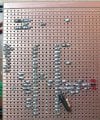
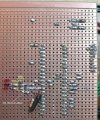
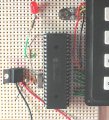
The copper cuts and connections around the 7805 and crystal are a real mess.

It look as though you could have +Vinp to the xtal circuit as well as the 7805. Check with a voltmeter the Xtal pins 13 and 14 of the PIC

Why all the resistors around the crystal.?

Also, there is no decoupling at all on the +5V supply, either In or Out of the 7805.

You must have decoupling capacitors on these regulator supplies.

Sorry to be so blunt.

E
 

Attachments

ericgibbs

Joined Jan 29, 2010
21,458
hi C,
Your program will not work because you have not Enabled the High interrupt, it reads the GPS message when you add the Enable High.

Rich (BB code):
INTCON.PEIE = 1
PIE1.RCIE = 1
PIR1.RCIF = 0
Enable High
 

Thread Starter

camerart

Joined Feb 25, 2013
3,838
hi C.

The copper cuts and connections around the 7805 and crystal are a real mess.

It look as though you could have +Vinp to the xtal circuit as well as the 7805. Check with a voltmeter the Xtal pins 13 and 14 of the PIC

Why all the resistors around the crystal.?

Also, there is no decoupling at all on the +5V supply, either In or Out of the 7805.

You must have decoupling capacitors on these regulator supplies.

Sorry to be so blunt.

E
Hi Eric,

I added the resistors after suggestions to get the crystal working. It has got messy, because I've swapped every thing, a few times. Probably best if I start again.

Thanks, C.
 

Thread Starter

camerart

Joined Feb 25, 2013
3,838
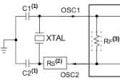
I'm making a fresh circuit with Eric's suggestions. I have attached a suggestion for tuning the Crystal. Do I need Rs2 resistor?

Camerart.XTL tune.jpg
 

ericgibbs

Joined Jan 29, 2010
21,458
hi,
If you rebuild, mount the 7805 away from the PIC, use a 100nF and 47uF on both the input and out of the 7805 , close to the 7805.

Dedicate a copper track to +5V and one for the 0V
Link the +5V and 0V to the PIC power pins,

Add a 100nF on the back of the PCB, across the +5V and 0V, close to the PIC power pins.

Use only 15pF or 22pF from each 20Mhz crystal pin to 0V. [ leave space to add a 1meg resistor later on, IF required]

If you plan to use the /MCLR pin, place a 10K from pin#1 to +5V.

Dont connect the Keypad or LCD at this time, add a 270R and a LED from a PIC output pin.

Write a test program that only flashes the LED on/off at say 1 second rate.
[ do not enable Interrupts]

Once the LED flashes at say 1 second you know the Xtal section is debugged.!

Then add the LCD, again write a LCD test program that just displays Hello.!

Next add the Keypad, with a keypad test program.

If you debug to that point , then I would suggest you write a UART test program.

Eric
 

Thread Starter

camerart

Joined Feb 25, 2013
3,838
hi,
If you rebuild, mount the 7805 away from the PIC, use a 100nF and 47uF on both the input and out of the 7805 , close to the 7805.

Dedicate a copper track to +5V and one for the 0V
Link the +5V and 0V to the PIC power pins,

Add a 100nF on the back of the PCB, across the +5V and 0V, close to the PIC power pins.

Use only 15pF or 22pF from each 20Mhz crystal pin to 0V. [ leave space to add a 1meg resistor later on, IF required]

If you plan to use the /MCLR pin, place a 10K from pin#1 to +5V.

Dont connect the Keypad or LCD at this time, add a 270R and a LED from a PIC output pin.

Write a test program that only flashes the LED on/off at say 1 second rate.
[ do not enable Interrupts]

Once the LED flashes at say 1 second you know the Xtal section is debugged.!

Then add the LCD, again write a LCD test program that just displays Hello.!

Next add the Keypad, with a keypad test program.

If you debug to that point , then I would suggest you write a UART test program.

Eric
Eric,

Excellent, thanks. Will do.

C.
 

Thread Starter

camerart

Joined Feb 25, 2013
3,838
hi C,
Your program will not work because you have not Enabled the High interrupt, it reads the GPS message when you add the Enable High.

Rich (BB code):
INTCON.PEIE = 1
PIE1.RCIE = 1
PIR1.RCIF = 0
Enable High
Thanks Eric, The sim still reports 'incorrect input' ($GPGGA,123519,4807.038,N,01131.000,E,1,08,0.9,545.4,M,46.9,M,,*47)

I'm wondering if the UART is not for this PIC, in the 18F4520 data sheet I can only find USART.

Camerart.
 
Top