
Getting Started with STM32 Board

Thread Starter

champ1

Joined Jun 4, 2018
136
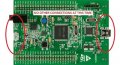
I recently got STM32F407G-DisC1 Discovery Board. I'm trying to connect this board with window computer. There are the two types of USB connector on board.

stm32f4_discovery4.jpg

I have to connect a "micro USB" cable between the STM32F4DISCOVERY and the computer, I have only one micro USB cable that I use for mobile charging but I can't connect this cable with CN1 end because the size of adopter is small.

My question is related to connection. Will i have to buy a new cable? or I can use the cable I have for powering and programming board
 

Thread Starter

champ1

Joined Jun 4, 2018
136
I received a cable today. I am looking development tool for STM32F407G-DisC1 Discovery Board.

I found development tool information in this link https://www.st.com/en/development-t...ent-tools.html?querycriteria=productId=SC2106

There are the many option available in link I don't know which IDE tool being used recently But I would be go with ARM keil compiler. if anyone want me to suggest another please let me know.

It would be appreciate if somebody suggest me compatible compiler and programmer tool for STM32 Discovery board
 

Thread Starter

champ1

Joined Jun 4, 2018
136
There are lots of guides and tutorials available online.
I have installed Atollic TrueSTUDIO. We can write, build and compile code on atollic studio.

I have read documents provided by you and searched on google. I have just one doubt. I didn't understand how to program STM32F407G board.

Can i flash program on STM32F407G through atollic studio or else I need programmer software tool to flash program on STM32F407G.
 

MrChips

Joined Oct 2, 2009
34,632
You now have everything required to program the STM32F407.
I will send you a sample file and will try to guide you through Atollic TrueSTUDIO but it will have to wait for awhile until I find some time to do this.
In the meantime you can try to get familiar with TrueSTUDIO.

Have you downloaded CubeMX?
 

Thread Starter

champ1

Joined Jun 4, 2018
136
I will send you a sample file and will try to guide you through Atollic TrueSTUDIO but it will have to wait for awhile until I find some time to do this.
In the meantime you can try to get familiar with TrueSTUDIO.
Thank you very much. No problem, I am trying to gather more information on internet about Atollic TrueSTUDIO and STM32F407G

Have you downloaded CubeMX?
I haven't done yet. Should i download it
 
Last edited:

MrChips

Joined Oct 2, 2009
34,632
Thank you very much. No problem, I am trying to gather more information on internet about Atollic TrueSTUDIO and STM32F407G


I haven't done yet. Should i download it
CubeMX is not essential, but it will make your life easier since you are now starting out with a new MCU and IDE platform.
It will allow you to configure the MCU pins, initialize the hardware required, and generate the startup code.
 

Thread Starter

champ1

Joined Jun 4, 2018
136
It will allow you to configure the MCU pins, initialize the hardware required, and generate the startup code.
You are absolutely right, MCU has input/output pin's. if we want to use it as input pin or as output pin, We have to configure first. We can configure input/output pin by programming.

if that's the case, I won't use CubeMX, I will prefer to initialize the MCU pin by writing code. I think this is the right way
 

MrChips

Joined Oct 2, 2009
34,632
The first thing one wants to do when working with a new MCU is to flash an LED or what is known as IO_Toggle.
If you have an oscilloscope you can check the native speed of the MCU. If you do not have an oscilloscope the LED will be changing too quickly to be able to verify if the code is working properly.

With an oscilloscope, your main program is going to look something like this:
Code:
void main(void)
{
  Init();
  while (1)
  {
    GPIO_SetBits(GPIOD, GPIO_Pin_5);
    GPIO_ResetBits(GPIOD, GPIO_Pin_5);
  }
}
I have chosen PD5 because a red LED is connected to PD5 on the STM32F4_DISCOVERY board.

If you do not have an oscilloscope, then you will want to put a couple of delays in the while loop:

Code:
void delay( unsigned long d)
{
  while(--d);
}

void main(void)
{
  Init();
  while (1)
  {
    GPIO_SetBits(GPIOD, GPIO_Pin_5);
    delay(1000000);
    GPIO_ResetBits(GPIOD, GPIO_Pin_5);
    delay(1000000);
  }
}
Normally, I would be using #define statements but I omitted these so that you can see what is happening.
The code would then look like this:
Code:
#define LED_PORT GPIOD
#define RED_LED GPIO_Pin_5
#define DELAY 1000000

void delay( unsigned long d)
{
  while(--d);
}

void main(void)
{
  Init();
  while (1)
  {
    GPIO_SetBits(LED_PORT, RED_LED);
    delay(DELAY);
    GPIO_ResetBits(LED_PORT, RED_LED);
    delay(DELAY);
  }
}
 

MrChips

Joined Oct 2, 2009
34,632
Launch Atollic TrueSTUDIO.
Create a new folder for your workspace.
Navigate through the menus as follows:
File>New>C Project

Project type: Embedded C Project
Project name: <give the project a name>
Next>

Target> STM32F4>Boards>STM32F4_Discovery
Next>
Next>
Next>
Finish

Debug the project <as is> without changes and confirm that the project is built and the target is programmed.

The next step will be to download the IO_Toggle example.
 

MrChips

Joined Oct 2, 2009
34,632
Import the IO_Toggle as follows:

File>Import>Example projects>
Download new example project from TrueSTORE>
STMicroelectronics>
STM32F4_Discovery>
STM32F4_Discovery_IO_Toggle
Finish
 

MrChips

Joined Oct 2, 2009
34,632
In the main.c file you should find this:

Code:
/**
  ******************************************************************************
  * @file    IO_Toggle/main.c
  * @author  MCD Application Team
  * @version V1.0.1
  * @date    15-May-2012
  * @brief   Main program body
  ******************************************************************************
  * @attention
  *
  * <h2><center>&copy; COPYRIGHT 2012 STMicroelectronics</center></h2>
  *
  * Licensed under MCD-ST Liberty SW License Agreement V2, (the "License");
  * You may not use this file except in compliance with the License.
  * You may obtain a copy of the License at:
  *
  *        http://www.st.com/software_license_agreement_liberty_v2
  *
  * Unless required by applicable law or agreed to in writing, software
  * distributed under the License is distributed on an "AS IS" BASIS,
  * WITHOUT WARRANTIES OR CONDITIONS OF ANY KIND, either express or implied.
  * See the License for the specific language governing permissions and
  * limitations under the License.
  *
  ******************************************************************************
  */
/* Includes ------------------------------------------------------------------*/
#include "stm32f4_discovery.h"
/** @addtogroup STM32F4_Discovery_Peripheral_Examples
  * @{
  */
/** @addtogroup IO_Toggle
  * @{
  */
/* Private typedef -----------------------------------------------------------*/
GPIO_InitTypeDef  GPIO_InitStructure;
/* Private define ------------------------------------------------------------*/
/* Private macro -------------------------------------------------------------*/
/* Private variables ---------------------------------------------------------*/
/* Private function prototypes -----------------------------------------------*/
void Delay(__IO uint32_t nCount);
/* Private functions ---------------------------------------------------------*/
/**
  * @brief  Main program
  * @param  None
  * @retval None
  */
int main(void)
{
  /*!< At this stage the microcontroller clock setting is already configured,
       this is done through SystemInit() function which is called from startup
       file (startup_stm32f4xx.s) before to branch to application main.
       To reconfigure the default setting of SystemInit() function, refer to
        system_stm32f4xx.c file
     */
  /* GPIOD Periph clock enable */
  RCC_AHB1PeriphClockCmd(RCC_AHB1Periph_GPIOD, ENABLE);
  /* Configure PD12, PD13, PD14 and PD15 in output pushpull mode */
  GPIO_InitStructure.GPIO_Pin = GPIO_Pin_12 | GPIO_Pin_13| GPIO_Pin_14| GPIO_Pin_15;
  GPIO_InitStructure.GPIO_Mode = GPIO_Mode_OUT;
  GPIO_InitStructure.GPIO_OType = GPIO_OType_PP;
  GPIO_InitStructure.GPIO_Speed = GPIO_Speed_100MHz;
  GPIO_InitStructure.GPIO_PuPd = GPIO_PuPd_NOPULL;
  GPIO_Init(GPIOD, &GPIO_InitStructure);
  while (1)
  {
    /* PD12 to be toggled */
    GPIO_SetBits(GPIOD, GPIO_Pin_12);
 
    /* Insert delay */
    Delay(0x3FFFFF);
 
    /* PD13 to be toggled */
    GPIO_SetBits(GPIOD, GPIO_Pin_13);
 
    /* Insert delay */
    Delay(0x3FFFFF);
    /* PD14 to be toggled */
    GPIO_SetBits(GPIOD, GPIO_Pin_14);
 
    /* Insert delay */
    Delay(0x3FFFFF);
 
    /* PD15 to be toggled */
    GPIO_SetBits(GPIOD, GPIO_Pin_15);
 
    /* Insert delay */
    Delay(0x7FFFFF);
 
    GPIO_ResetBits(GPIOD, GPIO_Pin_12|GPIO_Pin_13|GPIO_Pin_14|GPIO_Pin_15);
 
    /* Insert delay */
    Delay(0xFFFFFF);
  }
}
/**
  * @brief  Delay Function.
  * @param  nCount:specifies the Delay time length.
  * @retval None
  */
void Delay(__IO uint32_t nCount)
{
  while(nCount--)
  {
  }
}
#ifdef  USE_FULL_ASSERT
/**
  * @brief  Reports the name of the source file and the source line number
  *         where the assert_param error has occurred.
  * @param  file: pointer to the source file name
  * @param  line: assert_param error line source number
  * @retval None
  */
void assert_failed(uint8_t* file, uint32_t line)
{
  /* User can add his own implementation to report the file name and line number,
     ex: printf("Wrong parameters value: file %s on line %d\r\n", file, line) */
  /* Infinite loop */
  while (1)
  {
  }
}
#endif
/**
  * @}
  */
/**
  * @}
  */
/******************* (C) COPYRIGHT 2011 STMicroelectronics *****END OF FILE****/
You can modify the while(1) loop in main() to just toggle RED_LED as I posted earlier.

Note that in the GPIO configuration, they are using PD12, PD13, PD14, PD15.
You can use these or you can add PD5 to the list for the other red LED at the bottom of the circuit board.

Good luck with this.
 

MrChips

Joined Oct 2, 2009
34,632
Here is a condensed version of the above code:
Code:
#include "stm32f4_discovery.h"


GPIO_InitTypeDef  GPIO_InitStructure;

#define LED_PORT GPIOD
#define RED_LED GPIO_Pin_5
#define DELAY 1000000

void delay( unsigned long d)
{
  while(--d);
}

void Init(void)
{
  RCC_AHB1PeriphClockCmd(RCC_AHB1Periph_GPIOD, ENABLE);
  /* Configure PD5, PD12, PD13, PD14 and PD15 in output pushpull mode */
  GPIO_InitStructure.GPIO_Pin = GPIO_Pin_5 | GPIO_Pin_12 | GPIO_Pin_13| GPIO_Pin_14| GPIO_Pin_15;
  GPIO_InitStructure.GPIO_Mode = GPIO_Mode_OUT;
  GPIO_InitStructure.GPIO_OType = GPIO_OType_PP;
  GPIO_InitStructure.GPIO_Speed = GPIO_Speed_100MHz;
  GPIO_InitStructure.GPIO_PuPd = GPIO_PuPd_NOPULL;
  GPIO_Init(GPIOD, &GPIO_InitStructure);
}

void main(void)
{
  Init();
  while (1)
  {
    GPIO_SetBits(LED_PORT, RED_LED);
    delay(DELAY);
    GPIO_ResetBits(LED_PORT, RED_LED);
    delay(DELAY);
  }
}
 
Top





