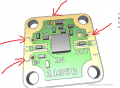
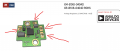
finding the GND VCC ports on the pcb component

Irving

Joined Jan 30, 2016
4,996
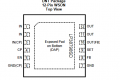
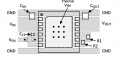
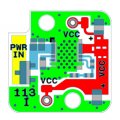
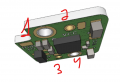
Your question makes little sense. The package looks like this (below). VCC above is the output of the regulator; on two round pads and the layer to the right hand edge.

1754420009309.png

Further on in the data sheet it shows a similar layout. Comparing the two should give you the answer to where GND is.

1754420525394.png
 

Thread Starter

yef smith

Joined Aug 2, 2020
1,446
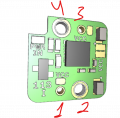
Hello Irving ,there are 4 holes in this PCB shown below.
How Can I know which one is for Vcc and which one inf GND?
Thanks.
1754421267582.png
1754421205221.png
 

Thread Starter

yef smith

Joined Aug 2, 2020
1,446
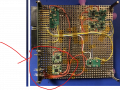
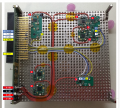
Hello , I have this circuit to bias and amplifier shown below.
There is the general document attached which I am trying to follow.
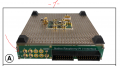
from the photo below there is a special place for connecting all the bias points.
I have in the biasing circuit 3 ports:
1.power
2.Vcc
3.gnd


what is the stratefy logic for connecting the biasing pcb 3 ports in this system?
Why the did a PWR port ,we only need Vcc and gnd?
Thanks.

biasing component
https://catalog.quanticxmw.com/item/bias-and-control/voltage-regulators/xm-a2j4-0404d-sp
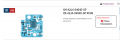
amplifier:
https://catalog.quanticxmw.com/item/x-mwblocks/amplifiers/XM-A9V6-0604D

1754422389858.png
 

Attachments

Irving

Joined Jan 30, 2016
4,996
The biassing voltage regulators are underneath (opposite side of proto-plate) from the amplifiers 9 & 10. The PWR inputs are connected together and to other similar voltages and to the relevant power input. The VCC and GND connections go through the proto-plate and connect to the amplifiers. Note that the regulators are in different orientations to match the amplifier's VCC input.
 

Thread Starter

yef smith

Joined Aug 2, 2020
1,446
Hello Irving , thank you very much for the responce.
I am trying to think on the exact components needed to power this basic amplifier.on the basic handling the holes on the PCB question
We have the biasing pcb with holes 1 2 3 4
but on the amplifier we have only one hole called hole 5.

I know that we connect the biasing using spring pin.
how do I handle holes 1 2 3 4 , 5 so these two components will work together?
Thanks.

1754473340026.png1754473107931.png
1754473092983.png
 

Irving

Joined Jan 30, 2016
4,996
I know that we connect the biasing using spring pin.
how do I handle holes 1 2 3 4 , 5 so these two components will work together?
Basically you have to replicate what the proto-board does. These two modules are part of a 'Lego' kit for microwave system development and maybe one-off deployments, not for manufacturing. The fixing method of GND on both boards connecting to the proto-board you probably can replicate with a piece of 6mm alloy plate suitably drilled and tapped and threaded stand-offs of appropriate length on both sides The VCC connection can also be mounted, with isolation, on this plate, as a through connection to the VCC pin on the amp from it's matching location on the bias module with hollow nylon stand-offs.
 

panic mode

Joined Oct 10, 2011
4,864
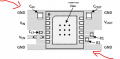
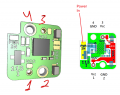
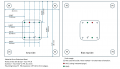
as already stated and clearly seen from the datasheet, your "holes" are:
2 and 4 are GND.
1 and 3 are Vcc.

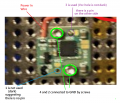
I am not sure how this is not obvious but... you can start on pin1 on the picture on the right, and follow through red copper area till you reach pin 3. so pins 1 and 3 are internally connected, they are the same thing - the output of the voltage regulator. input power comes in though wire "power in". GND is obtained by bolts in 2 and 4.
1754519599498.png
1754519763458.png


when working with high frequencies, you want all connections to be as short as possible and shielded to prevent interference.
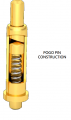
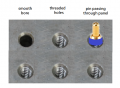
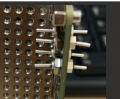
the prototyping panel is the massive GND plane with bunch of holes. the holes in the panel grid are not smooth bore, they are threaded. this allows connecting modules to GND plane. it also allows passing signals though the GND plane by means of insulated pogo pins.

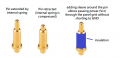
"pogo pins" are spring loaded contacts. many types exist. typical construction is something like this:
1754520592554.png

1754520606413.png


"prototyping board" or GND plane is just a metal plate with bunch of threaded holes, similar to this:
1754520621259.png
 
Last edited:

panic mode

Joined Oct 10, 2011
4,864
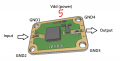
and amplifier does not have "only one connection". i see
4x GND
1x Input
1x Output
1x Vdd

by my count that is SEVEN connections,

1754520893278.png
 

Irving

Joined Jan 30, 2016
4,996
as already stated and clearly seen from the datasheet, your "holes" are:
2 and 4 are GND.
1 and 3 are Vcc.

I am not sure how this is not obvious but... you can start on pin1 on the picture on the right, and follow through red copper area till you reach pin 3. so pins 1 and 3 are internally connected, they are the same thing - the output of the voltage regulator. input power comes in though wire "power in". GND is obtained by bolts in 2 and 4.
@yef smith What you don't seem to appreciate is these modules cannot easily be used without a proto-plate or something equivalent. The plate is integral to their design and provides 3 key functions: a low-ohmic interconnect for GND, a mechanical support for isolated inter-board connectivity eg VCC, and, arguably the most important, a heatsink for the power-conversion and amplifier modules. You cannot use just bits of wire.

If you're not going to use a proto-board, you need to make a carrier for these modules; I've drawn up something that should work OK. I've drawn it 1.5" sq which I'm estimating should provide enough heat-sinking, also I've said 5mm thick, but that might need to be adjusted depending on the length of the spring pins you can source, but you can't go below 3mm. I've also added mounting holes to attach some legs, eg 3mm tapped stand-off pillars. There's enough room to put in additional holes on the same 0.135"grid for the Quantic X-MW SMA probes for amp input & output but I don't know how you intended to do that.

1754576867581.png
 
Last edited:

Thread Starter

yef smith

Joined Aug 2, 2020
1,446
Hello, Thanks you very much for the responces.few questions:
1.Regarding the ground plain:
All the grounds of the components are connected to the grid but the GROUND need to connect to the ground of the power source.
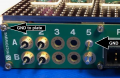
As I see it I just plug a wire from the grid to A1 (for example )and say that this is my GND connection for supplying the power?
I dont see the GND connections in the photos bellow taken from the manual attached.

2. As you can see in the photo 1 we have only 4 connection to the biasing, however I have more then 10 devices I need to BIAS.
In the last photos I made a zoom photo.
What is the name of this connection on the PCB hole so I could order them and increase the number of devices I could BIAS?
Thanks.

1754814795889.png

1754814779124.png

1754820164805.png
 

Attachments

Thread Starter

yef smith

Joined Aug 2, 2020
1,446
Hello Irving , thank you very much for the responce .
I have attached in the previos reply the getting started manual I got .
Regarding the GND . I understand that the ground is the protoplate but in there examples they didnt say what is the way to connect it to the outside world ground.

The method I thought is just to screw the GND wire to this metal plate , Is it a proper way?Or there are some other recommended
way ?
Thanks.
 

Irving

Joined Jan 30, 2016
4,996
The method I thought is just to screw the GND wire to this metal plate , Is it a proper way?Or there are some other recommended
way ?
If you look carefully, the GND connection on the power input PCB connects to a GND plane on the back and to the main proto-board through the supports at each end. If you connect your power grounds directly to the plate, use a multi-way tag to connect all grounds to a common point or keep all the grounds clustered together to avoid creating ground loops.

1754858053810.png
 

Thread Starter

yef smith

Joined Aug 2, 2020
1,446

panic mode

Joined Oct 10, 2011
4,864
that is on you... you need to place spring pins in convenient locations.
from what i see this is all simple. place the board on top of pins. your board has exposed pads. when you fasten the board to the panel, board pads will make contact with the spring pin. as you tighten the screws, the board will press (and compress) spring pin. that is how contact is made.

here is a video showing the same thing. pogo pins are used everywhere to test things such as assembled boards. your regulator only needs one or two spring pins, not a "bed of nails" as shown in video:

now that your board is attaches to panel, flip the panel and solder wires to other side of the spring pins. this way power wires are behind proto panel (shielding) and module replacement does not require soldering, just remove screws, remove board, put another board in same place and insert screws.
 
Last edited:

Thread Starter

yef smith

Joined Aug 2, 2020
1,446
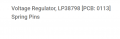
Hello Panic mode,I need to buy 4 spring pins for this task.Where can I see a link to the sping pin component.
So i could order it.
XM-A2J9-0404D-SP

1758039021757.png1758038865471.png
 

panic mode

Joined Oct 10, 2011
4,864
spring loaded pins or pogo pins can be sourced almost anywhere... DigiKey, Mouser, Newark, Amazon, AliExpress, Temu....
but you need to select correct one for your type of hardware. it looks like pretty unique ecosystem so you may want to order some there at least until you get more familiar with the product. lets face it, you are not good at reading and interpreting documentation and there is a lot of variety out there.
 
Top