Excel Match/Lookup Programming

Thread Starter

SigmaCeq

Joined Jul 30, 2009
19
Sorry I couldn't find a better forum for this! I am trying to find the row where two values occur in separate columns (ie, I need the find the row where 1 is in column B and 3 is in column C, specifically). Is there a way to do this using the regular MATCH, LOOKUP, etc. functions?

Thank you!
 

KL7AJ

Joined Nov 4, 2008
2,229
Sorry I couldn't find a better forum for this! I am trying to find the row where two values occur in separate columns (ie, I need the find the row where 1 is in column B and 3 is in column C, specifically). Is there a way to do this using the regular MATCH, LOOKUP, etc. functions?

Thank you!

Yes...I believe HLOOKUP is the function you're looking for. See the Help files for exact syntax

Eric
 

Thread Starter

SigmaCeq

Joined Jul 30, 2009
19
Yes...I believe HLOOKUP is the function you're looking for
I tried and I don't think it will work for me. Thanks though!

I guess I should be more specific about my table; I have a spreadsheet with over 65,000 rows and columns up to letter N. In column B I have a set of numbers with most of the values occuring more than once in the column. In column D I have a separate set of numbers that also occur multiple times. I need to find the first instance where the number 220 appears in column B and the number 2 occurs in column D in the same row.

I've looked pretty much everywhere and have not successfully found a way to do this. :eek: Personally I am starting to doubt it exists!
 

Mass

Joined Apr 9, 2009
26
Here's a macro that I got working...I needed to brush up anyway:p

The code is bulky and might not be proper, but it works. I tried to make it easy to follow by using descriptive variables.

Copy the code like this...

In Excel, go to the Tools menu/Macro/Visual Basic Editor.
Right click on VBAProject(filename.xls). Select Insert/Module.
Copy the code below into the editor and close the window.

To run the macro, go to Tools/Macro/Macros...(with the play icon), select the macro and hit Run. That's it - hope it works.
EDIT - You may want to comment out the 4 lines "Cells(x, y) = SearchColumn(n)" because it will write into cells A1, A2, B1, and B2. I forgot to remove those lines before I posted.

Sub SearchTwoColumns()

Dim QuitSearch As Boolean
Dim ReceivedGoodInput1 As Boolean
Dim ReceivedGoodInput2 As Boolean
Dim ReceivedGoodInput3 As Boolean
Dim ReceivedGoodInput4 As Boolean
Dim SearchColumn1
Dim SearchColumn2
Dim SearchValue1
Dim SearchValue2
Dim FoundInput1 As Boolean
Dim FoundInput2 As Boolean
Dim ActiveRow
Dim ActiveValue1
Dim ActiveValue2

While QuitSearch = False

ReceivedGoodInput1 = False
While ReceivedGoodInput1 = False
SearchColumn1 = InputBox("Enter search column 1 (integer)")
If SearchColumn1 = "" Then End
Cells(1, 1) = SearchColumn1
If IsNumeric(SearchColumn1) Then
SearchColumn1 = Val(SearchColumn1)
If SearchColumn1 = Int(SearchColumn1) Then
ReceivedGoodInput1 = True
End If
End If
Wend

ReceivedGoodInput2 = False
While ReceivedGoodInput2 = False
SearchColumn2 = InputBox("Enter search column 2 (integer)")
If SearchColumn2 = "" Then End
Cells(1, 2) = SearchColumn2
If IsNumeric(SearchColumn2) = True Then
SearchColumn2 = Val(SearchColumn2)
If SearchColumn2 = Int(SearchColumn2) Then
ReceivedGoodInput2 = True
End If
End If
Wend

ReceivedGoodInput3 = False
While ReceivedGoodInput3 = False
SearchValue1 = InputBox("Enter search value 1 (numeric)")
If SearchValue1 = "" Then End
Cells(2, 1) = SearchValue1
If IsNumeric(SearchValue1) = True Then
SearchValue1 = Val(SearchValue1)
ReceivedGoodInput3 = True
End If
Wend

ReceivedGoodInput4 = False
While ReceivedGoodInput4 = False
SearchValue2 = InputBox("Enter search value 2 (numeric)")
If SearchValue2 = "" Then End
Cells(2, 2) = SearchValue2
If IsNumeric(SearchValue2) = True Then
SearchValue2 = Val(SearchValue2)
ReceivedGoodInput4 = True
End If
Wend

ActiveValue1 = " "
ActiveValue2 = " "
ActiveRow = 1

FoundInput1 = False
FoundInput2 = False
While FoundInput2 = False
While FoundInput1 = False
ActiveValue1 = Cells(ActiveRow, SearchColumn1)
If ActiveValue1 = SearchValue1 Then
FoundInput1 = True
ActiveValue2 = Cells(ActiveRow, SearchColumn2)
If ActiveValue2 = SearchValue2 Then
FoundInput2 = True
Else
FoundInput1 = False
FoundInput2 = False
ActiveRow = ActiveRow + 1
End If
Else
ActiveRow = ActiveRow + 1
If ActiveRow = 65537 Then
MsgBox ("End of Excel file reached without finding match")
End
End If
End If
Wend
Wend

MsgBox ("Search terms found on row " & ActiveRow)
If MsgBox("Search again?", vbYesNo) = vbNo Then QuitSearch = True
Wend

End Sub
 
Last edited:

eblc1388

Joined Nov 28, 2008
1,542
I don't know how to write macros but it seems it may be time for me to learn. Any pointers?
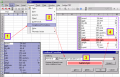
This is another way to do that without macro or VBA programming, and it is also easy to change the selection criteria.

However, the result is visual only so you will have to resort to marco or programming if you want the result as data.

First Select your range of data, then apply conditional formatting. Put your requirement in the formula. The required data will be then highlighted in color of your choice after you pressed OK.


Attachments

Last edited:

Thread Starter

SigmaCeq

Joined Jul 30, 2009
19
Mass, thank you SO much for your help! The program didn't work exactly how I needed it to, but it's very close so I think I'll be able to edit it (I'm getting a VBA book from the library today... :p). Thank you again!
 
Top