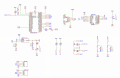
ESP32 not comunicating with IDE

Thread Starter

LucaBresciani

Joined Jun 25, 2025
7
Hey everyone,
I just received my first ever SMD only board and i really thought it was gonna work on the first try as a followed a tutorial on how to implement it without changing to many things on my own.
When it arrived i noticed that i selected the wrong LDO (a AMS1117 5.0 instead of the 3V3 one) so i soldered it manually (as all the other components were pre installed on the board by the manufacturer) but when i tryied to upload code to it with the Arduino IDE (i used the official espressiff addon and i selected the attached upload settings) it gave an error saying that it couldn't connect to the ESP via the COM port (i checked that it was the correct one in the device manager and i also made sure that i had the updated drivers for the CH340C correctly installed).
As it's my first time making a board from ground up i am kinda stuck and any help would be truely apreciated
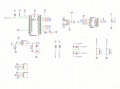
1750868790479.png
1750868798096.png
 

ericgibbs

Joined Jan 29, 2010
21,442
hi Luca,
Welcome to AAC.
Which ESP32 type have you selected on the 'Board' option menu? I assume the type in your post?
Also, which versions of the Ardunio IDE and 'ESP32 espressive' lib are you using.

E

Update: if you are using the latest espressiveif, with the ESP32 DEV Module, you will get that error message.

On Windows using Explorer, find this folder.
C:\Users\[your user name]\AppData\Local\Arduino15

You should see this 'json' file open it with a text editor
package_esp32_index.json

"category": "ESP32",
"url": "https://github.com/espressif/arduino-esp32/releases/download/1.0.6/esp32-1.0.6.zip",
"archiveFileName": "esp32-1.0.6.zip",
"checksum": "SHA-256:982da9aaa181b6cb9c692dd4c9622b022ecc0d1e3aa0c5b70428ccc3c1b4556b",
"size": "51126662",
"help": {
"online": ""

Post your results.
E
 
Last edited:

Thread Starter

LucaBresciani

Joined Jun 25, 2025
7
I selected esp32 dev module, my ide version is 1.8.19 (legacy ide), and the espressiff version is 3.2.0

I'll try your suggestion and let you know
 

ericgibbs

Joined Jan 29, 2010
21,442
Hi Luca,
I was using the latest version and had the same problem, so had to delete the latest ESP32 version and load an earlier version, see my notes.
1.0.6
My PC's work OK with the ESP32 Dev Module selected.

BTW: You may have to pull the 'boot' pin momentarily to 0V at the end of Compiling, if it cannot make an automatic connection.

Let us know the results.
E
 

Thread Starter

LucaBresciani

Joined Jun 25, 2025
7
I can confirm you that i had that version with the file you mentioned, so i downloaded the 1.0.6 but the issue persists.
The exact error it gives is:
Code:
Arduino: 1.8.19 (Windows 10), TD: 1.58, Board: "ESP32 Dev Module, Disabled, Default 4MB with spiffs (1.2MB APP/1.5MB SPIFFS), 240MHz (WiFi/BT), QIO, 80MHz, 8MB (64Mb), 115200, None"

Sketch uses 197736 bytes (15%) of program storage space. Maximum is 1310720 bytes.

Global variables use 13084 bytes (3%) of dynamic memory, leaving 314596 bytes for local variables. Maximum is 327680 bytes.

esptool.py v3.0-dev

Serial port COM3

Connecting........_____....._____....._____....._____....._____....._____.....____An error occurred while uploading the sketch

_


A fatal error occurred: Failed to connect to ESP32: Timed out waiting for packet header


This report would have more information with
"Show verbose output during compilation"
option enabled in File -> Preferences.
 

geekoftheweek

Joined Oct 6, 2013
1,429
One thing I noticed is pin 2 needs to be pulled high if I remember correctly and there should be one other pin pulled high also. Unfortunately I am 1000 miles from home and don't have the information available at the moment. Maybe take a look at the ESP32 manual for details.

Edit:
I meant IO2 instead of pin 2.
 

Thread Starter

LucaBresciani

Joined Jun 25, 2025
7
I solved the problem: basically it turned out to be power related.
I measured with a voltmeter the voltage on the ESP power pins and it was 1.2V, even though the voltage fed through the decoupling capacitor (C5 in the schematic) was 3V3.
I solved the problem simply by powering the esp with a jumper, so now it looks bad but at least it can be programmed and used normally.

If anyone has the knowledge needed to understand such behaviour i'd be pleased of learning more.
Thanks everyone
 

MrChips

Joined Oct 2, 2009
34,810
C5 in series is wrong.
You cannot supply DC current through a series capacitor. Remove C5 and replace it with a jumper.

A power supply decoupling/filter capacitor has to go in parallel with Vcc and GND.
 

geekoftheweek

Joined Oct 6, 2013
1,429
Apparently I was wrong. I would still suggest reading the manual and finding what the IO pins are used for at boot. On some versions the state of certain pins at power up determine whether to boot or enter a factory diagnostics mode, flash memory configuration, and other details.
 

ericgibbs

Joined Jan 29, 2010
21,442
hi Luca,
Sometimes when the IDE has finished compiling, you will get this error message.
EG 1563.png

As I explained in post #4
BTW: You may have to pull the 'boot' pin momentarily to 0V at the end of Compiling period, if it cannot make an automatic connection. The boot pin is IO0.
On complete ESP32 Dev module, there is a push button marked 'boot'

I do not use EDA Pro, could you please post an updated circuit diagram.?

E
 
Hey everyone,
I just received my first ever SMD only board and i really thought it was gonna work on the first try as a followed a tutorial on how to implement it without changing to many things on my own.
When it arrived i noticed that i selected the wrong LDO (a AMS1117 5.0 instead of the 3V3 one) so i soldered it manually (as all the other components were pre installed on the board by the manufacturer) but when i tryied to upload code to it with the Arduino IDE (i used the official espressiff addon and i selected the attached upload settings) it gave an error saying that it couldn't connect to the ESP via the COM port (i checked that it was the correct one in the device manager and i also made sure that i had the updated drivers for the CH340C correctly installed).
As it's my first time making a board from ground up i am kinda stuck and any help would be truely apreciated
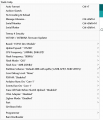
View attachment 351717
View attachment 351718
Hi Luca,

Does the chip have a bootloader?

Erik
 

Thread Starter

LucaBresciani

Joined Jun 25, 2025
7
Yes it comes with a boot loader that is also arduino compatible preinstalled. It is activated when, during a reset, the GPIO0 is pulled to ground.
 
Top