Facebook
 Google
 GitHub
 Linkedin
Can anyone help me with this task plz
From the physical point of view, an alarm loop (AL) is an electrical circuit that connects the device with detectors (sensors) using wired connections. The main task of the alarm loop is to ensure the detection of the fact of detector actuation. The loop is connected to the resistance meter via the terminals located on the control panel board. The microprocessor measures the electrical resistance of the entire loop circuit and, based on its value, decides whether the detector has been triggered or not.
Any detector can be represented as an electrical contact, which, when triggered, changes its resistance dramatically: it becomes either closed (contact resistance is zero (NC)) or open (contact resistance is infinity (NO)).
From the physical point of view, each loop has different variants of wiring diagrams, which the user selects. The wiring diagram depicts the detector contacts, resistors, and other components that ensure the operation of the alarm loop.

Main task:
It is necessary to depict an electrical ring/chain (as in the connection example) on which there will be 2 loops (loops/sensors/keys) with the correct type of connection (series and parallel) and understand when we have a change in the circuit, namely, whether there is a current when any of the loops (loops/sensors/keys) is triggered
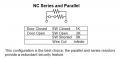
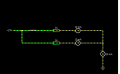
Image of the loop connection:
1. with 2 normally open (NO) sensors. By default, the current does NOT flow through the circuit, and when triggered (closed), it does
2. with 2 normally closed (NC) detectors. By default, the current flows in a circuit, and when triggered (opened), it does NOT flow
3. with mixed contact activation, where there are normally closed (NC) and normally open (NO) sensors
4. with 2 normally closed (NC) sensors and a 5 kΩ resistor (the circuit resistance is also 5 kΩ)
5. with 2 normally open (NO) sensors and a 5 kΩ resistor (the circuit resistance is also 5 kΩ)
The resistor is used to prevent sabotage because if the circuit to the loops/sensors is shorted, then the triggering will not be detected. The resistor must be placed in such a way that we can understand when the circuit is shorted to the loop/sensor (resistance does not correspond to the expected value (resistor value))
I have to draw the serie version and the parallel respecting the example given plz can anyone help me do that Im new in electronic
From the physical point of view, an alarm loop (AL) is an electrical circuit that connects the device with detectors (sensors) using wired connections. The main task of the alarm loop is to ensure the detection of the fact of detector actuation. The loop is connected to the resistance meter via the terminals located on the control panel board. The microprocessor measures the electrical resistance of the entire loop circuit and, based on its value, decides whether the detector has been triggered or not.
Any detector can be represented as an electrical contact, which, when triggered, changes its resistance dramatically: it becomes either closed (contact resistance is zero (NC)) or open (contact resistance is infinity (NO)).
From the physical point of view, each loop has different variants of wiring diagrams, which the user selects. The wiring diagram depicts the detector contacts, resistors, and other components that ensure the operation of the alarm loop.
Main task:
It is necessary to depict an electrical ring/chain (as in the connection example) on which there will be 2 loops (loops/sensors/keys) with the correct type of connection (series and parallel) and understand when we have a change in the circuit, namely, whether there is a current when any of the loops (loops/sensors/keys) is triggered
Image of the loop connection:
1. with 2 normally open (NO) sensors. By default, the current does NOT flow through the circuit, and when triggered (closed), it does
2. with 2 normally closed (NC) detectors. By default, the current flows in a circuit, and when triggered (opened), it does NOT flow
3. with mixed contact activation, where there are normally closed (NC) and normally open (NO) sensors
4. with 2 normally closed (NC) sensors and a 5 kΩ resistor (the circuit resistance is also 5 kΩ)
5. with 2 normally open (NO) sensors and a 5 kΩ resistor (the circuit resistance is also 5 kΩ)
The resistor is used to prevent sabotage because if the circuit to the loops/sensors is shorted, then the triggering will not be detected. The resistor must be placed in such a way that we can understand when the circuit is shorted to the loop/sensor (resistance does not correspond to the expected value (resistor value))
I have to draw the serie version and the parallel respecting the example given plz can anyone help me do that Im new in electronic