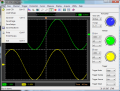
I am attempting to write serial decoder application that would process data in a CSV file. My Rigol scope will export such a file. Do other DSOs have this feature?
I am attempting to write serial decoder application that would process data in a CSV file. My Rigol scope will export such a file. Do other DSOs have this feature?
So far, after playing around with it for an hour or so, I'm pleased.
EDIT: I found out that even my ancient Tektronix TDS1001B (≈10 years old) scope will save .CSV files. I suspect the capability is near-universal anymore.
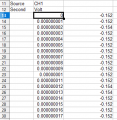
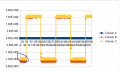
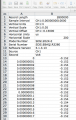
Was this the file as it was output from your scope? If so, it looks like their CSV file creator is a little buggy. Notice that that CH1 Volt appears over the time column.
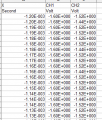
Mine is different. I don't have any of that header information at the top. I have negative values for time that is left of the center vertical gradient. It also looks like they are including one time entry for each channel which is really dumb imho. Can you try 2 channels to see if you get similar results with duplicate readings?
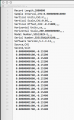
This is the actual contents of the file, as viewed in a plain ASCII text editor (BBEdit):
I noticed there is a leading space before each data record; maybe that is what's causing your spreadsheet program (OpenOffice?) to insert an extra column?
Mine is different. I don't have any of that header information at the top. I have negative values for time that is left of the center vertical gradient. It also looks like they are including one time entry for each channel which is really dumb imho.
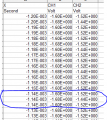
Those aren't duplicate entries for each time point; it only looks that way because of how your spreadsheet is formatting the numbers for display. Try specifying a format with more significant digits.
I noticed there is a leading space before each data record; maybe that is what's causing your spreadsheet program (OpenOffice?) to insert an extra column?
Those aren't duplicate entries for each time point; it only looks that way because of how your spreadsheet is formatting the numbers for display. Try specifying a format with more significant digits.
Yeah pointed out in another thread. I should have looked at the raw data. I feel dumb. But Calc really should have some kind of warning that not all data is displayed.
Excel doesn't have any such warning, either, because it's really not necessary: people usually understand that numbers are displayed according to cell formatting preferences, and generally will NOT be an exact representation of the underlying data. You pick the display format that best suits your purpose, and that may not be the default format.

 Facebook
 Google
 GitHub
 Linkedin

 8.6 KB Views: 7