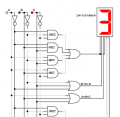
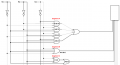
Designing a circuit for a 7 Segment LED counter to display 24 followed by your student number.

Thread Starter

Blarbarb

Joined Oct 18, 2024
7
Hi, first of all I'm not looking for the answer just some help and guidance.
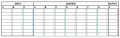
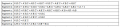
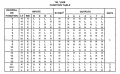
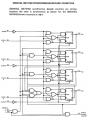
For the problem, I'm pretty sure that I'm close to finishing the circuit. However, my main problem is, when I did the boolean expressions I came to some conclusions that didn't make sense in terms of how I would actually wire that into the circuit (mainly referring to segments; b, g). I'll upload where I've gotten so far for the circuit and then what I got for my boolean expressions as well as the truth table. Have I gotten the Boolean expressions wrong?
Side note: If anyone has any advice on how to properly and neatly design the circuit in terms of placing the wires better to make it easier to understand as well.
Thanks
Assignment Help.pngTruth Table.pngBoolean Expression.png
 

dl324

Joined Mar 30, 2015
18,219
Welcome to AAC!
I'm pretty sure that I'm close to finishing the circuit.
Zip up the .dwm file and post it.
Have I gotten the Boolean expressions wrong?
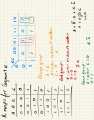
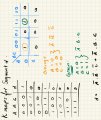
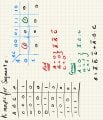
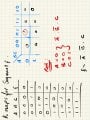
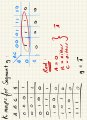
Post your Kmaps.
Side note: If anyone has any advice on how to properly and neatly design the circuit in terms of placing the wires better to make it easier to understand as well.
Avoid unnecessary wire crossings and jogs. I prefer to put the sequencers on the top, with the inverted signal to the right. I also align the gates.

It seems that this thread might be from a classmate.
 
Last edited:

Thread Starter

Blarbarb

Joined Oct 18, 2024
7
In regards to zipping the .dwm file, is this what you meant?
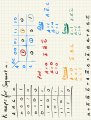
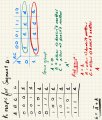
I've also attached my k-maps below, if they're correct then I believe segment c is wrong when i originally posted.
For Segment C, it finalises to C = A + B ⊕ C, would this mean I use the AND gate for A & B then the XNOR gate for C? In addition, compared to my original post from my truth table I'm guessing my last values for C were wrong and would make my inputs for anything for segment C wrong in the circuit.
For Segment G, it just finalises to A' so I'm guessing that would be the NOT gate for G
Other than that I believe the K-maps for all other segments; A, D, E, F are all fine.
In terms of the wiring, I'm gonna start looking at fixing that so thanks for the advice on that.
IMG_0013 (1).jpgIMG_0011.jpgIMG_0012.jpgIMG_0014.jpgIMG_0015.jpgIMG_0016.jpgIMG_0017.jpg
 

Attachments

dl324

Joined Mar 30, 2015
18,219
Have I gotten the Boolean expressions wrong?
Most of your work is correct.

You jumped through some hoops for 'b'. You could have just drawn a grouping of 8.

For 'c', I would have just left it as A+B'C+BC'. Is B'C+BC' an XNOR? I'm not sure what you actually implemented...

Your simplification for 'g' is wrong. You can't make a grouping of 3.

I dislike that they're teaching you that A is always MSB. It should always be LSB.
 

Thread Starter

Blarbarb

Joined Oct 18, 2024
7
Hi thanks,
In regards to what I did for c, I had watched someone do an example online and when they had exactly B’C + BC’ they said it was XNOR, which is why I had done that.
For g, why can I not have it as groupings of 3, would I just then have it as: g = A’B’C + A’B’C + A’BC

You mentioned A should always be LSB, why is that?

Thanks,
Aaron
 

dl324

Joined Mar 30, 2015
18,219
In regards to what I did for c, I had watched someone do an example online and when they had exactly B’C + BC’ they said it was XNOR, which is why I had done that.
You can't believe everything you see/read on the internet. It's XOR, not XNOR.
For g, why can I not have it as groupings of 3, would I just then have it as: g = A’B’C + A’B’C + A’BC
That's just the way it works. Groupings are 1, 2, 4, 8, 16, ...

It simplifies to A'B'+A'C.
You mentioned A should always be LSB, why is that?
That's the way they did it in the 1960's/1970's.
1730516387069.png
1730517592028.png
A was always 2^0, B 2^1, etc. The way they're teaching you now, nothing is fixed.
 
Last edited:

neonstrobe

Joined May 15, 2009
199
Regarding your decoder circuitry - I recommend the usual approach of drawing vertical lines for the inputs and the inverse functions adjacent (in your orig post that would be 6 verticals). Then just tap off the true or inverse as needed for each combo gate.
You don't say if you are trying to drive an actual 7 segment which would need to be defined as common anode or common cathode, I suspect this is just a test in logic design?
 

Thread Starter

Blarbarb

Joined Oct 18, 2024
7
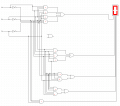
Hi, this is how far I've gotten with the circuit.
The main issue I have is that it displays the first 1 for my student ID number but not the second or the third 1 I have. I believe in regards to why the second 1 isn't being displayed is due to segment c, this is because the XOR gate does not get a true input but I've done it according to my k-maps, (segment b lights up but not c for both).
For my student number I have two 7's straight after each other is their a way to indicate that it has displayed both 7's (does it display it for a longer amount of time compared to other numbers)? If not then that would mean the only issue I have is getting the second and third 1 to display.
Thanks
 

Attachments

dl324

Joined Mar 30, 2015
18,219
this is how far I've gotten with the circuit
Why did you start using wires that weren't multiples of 90 degrees? And why all of the unnecessary whitespace?
The main issue I have is that it displays the first 1 for my student ID number but not the second or the third 1 I have. I believe in regards to why the second 1 isn't being displayed is due to segment c, this is because the XOR gate does not get a true input but I've done it according to my k-maps, (segment b lights up but not c for both).
The logic for 'c' doesn't match what you derived from the kmap.
 
Last edited:

Thread Starter

Blarbarb

Joined Oct 18, 2024
7
I was looking at drawing the inputs as vertical lines but I cant seem to figure out how to actually rotate the sequence generators 90 degrees. I've looked through the top toolbar as well as selecting the generators and trying 'R' and 'CTRL + R'. I also can't seem to find an answer online. Although I have seen other peoples circuits where they had rotated it, so i'm not sure if it's to do with the version of Digital Works that I have or not (I have the V3 version if that helps). If you know any way to do it that would be greatly appreciated thanks
 

Thread Starter

Blarbarb

Joined Oct 18, 2024
7
Hi, yeah I've managed to get the circuit working now thanks for all the help and advice. In terms of making the wires 90 degrees. I plan on doing that now, just trying to figure out a way to rotate the sequence generators to make the input lines vertical.
Thanks :)
 

MrChips

Joined Oct 2, 2009
34,628
You can draw the inputs as vertical lines as you wish.
Don't rotate the devices. Simply connect with lines with a 90° bend or connect with a single straight horizontal line to a junction (dot).

1730989211152.png
 

dl324

Joined Mar 30, 2015
18,219
In terms of making the wires 90 degrees. I plan on doing that now, just trying to figure out a way to rotate the sequence generators to make the input lines vertical.
You can change the text location, but can't rotate the generators.

1730993094373.png
I usually space the lines evenly, but didn't this time...
Would this be fine, easy to understand where everything is connected and whatnot
1730993647293.png
Better than most that I've seen, but still too much unnecessary whitespace. Gate alignment could be better. You still have wires at odd angles. The logic for 'b' is questionable. The label doesn't match the gate. What is A+A'?
 
Top