Dead Dinosaur (animatronic).

Thread Starter

v-8 volvo

Joined Mar 29, 2011
41
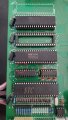
The board looks clean from our perspective.
I would hold off on doing any cleaning or pulling chips for now.
I would prefer to wait until we see some oscilloscope waveforms.

Is there any rush on this repair job?
Yes, the owner wants it back sooner than later. He realizes that I am on vacation (last day today), but wants it on line ASAP. The whole scope thing is a learning curve for me, so I'll be watching some You-tube tutorials.
 

MrChips

Joined Oct 2, 2009
34,866
Yes, the owner wants it back sooner than later. He realizes that I am on vacation (last day today), but wants it on line ASAP. The whole scope thing is a learning curve for me, so I'll be watching some You-tube tutorials.
Sure. The ower wants it operating yesterday.
But you have the advantage. The owner can have it back anytime, non-functional.
 

Thread Starter

v-8 volvo

Joined Mar 29, 2011
41
I know, but things are tough financially at the moment, and if I can get it running again, I'll be in better shape.
I couldn't find any 10X probes, so I ordered some on Amazon. In the meantime I half-unseated the chips one at a time and used a cut down acid brush with some deoxit on everything and reseated. No change (big surprise). Tried a small heat gun in the area of the crystal on low setting with no results.
Now I wait for a scope to see if the oscillator and processor are alive.
 

Thread Starter

v-8 volvo

Joined Mar 29, 2011
41
I couldn't find any 10X probes, so I ordered some on Amazon. In the meantime I half-unseated the chips one at a time and used a cut down acid brush with some deoxit on everything and reseated. No change (big surprise). Tried a small heat gun in the area of the crystal on low setting with no results.
Now I wait for a scope to see if the oscillator and processor are alive.
7/18:
My coworker came through with the BK Precision 2190A, and all that I could get out of it for a trace was a progressively bright flashing dot (even with the intensity turned down).
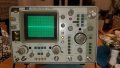
The video file is too large even after paring down to 3 sec. The HP scope (earlier pic), intimidated me, but I need to buckle down and figure it out
 

Thread Starter

v-8 volvo

Joined Mar 29, 2011
41
7/18:
My coworker came through with the BK Precision 2190A, and all that I could get out of it for a trace was a progressively bright flashing dot (even with the intensity turned down).
The video file is too large even after paring down to 3 sec. The HP scope (earlier pic), intimidated me, but I need to buckle down and figure it out
The Mrs. is saying "Give it up!" I don't think so! The leads came today, so I can try the HP scope
 

MrChips

Joined Oct 2, 2009
34,866
Ok. So you need a crash course on how to use an oscilloscope.
Let's take one thing at a time. Don't give up. This entire process will be a huge learning experience for you which would be useful in future.

Let's start with the HP scope.
Take some pictures of the screen and the control panel so that we can see how you have it set up.
 

Thread Starter

v-8 volvo

Joined Mar 29, 2011
41
Ok. So you need a crash course on how to use an oscilloscope.
Let's take one thing at a time. Don't give up. This entire process will be a huge learning experience for you which would be useful in future.

Let's start with the HP scope.
Take some pictures of the screen and the control panel so that we can see how you have it set up.
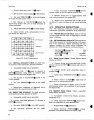
I downloaded the HP User manual and got as far as step 3-12. The scope seems to be acting normally. I take it the check of oscillator function is a good first step. I need to know how to set volts/div and time/div to proper values to see if the 12 mhz crystal and oscillator are ok.
Unfortunately, being back to work has me up at 4:30AM, I wish I had the test equipment ready to go last week.
Nite all and THANK YOU!20230718_223311.jpgScreenshot_20230718_223625.jpgScreenshot_20230718_223649.jpg
 

MrChips

Joined Oct 2, 2009
34,866
Ok. Connect the x10 attenuation probe to CHAN A input.
Set input to DC .1 VOLT/DIV.
Set TIME/DIV to .2ms (as in the photo)
Connect the probe to CAL 1V

If you have done step 3-10, is the waveform square with no under or overshoot?
 

Thread Starter

v-8 volvo

Joined Mar 29, 2011
41
Ok. Connect the x10 attenuation probe to CHAN A input.
Set input to DC .1 VOLT/DIV.
Set TIME/DIV to .2ms (as in the photo)
Connect the probe to CAL 1V

If you have done step 3-10, is the waveform square with no under or overshoot?
Yes, it took minor adjustment of the probe trimmer to square up the waveform.
I will be able to resume at 3 PM today.
 

Thread Starter

v-8 volvo

Joined Mar 29, 2011
41
Well, so much for resuming. I took my Wife to see Roomful of Blues at a beach concert. Her favorite band.
What would be the next step for me? Set up scope to check processor or crystal?
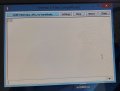
Regarding terminal connection to serial port, is it as simple as using a USB to Serial adapter, and download ahttps://www.compuphase.com/software_termite.htm program such as Termite?
https://www.compuphase.com/software_termite.htm
 

Ya’akov

Joined Jan 27, 2019
10,258
The short answer is “Yes”.

The longer one is:

While the program you’ve linked looks good I’ve never used it so if there are any gotchas I don’t know them. I don’t usually use Windows so I don’t really have any recommendations, sadly. The feature list and target of Termite does look right though.

Concerning the RS-232 USB adapter, some work transparently and some are a pain in the neck. I have used Keyspan adapters with excellent results, so I can recommend them.

The complication that bites you could be in the cable. Even though this is a trivial thing to the experienced it can be an opaque obstacle to the neophyte. Particularly on a case like yours where you don’t even know if the interface works.

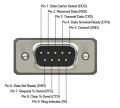
The Keyspan and most others use a DB9 connector for the serial communications. The DB9 for RS-232 has quite a few pins defined. What I would expect is that you need only 3 connections: RXD (Receive Data) on pin 2 (or 3*), TXD (Transmit Data on pin 3 (or 2) and GND.

1689850958349.png
* There is a confusing nomenclature for the complimentary pinouts of devices: DCE and DTE. DCE is Data Communications Equipment which covers things like modems while DTE is Data Terminal Equipment which covers things like... terminals. When the standard was developed, the people involved had no vision about how it would be used in the future, so the idea that an end user would ever have been providing a server using a little computer, or other things like that, wasn’t considered.

The cogent difference here, between the two, is the position of the RXD and TXD connections. These have to cross over because TX needs to go to RX and vice versa. Knowing how your Dino controller is wired is a matter of guess work, though there are only two options.

But if you use a molded 9-to-9 pin cable, changing this could be pretty tough. Nowadays I don’t even use “RS-232” adapters any more. Instead I used cheap and cheerful tiny TTL to USB modules. These offer conversion from TTL (Transistor-Transistor Logic) level serial to a USB connection. They cost a couple of bucks from Amazon or AliExpress. I would probably use one, at least at first, so I could more easily test wiring, but that might not one a good idea...

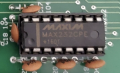
Because of this chip on the board. This is a Maximum MAX232 level converter which is designed to bi-directionally shift the ±5V TTL logic signal to the ±3-15V that can be found on an “RS-232” connector. It may be no problem at all since the MAX232 is quite agile concerning the voltages on that side of the connection, but I can’t recall using the common modules on one, and I don’t have one to test with.

But, this could be a good thing anyway because if you trace pin 2 of the DB9 back to this chip, the pinout in the datasheet will tell you how it is wired. Then you can compare with your adapter and choose the correct cable.

If the wiring of the two connectors is different, a straight through cable is required, if they are the same, you will need a null modem cable. Null modem refers to the expected modem which isn’t present to offer a DCE jack to your DTE adapter. This cable crosses pins 2 and 3, replacing the modem.

The second, less challenging thing will be the communications parameters: baud rate, symbol length in bits, parity, and stop bits. As @JohnInTX mentioned, these can be set to 9600, 8, N, and 1 respectively as a baseline and it might just work. The second and third tries I would make are 57600 and 115200 with the same 8N1.

There may also be ABR (Auto Baud Rate [detection] or autobaud) where the DCE side (MCU) works out the terminals settings using a clever examination of bit patterns and timings when a particular character is sent. For technical reasons these are often “A”, “a”, or “U” but I have also seen “*”. If there is ABR, you’ll want to choose something like 57600 or higher if the dinobox can handle it because 9600 can be painfully slow.

I am very hopeful that there will be a diagnostic interface on that port, or at least a console prompt of some kind. It is one of the very first things I would check if I was trying to repair this, right after power supply (is it plugged in?, is it turned on? has “repaired” more equipment in my career than I prefer to reflect on).
 

JohnInTX

Joined Jun 26, 2012
4,787
With a 11.059 MHz XTAL, the likely baud rates are limited to 1200-19.2K (pp 122 of the datasheet linked above). For a diagnostic/config/firmware load port, that's pretty common.

A simple way to buzz out a terminal link is to create a 'wrap plug' i.e. connect RX and TX as close to the UART as possible. Then type a few characters on the terminal and see if they show up on the screen. If so, your terminal, USB-Serial cable, and whatever else is in the line is working. I usually pull the processor (drop the power first) or hold it in RESET, connect the UART TX and RX pins at the socket with a piece of jumper wire and type a few characters. If I get them back on the screen, the whole serial chain is working, any handshaking is happy etc. This technique won't identify the baud rate, parity et. al. but will confirm that you have at least the basics working.

But be sure to check the simple stuff first - RST line low especially. A DMM can be helpful - if the processor is running, most or all of the IO should be at a good logic level (the program has to run to initialize the ports.) Pins that change like ALE will usually show up as some average voltage that wiggles around a few LS digits compared to the stable Vcc supply. OSC2 should show around .3 - .5 Vcc if the oscillator is running at all. It's not great but it may shed some light. You can probe the UART RX pin with the DMM and send 'U' repeatedly. The DMM reading will wiggle around. Send a BREAK (see terminal documentation for how) and the DMM should show close to 0 for the duration of the break.

Good luck!
 

Thread Starter

v-8 volvo

Joined Mar 29, 2011
41
The short answer is “Yes”.

The longer one is:

While the program you’ve linked looks good I’ve never used it so if there are any gotchas I don’t know them. I don’t usually use Windows so I don’t really have any recommendations, sadly. The feature list and target of Termite does look right though.

Concerning the RS-232 USB adapter, some work transparently and some are a pain in the neck. I have used Keyspan adapters with excellent results, so I can recommend them.

The complication that bites you could be in the cable. Even though this is a trivial thing to the experienced it can be an opaque obstacle to the neophyte. Particularly on a case like yours where you don’t even know if the interface works.

The Keyspan and most others use a DB9 connector for the serial communications. The DB9 for RS-232 has quite a few pins defined. What I would expect is that you need only 3 connections: RXD (Receive Data) on pin 2 (or 3*), TXD (Transmit Data on pin 3 (or 2) and GND.

* There is a confusing nomenclature for the complimentary pinouts of devices: DCE and DTE. DCE is Data Communications Equipment which covers things like modems while DTE is Data Terminal Equipment which covers things like... terminals. When the standard was developed, the people involved had no vision about how it would be used in the future, so the idea that an end user would ever have been providing a server using a little computer, or other things like that, wasn’t considered.

The cogent difference here, between the two, is the position of the RXD and TXD connections. These have to cross over because TX needs to go to RX and vice versa. Knowing how your Dino controller is wired is a matter of guess work, though there are only two options.

But if you use a molded 9-to-9 pin cable, changing this could be pretty tough. Nowadays I don’t even use “RS-232” adapters any more. Instead I used cheap and cheerful tiny TTL to USB modules. These offer conversion from TTL (Transistor-Transistor Logic) level serial to a USB connection. They cost a couple of bucks from Amazon or AliExpress. I would probably use one, at least at first, so I could more easily test wiring, but that might not one a good idea...

Because of this chip on the board. This is a Maximum MAX232 level converter which is designed to bi-directionally shift the ±5V TTL logic signal to the ±3-15V that can be found on an “RS-232” connector. It may be no problem at all since the MAX232 is quite agile concerning the voltages on that side of the connection, but I can’t recall using the common modules on one, and I don’t have one to test with.

But, this could be a good thing anyway because if you trace pin 2 of the DB9 back to this chip, the pinout in the datasheet will tell you how it is wired. Then you can compare with your adapter and choose the correct cable.

If the wiring of the two connectors is different, a straight through cable is required, if they are the same, you will need a null modem cable. Null modem refers to the expected modem which isn’t present to offer a DCE jack to your DTE adapter. This cable crosses pins 2 and 3, replacing the modem.

The second, less challenging thing will be the communications parameters: baud rate, symbol length in bits, parity, and stop bits. As @JohnInTX mentioned, these can be set to 9600, 8, N, and 1 respectively as a baseline and it might just work. The second and third tries I would make are 57600 and 115200 with the same 8N1.

There may also be ABR (Auto Baud Rate [detection] or autobaud) where the DCE side (MCU) works out the terminals settings using a clever examination of bit patterns and timings when a particular character is sent. For technical reasons these are often “A”, “a”, or “U” but I have also seen “*”. If there is ABR, you’ll want to choose something like 57600 or higher if the dinobox can handle it because 9600 can be painfully slow.

I am very hopeful that there will be a diagnostic interface on that port, or at least a console prompt of some kind. It is one of the very first things I would check if I was trying to repair this, right after power supply (is it plugged in?, is it turned on? has “repaired” more equipment in my career than I prefer to reflect on).
With a 11.059 MHz XTAL, the likely baud rates are limited to 1200-19.2K (pp 122 of the datasheet linked above). For a diagnostic/config/firmware load port, that's pretty common.

A simple way to buzz out a terminal link is to create a 'wrap plug' i.e. connect RX and TX as close to the UART as possible. Then type a few characters on the terminal and see if they show up on the screen. If so, your terminal, USB-Serial cable, and whatever else is in the line is working. I usually pull the processor (drop the power first) or hold it in RESET, connect the UART TX and RX pins at the socket with a piece of jumper wire and type a few characters. If I get them back on the screen, the whole serial chain is working, any handshaking is happy etc. This technique won't identify the baud rate, parity et. al. but will confirm that you have at least the basics working.

But be sure to check the simple stuff first - RST line low especially. A DMM can be helpful - if the processor is running, most or all of the IO should be at a good logic level (the program has to run to initialize the ports.) Pins that change like ALE will usually show up as some average voltage that wiggles around a few LS digits compared to the stable Vcc supply. OSC2 should show around .3 - .5 Vcc if the oscillator is running at all. It's not great but it may shed some light. You can probe the UART RX pin with the DMM and send 'U' repeatedly. The DMM reading will wiggle around. Send a BREAK (see terminal documentation for how) and the DMM should show close to 0 for the duration of the break.

Good luck!
I managed to locate a USB to Serial D adapter, downloaded the driver and after a struggle with the laptop, was ready to try it on the UART. I removed the processor (after powering down). I connected RX, TX and GND to front panel connector, entered some text...and nothing. Played with baud rates, still nothing. Connected the USB to TTL adapter, entered text, and saw some gobbledygook show up on the screen. I backed the baud rate down to 9600 and tried again. More random characters came up. Entered text again, not believing what I was seeing, and nothing came up. At that point, it was time to head to breakfast. Will get back to it a little later today.
 

Attachments

Thread Starter

v-8 volvo

Joined Mar 29, 2011
41
I managed to locate a USB to Serial D adapter, downloaded the driver and after a struggle with the laptop, was ready to try it on the UART. I removed the processor (after powering down). I connected RX, TX and GND to front panel connector, entered some text...and nothing. Played with baud rates, still nothing. Connected the USB to TTL adapter, entered text, and saw some gobbledygook show up on the screen. I backed the baud rate down to 9600 and tried again. More random characters came up. Entered text again, not believing what I was seeing, and nothing came up. At that point, it was time to head to breakfast. Will get back to it a little later today.
BTW: How the HELL do I get back to the mobile site on my phone?
 

Poyntat

Joined May 24, 2022
60
Probably nothing to worry about but can you check and clean the area that looks to be contaminated between the octal latch (74hc373) and the nearby PPI (8255) I have attached an image with the contaminated area circled.
 

Attachments

Top