DC Power Question

Thread Starter

james211

Joined May 29, 2012
291
I work in the photo and film industry - Streaming has become the new norm for clients to remotely view the productions so I’ve invested in a lot of equipment to do so.

To make things easier I designed an all inclusive pelican for my cellular stream equipment. I’m having what I believe are power issues though. The device keeps freezing and acting strange, long boot times etc.

As soon as I remove it from the case it’s fine. So with little knowledge, I’m looking for some guidance on how I can find the issue.

Inside the case there are multiple components, a 65w usb dc power supply (for the iPad), a three port Ethernet switch, a 12v fan w/PWM controller, and 1x2 SDI amplifier.

This seems like it could be a possible ground loop, but I’m a bit unsure how to detect that.

any help or guidance is appreciated.

here is a photo:
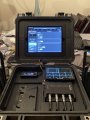
7BE661CF-5CF7-48AD-9818-E70FC2108FED.jpeg
 
Last edited:

sagor

Joined Mar 10, 2019
1,049
What happens if you remove all the equipment and place it in the same positions as when in the case? Does it still happen? Proximity to other devices could be a cause of interference.
Plastic in the case may be either causing static, or it may even be conductive. Many black plastics have carbon in them, which can conduct. Try a separate ground between each device (wire) while in the case, see if the problem persists. (all devices grounded to each other). This would eliminate grounding issues. Try the same outside the case to be sure.
Your PWM fan controller could be causing RFI, they are notorious for that. Does this still happen in the case if the fan controller is turned off?
Finally, could it be the case is RF conductive, causing RF currents elsewhere in the case. Not very likely, but it is a remote possibility.

Good luck
 

MisterBill2

Joined Jan 23, 2018
27,513
A ground loop is created when a power supply return wire goes to another device first and then to the power source negative (aka ground). I also would suspect electrical noise from the fan system, that can be verified by disconnecting the fan and starting the system and seeing if the problem remains.
What is "it" that you remove from the case and all else works OK? Do you use exactly the same power cable with "IT" removed? Is that 3-port ethernet switch connected the same way when the "it" is out of the case? Are any wireless signals being used with all of the items inside the case?
 

slackguy

Joined Feb 11, 2016
76
The case is the easiest thing to replace. I don't like the color either. I held my iphone wrong and got poorer reception. Plastic has a residual charge which may be a problem, LED monitor emits waves that can block waves, a full metal case would block radiation. where is your antenna? or is it a physical lan connection?

You've really said so little about this project (such as transmit receive hardware), it's impossible to say more.

You should protect yourself from radiation but if using a grounded metal box (note - do not interfere with the circuit - just because it's ground doesn't mean anything metal can touch metal). But if you do that you may find the unit is "blocked". You'd rather have the unit how many feet from you and have the led and keyboard on bluetooth and longer monitor connector if you have it "out of the box". But you have a business to run. Not years to fool around on a single box that might be outdated before you know it. So.
 

MaxHeadRoom

Joined Jul 18, 2013
30,658
Inside the case there are multiple components, a 65w usb dc power supply (for the iPad), a three port Ethernet switch, a 12v fan w/PWM controller, and 1x2 SDI amplifier.

This seems like it could be a possible ground loop, but I’m a bit unsure how to detect that.
Is any part of various supplies common at Earth GND potential?
For E.G. a PC derived supply through USB is.
Max.
 

MisterBill2

Joined Jan 23, 2018
27,513
"You should protect yourself from radiation but if using a grounded metal box (note - do not interfere with the circuit - just because it's ground doesn't mean anything metal can touch metal)." Radiation? from a LCD monitor??? That sort of technical wisdom is amazing to find.
Another check will be to start the computer mounted inside the case but with an external power supply connected, and see how that works.
One more thought is that I have at least one laptop that will only run in the slow mode unless powered by the OEM supply. (18 volts, 3.16 amps) connected to an outside higher power very good supply (18 volts @ 5 amps 100% duty rated), it will only run in the low speed low power mode, and display a wrong supply message. It is the last HP I will ever get. So it could be something dumb like that.
 

Thread Starter

james211

Joined May 29, 2012
291
Okay, a lot of feedback here. First off, a lot of electronic devices are designed using pelican cases so I'm not sure that's exactly the issue, although I do understand the concern about carbon in plastics.

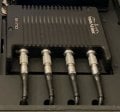
A bit more info. The main unit is a called a Teradek Bond, its a machined aluminum video encoder that connects to four individual modems via a cable that uses USB protocol. Each of the modems is enclosed in machined aluminum as well, and they each have two antenna's. So when I mentioned "IT" I was referring to the bond unit.

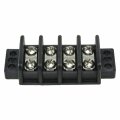
The way this is wired. The primary source is an Anton Bauer Gold Mount battery. These batteries output 14.8v, they are a standard in the motion picture industry, very high quality batteries. I ran the pos/neg of that battery to two separate terminals of a four circuit power distribution block similar to the picture below. The two circuits on the left are positive, tied together with a 16g wire, the two on the right are negative tied together with a 16g wire. All of the components are tied into this unit. The monitor on the front panel is an iPad which plugs into a 60w USB charger. The small monitor in front right corner is an industry standard Small HD 5in monitor, enclosed in aluminum and is powered from the back via a DC battery adaptor, again wired into the distribution block. The PWM adaptor is a small circuit board with a thermocouple and it adjusts the speed of the fan accordingly, again, plugged into the distribution block. The last component is the SDI Distribution Amplifier, this is as well is wired into the block. All of these components have extremely large voltage ranges, most range from 7-36v, others are in the 12-14v range, but nothing is out of spec.

u1952a.jpg

Hopefully this helps a bit with the guidance. I'm on set tomorrow and then Friday I'm going to go back and retest everything, outside of the box, one by one and see what happens.
 

MisterBill2

Joined Jan 23, 2018
27,513
OK, that is a good description of the system. The part that is slow to boot, then, is the computer with the video display? Or something else? And my suggestion of trying with some parts switched off is still valid. It is a diagnostic thing, once the source of the problem is clear a working solution does not need so much blind luck to be found. And if you have the means to monitor the voltage on the terminal strip during a startup that could reveal any voltage related problems.
 

Thread Starter

james211

Joined May 29, 2012
291
Thank you @MisterHill2, I have a good meter and I also have a volt/amp meter I could tie in directly. Anything specific I should look out for?

The part that was slow to boot, rebooting, or freezing is the Teradek bond unit, the heart of it all, I've attached a screenshot. The four cables coming out the back are the modem connections. Below them are the SDI, HDMI, Ethernet and Power connections - they aren't visible.

I just spoke with an engineer at Teradek tonight, and he said over the years, and all the documented repairs due to power issues they've designed the unit to deal with a lot of different scenarios including a wide range of voltage and reverse polarity. So if something is causing weirdness, I'm curious what it might be. I'm far from an expert in this area so I'm just appreciative of sound advice.

Thank you!
 

Attachments

Deleted member 115935

Joined Dec 31, 1969
0
I'd like to say one thing here,
This is a very interesting project, I'm dying to see how it turns out,
 

MisterBill2

Joined Jan 23, 2018
27,513
Can you try starting the system in the Pelican case, but with the Teradek bond unit powered separately? That is the most definitive way to see if it is a power problem or something else.
My suggestion for the meter was to monitor the voltage at the terminal strip during startup to see if there were any disturbances.
I am guessing that all of the devices get switched on at the same time. Possibly starting them individually, in some sequence, could be a solution. Some devices that boot up need to have their inputs active to be recognized during boot, while some others get confused if inputs change during boot-up. I can only guess about your system.
 

Thread Starter

james211

Joined May 29, 2012
291
You’re thoughts are not wrong, the engineer mentioned to me if I’m ever experiencing weirdness to unplug everything and reboot.
I’ll give it a shot tomorrow.
 

MisterBill2

Joined Jan 23, 2018
27,513
You’re thoughts are not wrong, the engineer mentioned to me if I’m ever experiencing weirdness to unplug everything and reboot.
I’ll give it a shot tomorrow.
A large portion of my job for quite a few years was making industrial machines work correctly. Usually I was called in after nobody else could solve the problem. So my diagnostic experience is quite extensive. I have repaired complex machines via email, saving one customer a whole lot of money. And repaired a refrigerator for a missionary in the Kingdom of Thailand by email also. There is a logical sequence for addressing your problem, the first two steps are what I suggested.
 
Top