CRT computer monitor, making sparking sounds

Thread Starter

Domarius

Joined Sep 1, 2013
62
This is a very surface level observation and question, just looking for general advice at this stage, I doubt the problem can be solved yet.

My cherished BENQ V772 computer monitor I use to re-experience my DOS games exactly the way they looked in the 90's, recently started making a snapping / sparking sound from the lefthand side. It's intermittent, like once every few minutes, and each time, the image on the screen shuddered briefly.

Eventually I turned it off and decided not to use it again till I solve the problem or get it repaired.

My plan of attack was to put it somewhere safe, eg. perhaps not near anything that the electricity will not arc towards, just somewhere very un-conductive, like a tiled floor. Remove the casing, power it on, and watch / listen for what area the sparking is coming from, to get more information.

Does anyone have any tips on how to proceed? I'm aware of the general CRT safety precautions, stay away from the front of the tube where all the voltage is.
 

MrChips

Joined Oct 2, 2009
34,628
The first step would be to remove the case and inspect all circuits, cables and components while the monitor is unplugged.
Look for any signs of arcing (black scorch marks).
 

debe

Joined Sep 21, 2010
1,413
If its a CRT tube type monitor its probably dust & dampness on the CRT where the EHT is conected. Discharge any HV on the conection with an earthed probe, then clean up around the connector.
 

debe

Joined Sep 21, 2010
1,413
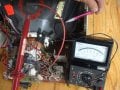
Where the EHT probe is where theres 25Kv that can arc over intermitently. Can also get int arcing from cracks in the Horz op transformer in the bottom RH corner of the picture.EHT Probe.JPG
 

Thread Starter

Domarius

Joined Sep 1, 2013
62
@MrChips , I will specifically look for scorch marks now that you brought that to my attention, thank you.

@debe I really appreciate the photo, and it's promising to know it might just need cleaning out! Perhaps if I see scorch marks in the places you indicated, that will confirm if it is what you said.

I'm familiar with the requirement of discharging the CRT, but have never actually done it. I can see the probe you've put there to discharge it, and the labeling makes me wonder if I need to buy something specially rated to do this? I imagine it would need to handle the current it's going to discharge, and be properly insulated...

And if there are cracks in the transformer, will they be quite obvious to see? And would it mean the whole part needs replacing?
 

debe

Joined Sep 21, 2010
1,413
That is a HV probe in the pic for measuring the voltage. To discharge it all i used was a screwdriver earthed to where the biro is pointing, & poke the screw driver in under where the HV probe is, The current is quite small but the voltage can be around 25Kv but depends how long ago the monitor was used, there may not be any but its worth earthing anyway.
 

Thread Starter

Domarius

Joined Sep 1, 2013
62
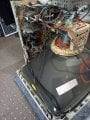
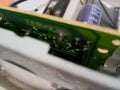
The case is off and I'm about to power on and observe any sparking. But before I did, I thought I would take photos.

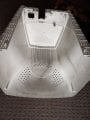
At first I thought maybe those dark lines on the inside of the case might be scorching - but actually I'd say it's dust, they both follow the 2 cables that are closest to the casing, and both those cables are insulated.

I included a photo of the same area you showed me in your photo @debe , and I can't see any obvious scorching. Also the grounding wire you're pointing at with your biro shows two wires branching out in close proximity, but on mine it seems the design is improved to just have one wire that only splits up very close to the front of the tube, probably to prevent that very same arcing you described. Also I can't see any 'cracks' on the transformer, though I don't know what they would look like.

I'm going turn it on before I even attempt to clean it or discharge it, and watch what happens.
 

Attachments

panic mode

Joined Oct 10, 2011
4,866
the most obvious place to look for this type of failures is power supply and HV section (flyback transformer). i would say look at the bottom side of the PCB for signs of erosion. leakage can also develop around the knobs on the flyback transformer or the HV wire going to CRT (cracked insulation?). if you hope to see the arcing, it will be much easier in dimmed light. good luck.
 

Thread Starter

Domarius

Joined Sep 1, 2013
62
@panic mode ah thank you, I never thought of that. I had the room as brightly lit as possible the entire time, initially because I was looking for scorch marks. I will do that next round.

I'm back, I left it on for 5 mins, nothing. I plugged into the desktop and booted it, left it for 10 mins straight like that, in case that was a requirement. Still nothing. Which is very weird, because it was making this sound at least once every few mins, from a cold boot.

I'm just going to air dust it (I have a mains powered one for dusting electronics) that way I don't even have to make contact with anything, put it back together and just continue to use it, until perhaps the sound happens more often, then try all this again to get a visual.

I will post here with more info when that eventually happens.
 

Thread Starter

Domarius

Joined Sep 1, 2013
62
@panic mode I'm considering pulling out the PCB and perform the inspection you described, I'll let you know if I do. Just being really hesitant about pulling it apart further. I got a torch in and couldn't see anything obvious underneath the PCB in the corner where the transformer is, I was able to peek in at least that far without removing the PCB. I assume you mean the part in the top left of my photo? Same part @debe described.

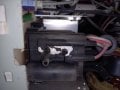
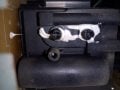
And here's a photo of the knobs on what I assume is the flyback transformer. They are dusty right now but I'm about to go ahead and blow all that off.
 

Attachments

Thread Starter

Domarius

Joined Sep 1, 2013
62
After my careful (and inexperienced) inspection, all I can say is this thing looks to be in beautiful shape for something 20 years old. Manufacturing date is 2003.

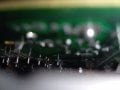
@panic mode I've attached photos after dust blowing, of just under the back of the PCB and also the knobs on the transformer.

I'll re-assemble and keep using it and if it starts making the noise again, I'll take the cover off and try again to catch it in the act, and post back here.
 

Attachments

panic mode

Joined Oct 10, 2011
4,866
or just running wires a bit differently... for example even if the HV conductor insulation was cracked or punctured (it could be way to small to see by eye), now it may be a bit further away from the GND wires, enough that there is no more leak.

here is a bad one:
 
Last edited:

Thread Starter

Domarius

Joined Sep 1, 2013
62
It is possible that getting rid of all the dust could have fixed the problem.
No that wasn't it, I made sure of that, because I wanted to see the problem sooner than later. So I did it in this order;
  • Open the case
  • Run it for a total of 15 minutes while observing. Nothing happened
  • Dusted it out and re-assembled it.

In fact I haven't run it since I dusted it. So if it starts happening now I will be really annoyed...

or just running wires a bit differently... for example even if the HV conductor insulation was cracked or punctured (it could be way to small to see by eye), now it may be a bit further away from the GND wires, enough that there is no more leak.

here is a bad one:
While I can't strictly rule that nothing moved (eg. during the phase when I took the monitor off the desk and rotated it 90 degrees to face the floor, before I took the case off) I can say, to the best of my observation, every single cable is still in the same place you see in the first photo I posted, from the moment I opened it, and all through my testing with it powered on.

Everything seems very secure, no cables were moving around freely (especially that grounding strap debe is pointing to in his photo) and I certainly didn't intentionally move any wires around. I was very gentle not to nudge a single thing before powering on and testing.

Afterwards (after I couldn't reproduce anything) I used a wall powered air duster so I didn't have to touch a single thing since I never discharged it. But I haven't turned it on since then, so I'll just have to see how the thing performs from now on before I can do anything more.
 

panic mode

Joined Oct 10, 2011
4,866
as mentioned leak spot can be tiny and very hard to see. but if not taken care of it will grow and eventually will be impossible to ignore.

you could try looking for points with weaker insulation. get a screwdriver, using piece of wire tie it to chassis/gnd. then slowly sweep around EHT wire and transformer. if there is a discharge, you found the leak spot. then you can try repairing it with some epoxy and keep it distanced from back side of the CRT and any other wires.
 

ApacheKid

Joined Jan 12, 2015
1,762
There's been some good advice here so far. Humidity can lead to this, if you've recently kept a window open and you live in Florida or there's been a heavy use of the bathroom and that's nearby and so on, so any change that might have exposed the unit to humidity is something to consider.

The tripler or final anode cable insulation might have cracks too, perhaps too small to see, but that can lead to arcing sometimes too. I think these are like 30 Kv too.
 

Thread Starter

Domarius

Joined Sep 1, 2013
62
@MrChips actually, I guess there's every possibility that whatever amount of dust was in there, could be enough to cause arcing, and even just the slight jostling I did before the test was enough to throw dust particles around so that no longer happened during the test. I just played for a few hours on it with no issue since. Hopefully the clean is what prevents it from ever happening again for a long time.

@panic mode I see what you mean. I just watched a video where he appears to be improving the seal under the anode cap with some sealant, to prevent this kind of arcing.
I understand the EHT wire goes between the anode cap and the transformer, so that's where I would be sweeping. But since I was playing for a few hours just now with no issue, for now I was hoping to take a wait and see approach in case it was just the dust.
 

Thread Starter

Domarius

Joined Sep 1, 2013
62
There's been some good advice here so far. Humidity can lead to this, if you've recently kept a window open and you live in Florida or there's been a heavy use of the bathroom and that's nearby and so on, so any change that might have exposed the unit to humidity is something to consider.

The tripler or final anode cable insulation might have cracks too, perhaps too small to see, but that can lead to arcing sometimes too. I think these are like 30 Kv too.
Thank you for the moisture warning. Well this is just a 2nd floor office and it's the middle of winter in Australia (I think the fan heater dries out the air) so I'm not expecting that to be the issue.

I'm very prepared to do the test "panic mode" suggested as soon as even one more spark sound happens.
 
Top