Converting a linear equation into the inverse for indicating capacity

Thread Starter

Adam Uraynar

Joined Dec 21, 2015
67
There is a cylinder (314.159*h) I am measuring the capacity of with a range sensor. The range (distance) is measured from top (location of sensor) to bottom (of the bin).

I want to indicate its capacity on LabVIEW. So I just need some multiplier and scaling factors for the voltage. Although, I don't know how exactly.

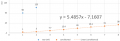
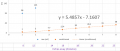
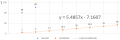
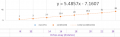
Equation: 5.4857x - 7.1607
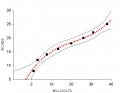
upload_2019-3-5_15-12-44.png
The bin is 25" high. So 25” – z (inches) equals the capacity. For instance:

1 mV → 8” = 5340.7 in^3

3 mV → 12” = 4084 in^3

38 mV → 25” = 0 (empty)

To be clear, I need help figuring out what equation is needed to convert the mV (analog) reading into inches.
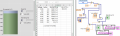
upload_2019-3-5_15-13-17.png


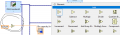
In LabVIEW, I will add the numeric operations to visually show the capacity...something like this:
upload_2019-3-5_15-14-5.png
 

Attachments

djsfantasi

Joined Apr 11, 2010
9,237
Basically, this is a mapping operation. The measurements are linear, so you need to write an equation of a line, that maps mV to inches.

The equation of a line is

Y = mX + b

Your Y axis is inches; the X axis is mV. “m” is the slope and defined as

m = ( y2 - y1 ) / ( x2 - x1 )

You have three data points. We only need two. Plugging your values into the equation for m gives

m = (25 - 8 ) / (38 - 1 )

This results in m=0.459 (or 0.46 may be enough)

So now we have

Y = 0.459X + b

Now take any of your data pairs, plug them into the above equation and solve for “b”.

25 = 0.459 * 38 + b
b = 7.54

That’s it. Your mapping equation is

inches = 0.459 * mV + 7.54

Now you can easily calculate what you need.

Good luck!
 

wayneh

Joined Sep 9, 2010
18,104
Or you could just rearrange to parameters of the fit line, which gives a bit more precision than just using two points (although your data line up nicely).

y = mx + b
x = (y-b)/m = y/m - b/m

mV = 5.4857•inches - 7.1607
inches = mV/5.4857 + 7.1607/5.4857 = 0.1823 • mV + 1.3053

This does not match the answer from @djsfantasi because the equation given in your post doesn't match the dataset. Not sure where you got it!
I get mV = 0.4024•inch + 9.822 using the data you show.
 

djsfantasi

Joined Apr 11, 2010
9,237
Or you could just rearrange to parameters of the fit line, which gives a bit more precision than just using two points (although your data line up nicely).

y = mx + b
x = (y-b)/m = y/m - b/m

mV = 5.4857•inches - 7.1607
inches = mV/5.4857 + 7.1607/5.4857 = 0.1823 • mV + 1.3053

This does not match the answer from @djsfantasi because the equation given in your post doesn't match the dataset. Not sure where you got it!
I get mV = 0.4024•inch + 9.822 using the data you show.
But he has mV and wants to calculate inches. The inverse of your equation.

Your equation equates to

X = 0.4204 * Y + 9.822

Solving for Y, we proceed as follows

X - 9.823 = 0,4204 * Y
Y = ( X - 9.822 ) / 0.4204
Y = X / 0.4204 - ( 9.822 / 0,4204 )
Y = 2.38 * X - 23.36

Something is wrong.

Using 38mV and 25 inches as a known datapoint, apply the equation inches = 2.38 * mV - 23.37, and we get the following

inches = 2.38 * 38 - 23.37
= 67.37 inches

Wait s minute! That fails the reasonable test.

Using the same datapoint and the equation inches = 0.459 * mV + 7.54 results in

inches = 0.459 * 38 + 7.55
= 25 inches

Spot on. I used the data from the table in post #1; I did not use the data contained in the graphs or images.
 

wayneh

Joined Sep 9, 2010
18,104
So apparently we have a documentation problem. The TS has supplied two sets of data that are not congruent with each other. I believe it’s up to the TS to resolve this issue.
I’ll double check tomorrow. His posted numbers seem to match the image, so I’m not ready to stand by my addled analysis.
 

wayneh

Joined Sep 9, 2010
18,104
I just used Excel:
I'm using Excel as well and I don't get anything like the line you've shown. I suspect you have made a line chart instead of a scatter plot, and so the fit line fits x data of 1, 2, 3, etc. instead of the x-values you've entered. Line charts are fine for business data such as daily or monthly results, but they're rarely of any use in science.
 
@Adam Uraynar You sure made it a confusing issue.

If your data (mV, inches) are these, as you have posted:
1.0000 8.0000
3.0000 12.0000
7.7000 14.0000
13.4000 16.0000
20.0000 18.0000
26.1000 20.0000
31.0000 22.0000
38.0000 25.0000

and you want to go from mV TO inches, your graph and equation looks like this:
To be clear, I need help figuring out what equation is needed to convert the mV (analog) reading into inches.

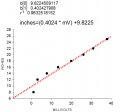
Your graph and equation to get INCHES from MILLIVOLTS is:
[hold on - I'm messing it up]

G3.jpg
 
Last edited:

wayneh

Joined Sep 9, 2010
18,104
@Adam Uraynar You sure made it a confusing issue.

If your data (mV, inches) are these, as you have posted:
1.0000 8.0000
3.0000 12.0000
7.7000 14.0000
13.4000 16.0000
20.0000 18.0000
26.1000 20.0000
31.0000 22.0000
38.0000 25.0000

and you want to go from mV TO inches, your graph and equation looks like this:


Your graph and equation to get INCHES from MILLIVOLTS is:
[hold on - I'm messing it up]

View attachment 171699
You're getting what I get. Personally, I'd drop the first datapoint since it clearly falls from from the linear model that fits the other points very well.
 
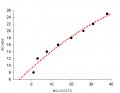
If you want a better fit, use a higher degree polynomial. @wayneh I would not drop any data. Here is what a quadratic looks like.
Coefficients:
b[0] 9.2291762552
b[1] 0.5196388699
b[2] -3.1289402566e-3
r ² 0.9692319075

and the graph:
G4.jpg


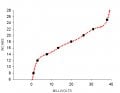
You could, if you wanted to, go up to a 7th degree polynomial, and the fit looks like this:

G5.jpg

and the coefficients
Coefficients:
b[0] 3.9578581231
b[1] 5.0155274029
b[2] -1.0914133284
b[3] 0.1256037916
b[4] -7.8408095572e-3
b[5] 2.6953907801e-4
b[6] -4.7874441461e-6
b[7] 3.4271482259e-8
r ² 1.0000000005

That gives you the best fit using a polynomial and is likely quite silly, and a good example of overfitting the data and why you would NOT want to do it if you ever anticipated having to extrapolate at the high end. I post it only to illustrate what you *could* do to illustrate the principle.

A second degree polynomial is what I would use, just to make the low end a little more representative.
 

djsfantasi

Joined Apr 11, 2010
9,237
@Adam Uraynar You sure made it a confusing issue.

If your data (mV, inches) are these, as you have posted:
1.0000 8.0000
3.0000 12.0000
7.7000 14.0000
13.4000 16.0000
20.0000 18.0000
26.1000 20.0000
31.0000 22.0000
38.0000 25.0000

and you want to go from mV TO inches, your graph and equation looks like this:


Your graph and equation to get INCHES from MILLIVOLTS is:
[hold on - I'm messing it up]

View attachment 171699
Thanks for the graph. It explains to me why my quick equation was wrong.
 

wayneh

Joined Sep 9, 2010
18,104
A second degree polynomial is what I would use, just to make the low end a little more representative.
It depends on the need. I shouldn't have implied dropping the data, I meant to drop it from the linear model that very well describes the rest of the data. That one data point is useful since it gives a hint of what is happening at low mV – that the curve bends over . If the TS needs to calibrate down in that low mV range, he'll need more data there because the linear model doesn't hold in that realm. Curve fitting could give you a guesstimate within that range and maybe that's all that's needed. But more data is always better.
 
It depends on the need. I shouldn't have implied dropping the data, I meant to drop it from the linear model that very well describes the rest of the data. That one data point is useful since it gives a hint of what is happening at low mV – that the curve bends over . If the TS needs to calibrate down in that low mV range, he'll need more data there because the linear model doesn't hold in that realm. Curve fitting could give you a guesstimate within that range and maybe that's all that's needed. But more data is always better.
We are not, necessarily, at odds here and I am not trying to argue against what you are saying because I am, largely, in agreement. This may go far beyond what the TS cares about, but it is interesting to me.

It depends on what you are trying to do - what your need is...yes, absolutely.
More data is better - yes, absolutely (within limits of course).

It also is worth considering whether you have any information to suggest what the function *should* look like. For example, would you expect a 1st degree based on something that you know or would you suspect a 5th degree. Sounds nutty at first, but the higher degree equation will always fit the data better, but it is not, necessarily the one to use.

I have criticized situations in which wildly high degreed polynomials were used where it would be only a fantasy that any such underlying process could exist. That is not the case here

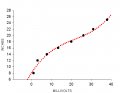
Then there is the calibrated eyeball effect, which may be going on here. Looking at the 1st degree polynomial...
AACorder1.jpg

Your eye immediately goes to that first data point and perceives it as the outlier. I am no different.

But, consider the case where the "true" function is a 3rd degree polynomial...
AACorder3.jpg

Now, your eye goes to the second data point as being the outlier.

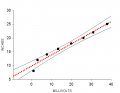
You may also want to look at some confidence intervals and consider at what distance you are likely to be getting most of your data from...These are 95% for the two cases

AACo1CL.jpg
AACo3cl.jpg

Fun stuff.

Then, of course, you can do it all over again with nonlinear regression :)
 

Thread Starter

Adam Uraynar

Joined Dec 21, 2015
67

Attachments

Top