Control 12V RGB LED Controller with Raspberry Pi GPIO

Thread Starter

Vitrivius

Joined Nov 3, 2023
8
Hi everyone,

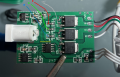
I have this 12V RGB LED controller PCB (see attached picture) and would like to control the RGB channels directly using Raspberry Pi GPIO pins instead of the remote control.


Is it possible to bypass the remote-control circuitry and control the R, G, and B channels using GPIO?

Any advice or guidance would be appreciated. Thanks!View attachment IMG_3428.jpg
 

Reloadron

Joined Jan 15, 2015
7,975
OK and as to your controller:

Infineon OptiMOS 2 09N03LA is a 25V, 50A N-channel logic-level power MOSFET designed for high-frequency DC-DC converters. It features a maximum drain-source resistance (\(R_{DS(on)}\)) of about 9.2 mΩ and an operating temperature up to 17 C. Those are the N Channel MOSFET specifications for your controller.

While I have never used a Raspberry Pi I have done plenty of circuits using a few uCs . I see no reason why you can't use a Raspberry Pi and just write your code accordingly. The best way to approach this is start with an outline of what you want to do. Control how? Face in / Fade Out, Turn On / Off

A simple Google of "raspberry pi control rgb led strip" brings up a dozen examples. You need to define exactly what you expect your LED strip to do? You also need to define your LED strip? Would it be plain LEDs or a programmable LED strip, A programmable RGB LED strip (also called an addressable or ARGB strip) lets you control the color and brightness of each individual LED pixel independently.

The better you define your goal the better the help you will get. :)

Ron
 

Thread Starter

Vitrivius

Joined Nov 3, 2023
8
Hi all,

I wasn’t clearer earlier, I should have given you more information.

I’ve already written the code on my Raspberry Pi to send signals over the red, green and blue wires to the LED driver, so the MOSFETs can switch each LED channel.
My plan is to connect these wires at the resistors, but I’m not sure whether to solder them before or after the resistor.

I’ll send you a picture showing where I intended to solder the wires coming from the Raspberry Pi.

View attachment IMG_3428.jpg

 

Reloadron

Joined Jan 15, 2015
7,975
Pure guess here. I would try as you posted. The resistors on the board look to be Gate resistors for the MOSFETs. Again, that is how it looks to me. Maybe another member will chime in? Wish I had a clue exactly what the controller board is? I know from the data sheet that the MOSFETs are logic level MOSFETs. Do you have a link to that controller board? You will; also need a common (Ground) connection between your Raspberry Pi and your controller board.

Ron
 

nsaspook

Joined Aug 27, 2009
16,503
Hi all,

I wasn’t clearer earlier, I should have given you more information.

I’ve already written the code on my Raspberry Pi to send signals over the red, green and blue wires to the LED driver, so the MOSFETs can switch each LED channel.
My plan is to connect these wires at the resistors, but I’m not sure whether to solder them before or after the resistor.

I’ll send you a picture showing where I intended to solder the wires coming from the Raspberry Pi.

View attachment 372457
Looks like a plan to destroy a RPI board.

The RPi board digital common ground needs to connect to the led board common ground. Don't connect it to +12vdc.

You really need a 3.3v to 5v level converter chip/module from the RPi gpio pins to drive the Mfets correctly and to provide some small bit of isolation from smoking your RPI.

https://core-electronics.com.au/guides/logic-level-converters-for-raspberry-pi/
 

panic mode

Joined Oct 10, 2011
5,399
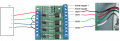
if you want to bypass onboard MCU to control things with RPI, you need to cut three traces (yellow line), connect GND to GND of RPI, and connect three channels to GPIOs of RPI.
note, installed mosfets are "logic level" but optimized for 5V and RPI GPIOs are 3.3V only. so suggestion to use level shifter is a good idea.
without level shift they will still work but may have problem turning fully on, which means under high load they will get warm/hot.
you can use optocouplers (and 2 resistors per optocoupler) and 5V rail (or 12V) to turn them on.
1792714106732.png
 
Last edited:

panic mode

Joined Oct 10, 2011
5,399
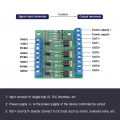
the other option is to forget about that board and make your own or get something like this:

1792715237852.png

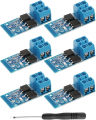
or this:
1792715280800.png
 
Last edited:

Thread Starter

Vitrivius

Joined Nov 3, 2023
8
Thank you all for your valuable information and help! I really appreciate your time and support.
I’ll take the necessary steps based on your advice.
 
Top