Code conversion C to Assembly.

Ian0

Joined Aug 7, 2020
13,131
The right way to do this is to "animate" the changing of the brightness with a succession of "small" steps from one "big" step to the next.
Not when you've run out of resolution!
On a 12-bit PWM the brightness varies from 0 to 41 over the lowest third of the dimming range, that would represent 5 seconds on a 15 second fade: that would 120ms per step if that section were linear - that's why it is quite noticeable. With an exponential change, the steps become even more noticeable at the lowest levels.
 

joeyd999

Joined Jun 6, 2011
6,279
Not when you've run out of resolution!
On a 12-bit PWM the brightness varies from 0 to 41 over the lowest third of the dimming range, that would represent 5 seconds on a 15 second fade: that would 120ms per step if that section were linear - that's why it is quite noticeable. With an exponential change, the steps become even more noticeable at the lowest levels.
I'd vary the time between small steps depending on where I am in the curve.
 

Ian0

Joined Aug 7, 2020
13,131
I'd vary the time between small steps depending on where I am in the curve.
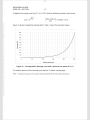
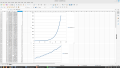
At the beginning of the curve, on a 15 second fade, the time difference between two adjacent 12-bit PWM levels is 0.3 seconds. (2% of the fade time). It is not possible to subdivide a step without increasing the PWM resolution. See the enlargement of the low end of the curve.
Screenshot from 2023-03-29 22-13-01.png
 
Last edited:

joeyd999

Joined Jun 6, 2011
6,279
At the beginning of the curve, on a 15 second fade, the time difference between two adjacent 12-bit PWM levels is 0.3 seconds. (2% of the fade time). It is not possible to subdivide a step without increasing the PWM resolution. See the enlargement of the low end of the curve.
View attachment 291010
If you can distinguish the difference in those levels, your eyes are waaaay better than mine.
 

Sensacell

Joined Jun 19, 2012
3,784
If the first value of your curve is 4, you are missing a bit of subtlety at the very beginning.
The slope is fine, just offset it so the first active value is 1, not 4.

This is what I do to get the absolute most out of dimming systems, mapping an 8 bit input value into a 12-16 bit PWM output.
 

Ian0

Joined Aug 7, 2020
13,131
If the first value of your curve is 4, you are missing a bit of subtlety at the very beginning.
The slope is fine, just offset it so the first active value is 1, not 4.

This is what I do to get the absolute most out of dimming systems, mapping an 8 bit input value into a 12-16 bit PWM output.
The standard specifies a minimum power of 0.1%. (which is 4 on a scale of 0 to 4095)
If you start the logarithmic curve any lower, it spends rather too long at low brightness levels.
 

Sensacell

Joined Jun 19, 2012
3,784
The standard specifies a minimum power of 0.1%. (which is 4 on a scale of 0 to 4095)
If you start the logarithmic curve any lower, it spends rather too long at low brightness levels.
I don't know (care) about any standards, what counts is getting the smoothest dimming possible as judged by the human eye.
I design LED fixtures for a VERY persnickety LED artist, we AGONIZE over this perceived smoothness.
 

Ian0

Joined Aug 7, 2020
13,131
I don't know (care) about any standards, what counts is getting the smoothest dimming possible as judged by the human eye.
I design LED fixtures for a VERY persnickety LED artist, we AGONIZE over this perceived smoothness.
And extending the curve to even lower brightness levels will result is the dimming being less and less smooth.
 

Ian0

Joined Aug 7, 2020
13,131
Pic16f18131, the program I intend is to use a 16 word index table to fade LED's in and out using PWM, exponentially.
Also, Unfortunately I am having to use MPLABX v5.35 due to the Pic not referenced in MPLAB IDE and so far have not been able to find a way of using a View-by-step as is possible in MPLAB.
I am using a look-up table, just need the exponential values.
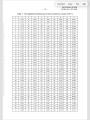
Here are the values from the standard:
7177B39A-EDA6-4444-8809-F4767A3621FA.png899A861C-0BB2-4A34-8867-00522D8C3453.pngBEBC2473-D50C-452F-AAF2-2B836C6FD900.png
 

joeyd999

Joined Jun 6, 2011
6,279
AT those levels, it's very obvious. There's a 50% jump in brightness between each level.
Fine. Here's C code for adding a 4 bit dither to a 10 bit PWM for a total of 14 bits (PIC18F57K42):

C:
void __interrupt(irq(IRQ_TMR2), base(IVT_Base)) TMR2_ISR(void)
{
    PIR4bits.TMR2IF = 0;            //clear pending ints

    CCPR1 = duty_cycle + fine_duty_ctr;

    fine_duty_ctr = (fine_duty_ctr + 0b000100) & 0b111100;
}
Pretty simple. Even easier in .asm. And it can be extended to 6 bits of dither by adjusting the increment and mask.
 

joeyd999

Joined Jun 6, 2011
6,279
I'd really, Really, REALLY like to see that code ... then again, I'd understand if you don't feel like sharing ...
What's the big deal?

Code:
tmr2int   bcf       pir4,tmr2if

          movfw     fine_duty_ctr
          addwf     duty_cycle,w
          movwf     ccpr1l

          movfw     fine_duty_ctr+1
          addwfc    duty_cycle+1,w
          movwf     ccpr1h

          movlw     b'00000100'
          addwf     fine_duty_ctr,w
          andlw     b'00111100'
          movwf     fine_duty_ctr
          skpnc
          incf      fine_duty_ctr+1,f

          retfie    fast
 
Last edited:

joeyd999

Joined Jun 6, 2011
6,279
but shouldn’t it just vary the duty cycle by 1? I.e. fine_duty_CTR should be either zero or 1.
I'm taking advantage of the fact that the hardware allows a left justified 10 bit word to control the PWM duty cycle. The bottom 6 bits are ignored. fine_duty_ctr is a 4 bit counter that decides when bit 7 of the PWM is toggled to a 1.

It helps to understand the hardware.

duty_cycle legal values are 0 to 0xffc0 for 0 to 100% (values greater than 0xffc0 will overflow to 0x0000 during dither), but the bottom two bits are ignored.
 
Last edited:

Thread Starter

MaxHeadRoom

Joined Jul 18, 2013
30,654
Anyway, back to the programming issue, in all the years i have programmed in assembly, I don't remember this much grief in trying to get the chip to act consistently and predictably.
I have ordered some new PIC's and will assemble one small step at a time.
This is the first time I have used these configurable pin Pics,
Unfortunately requiring me to use MPLABX .
 

joeyd999

Joined Jun 6, 2011
6,279
Anyway, back to the programming issue, in all the years i have programmed in assembly, I don't remember this much grief in trying to get the chip to act consistently and predictably.
I have ordered some new PIC's and will assemble one small step at a time.
This is the first time I have used these configurable pin Pics,
Unfortunately requiring me to use MPLABX .
Yup. MPLabX pretty much sucks for .asm.
 
Top