Clap switch with latching relay

Thread Starter

Copey84

Joined Jul 27, 2015
198
Hi Parkera, the PCB leads are 26awg and have 300v marked on them.
I measured the current drawn by the led lights and it's at 80ma, the mains voltage in my house is 245v.
With such a small amount of current I think the leads will be ok.
The pins are well shrouded but will only have a few millimetres of separation at solder points. I've seen a few AC mains voltage inputs to PCBs with similar spacing that's why I thought it was ok.

Anyway I'll let you know how I get on, hopefully this side of xmas.
 

Parkera

Joined May 3, 2016
127
Hi Copey84 - I agree that the wire will easily handle an 80ma load (#26 should be able to handle 800ma). The 300 volt insulation actually a DC voltage rating. Your 245 volt mains will have a peak voltage of about 346 volts, so while technically you should be using 600 volt wire, in reality it should be (lower case) ok.

As for the connector spacing, you say "a few millimeters". I would MAKE SURE you have at least 2mm (3 would be better) between the closest points for all of the following
  • Line to Line
  • Line to Ground
  • Line to Neutral (do you have a "neutral" in the UK?)
One reason for the spacing requirement is to account for "creepage paths". That is where you can start to have a current flow over the surface of an insulator. Naturally that current is very dependent on humidity, dirt and other contaminants, as well as the applied voltage. When you have a current flow across the surface of an insulator (PCB), you get localized heating (I2R). This localized heating degrades the insulator material and allows even more current flow. If this continues, I'm sure you can see that eventually a fire will result.

Another reason for spacing is to prevent arcing. Arcing will carbonize the PCB, drastically lowering the surface resistance. The mains power line is very noisy and "spiky" as a result of the varying loads from all others users of the power system. There are frequent peak voltages that go way above the normal peak of a sine wave. At one job I had, we kept blowing up SCRs and bridge rectifiers every night. The cause turned out to be the power company switching in power factor correction capacitors at 7:32 every morning. This caused a severe voltage dip, followed by a major overshoot of 1,800 volts that was caused by the inductance of the line, for 1 cycle.

This was on a 240 volt line. Who knows what the voltages would reach in the event of a lightening strike on the power line. In an early breadboard of the product, we initially had 0.1" between connector pins, and there was evidence of arcing at those pins, so the arcing risk is real. Having any "points" between conductors enhances the ability to initiate an arc, so make sure adjacent conductors are "round", not square.

UL and other safety agencies have all come up with spacing requirements as part of their safety standards for these reasons. Given the stakes, it is usually a good idea to follow them (but I will admit they also tend to be very conservative and based on worst-case scenarios). - Just thinking safety!
 

Thread Starter

Copey84

Joined Jul 27, 2015
198
Hi Parkera, my bad should have remembered the peak voltage on mains supply.
Going to get 600v PCB plug and socket.

One other thing, when it comes to connecting a pot do you always have to connect all three pins?
Could I connect only 2 pins of pot without a ground?
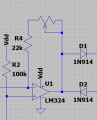
The circuit setup would be like this, lm358 inverting pin connected to 22k, across 22k resistor to pot, then wiper of pot to output of lm358.
 

Parkera

Joined May 3, 2016
127
Hi Copey84 - In this circuit you are using the pot as a rheostat, so 3 connections are not required. It is traditional to connect the unused end terminal to the wiper though. It does give a certain degree of "failsafe-ness" should the wiper open-circuit; it at least keeps the opamp from going open loop.

I can never remember what the terminal numbers vs. rotation resistance are, but using an ohmmeter, choose the end terminal that gives you maximum resistance in the full clockwise rotation. Short the other end terminal to the wiper and connect that to the output of the LM358. Remember, R4 + the pot is a series circuit.
upload_2017-8-18_11-46-10.png
 

Thread Starter

Copey84

Joined Jul 27, 2015
198
Hi Parkera, think that finally covers everything, just have to make a small change to PCB then get it etched out.
Could be awhile before I get it finished though, probably end of September, October.
Will post pics of finished product.

Also to answer your question from post 122 yes we do have a neutral in UK.
The neutral is at ceiling lights, I've only got switch wires at PCB to make lights two way from relay and wall switch.

Anyway thanks again for all your help.
 

Parkera

Joined May 3, 2016
127
Hi Copey84 - So I guess your normal 220 single phase is derived from 440 single phase, like our 110/220. Thanks for the info.

I look forward to the end result. September is our busy time away from computers, so I may not be able to respond right away, but rest assured, I will.
 

Thread Starter

Copey84

Joined Jul 27, 2015
198
Hi Parkera, and anyone else that's interested, I finally finished the clapper circuit.
Few things came up so I didn't have time until recently to get it finished, anyway it turned out ok.
Made final connections today turned it on and it worked first time, didn't even have to adjust the pot, seems ok in mid position.
I've included a photo without the cover on enclosure, not great quality I'll post a few better ones later in week, don't want to take it apart right now.

Only problem I've noticed when testing it out is sometimes the relay can turn on an off rapidly when I try to turn the lights on from clapping and when I use the room light switch, which is now in circuit.
Just to note the relay and light switch combine to make a two way light circuit, pair of wires between relay and wall switch, then a switch wire at relay and feed at wall switch, could be other way around doesn't matter.
I'm thinking a spike when switching either at the relay or wall switch is somehow triggering the relay coil.
Could a resistor or capacitor connected across switch wires solve the problem? Or maybe there's something else at play.
Anyway it doesn't appear to be a major problem could probably live with it, just thought I'd mention it.
If anyone has any suggestions let me know.
Thanks.1510089094394-171307344.jpg
 

Parkera

Joined May 3, 2016
127
Hi Copey84 – Glad to see progress on your project (I was wondering how it was coming along). Unfortunately, right now I have a major project underway with a critical time line. Like any other project, other things keep getting in the way, only adding to the workload. With that in mind, let me apologize for this EXTREMELY BRIEF reply.

I like the workmanship on the “finished” product. I agree with your suspicion of a ‘spike’ causing the false trigger. While an RC network (snubber) across the relay/switch/load wiring may solve the problem, it could re-appear as soon as a different ‘load’ is connected. I think the real problem is the layout of the finished package.

In this circuit, remember that the C2 node is EXTREMELY sensitive. You have the AC wiring strung right above that area of the circuit. Everything else is relatively low impedance and fairly bullet-proof, though not totally immune to 'outside' influence. You also have the mic circuit running parallel with the AC wiring which is not good practice (U1 has a modestly wide bandwidth that can be influenced by a spike-type waveform). I understand why you did this – it lays in there really nice – but it maximizes coupling where you don’t want it.

If you rotate the PCB 180 degrees and flip it (so that the components are away from the AC wiring) that will place the mic connector at the input end of the board and the AC connector at the relay end. That will reduce the coupling into the more critical circuits. The trick for the wiring is to put a single loop in the wiring with a 90-degree bend right at the housing-mounted connector. The end result is a 270-degree redirection of the wire. You basically achieved that with the DC input wire. (I apologize if this does not make sense to you; it is really hard to put something like this in just a few words. Photos work much better, but I don’t have the time right now.)

If that doesn’t work, the next step is shielding. Since the board will now be “turned over”, you can put an electrostatic shield between the circuit and the wiring. Put a piece of un-etched PCB with the substrate right up against the “wiring side” of your PCB. Connect the copper side of the shield board with a short single piece of wire to the ground end of C2. Keep this “shield” as close to the PCB as possible.

If that doesn’t work, I think you will have to go with a larger enclosure so that you can add more distance between the AC wiring and the PCB. You may also have to completely shield the PCB circuit, but that will be the last resort.

Re-read post #118. While it was written in the context of laying out the PCB, the same principles also apply to everything within the enclosure and even where the enclosure will be placed in use. (Not usually a concern with this kind of project, but very defiantly applies to RF and digital products.)

I hope this gives you enough guidance for a couple of weeks as I really don’t have the time right now to walk you through each step – I apologize for that. Good luck and keep me informed of your progress. I’ll answer as I can.
 

Thread Starter

Copey84

Joined Jul 27, 2015
198
Hi Parkera thanks for replying even though your busy.
I had intended on keeping the AC connections on side that they enter but the red bullet connectors fouled on the socket, I know should have seen that before I cut out the AC socket, so I can't really change position of PCB.

Also it's not just the switching of lights that effect the circuit, went to turn on TV at wall socket last night and the lights went out, kinda funny. Like the light switch it doesn't happen every time though.

Since the TV is effecting the circuit I think the cables are the main problem acting like antennas picking up noise. I'll try screening the mic wires and see if it helps, would a connection from screen to ground of DC supply socket inside enclosure be suitable, or should I connect to C2 ground?

Only reply if you've got the time Parkera, thanks
 

Parkera

Joined May 3, 2016
127
Hi Copey84 – Don’t feel stupid, we have all made those mistakes – countless times. Really when you think about it, when planning a 3D layout, there is an ENORMOUS amount of information and detail that you have to keep in mind simultaneously.

Since the TV is affecting the circuit, you are 100% correct that the main problem is the cables are acting like antennas, bringing in a strong ‘spike’ into your box. The internal wiring then ‘transmits’ that spike into the circuit (most likely the C2 node). I think shielding the circuit and physical isolation will be your only options.

You might be able to determine if the spike is being picked up by the mic wiring by looking at the output of U1 AND the output of the comparator (U2) simultaneously. I say “might be able” because by adding a scope probe, you are adding another antenna to the circuit, which may cause a problem on its own. Switch the light on and off with the switch, minimizing sound as much as possible. You can try putting a piece of tape over the microphone to reduce its pickup. If you see a signal on the comparator output but not (enough) signal on the U1 output, then the problem is pickup by C2. If you DO see output on U1 ALSO, then mic wiring pickup is a problem, but keep in mind it may not be the ONLY problem. Shielding the mic wiring is not a bad thing to do in any case, but it will cause you to have to have a 3rd wire on your mic connector with a direct short run to the ground side of R3.

If it is C2 pickup, plan on a new enclosure that allows a good layout and allows you to shield the PCB as described in the last post.

Back to my project – good luck.
 

Thread Starter

Copey84

Joined Jul 27, 2015
198
Hi Parkera, I tried screening the mic cable with some aluminium foil and a connection to the ground on the DC socket, however it hasn't solved the problem.
Would it be worth changing the grounding point from DC socket to R3 grounding point?

I also tried reducing the length of pins on bc547 incase they were picking up any unwanted noise and it does seem to have helped. Since I reconnected and tested a few times there's been no false triggering from the light switch, although the TV has still triggered, not very often though, at a guess probably 1 in 10.

I think I'll let it sit for a few days and see how it goes. If the false triggering gets to annoying then I'll order the 6 by 4 inch inclosure, that will give me more room to separate wires and i could even line the inside with PCB to totally screen the circuit.

Anyway I'll let you know how it goes, and thanks for replying.
 

Parkera

Joined May 3, 2016
127
Hi Copey84 – If you didn’t see any difference with shielding the mic wire to the DC socket, it is not likely that grounding to a different point will make any difference. Since there was no change, shielding the mic wiring is not the problem. Just twist the mic wires; that will cancel any external common-mode currents.

Assuming you have the diode close to the coil terminals and those are as short as practical, my guess is reduced length of the bc547 leads is coincidental. Bipolar transistors are pretty low impedance and the coil current is not that high. Also, if the transistor is next to the relay, it is quite a good distance from C2.

Since you are looking at an “intermittent” problem, the only real way to see if there are improvements is through the use of statistics. Nothing too elaborate, just an average of how many trials does it take to repeatedly achieve three false triggers. The hardest part of that is you need to make a fairly large number of measurements in total for each change you make in the circuit or layout.

For example, after a circuit change, let’s say that in order to obtain 3 false triggers, you had to turn the TV on 18 times. In order to prove repeatability, you need to do that exercise a total of 3 times. Let’s say for trial #2 it took 32 times and for trial #3 it took 15 times. The average was (18 + 32 + 15)/3 = 21.7 times. That says that you have a 13.8% chance of obtaining a false trigger with that configuration. It will keep you busy. Good luck.
 

Thread Starter

Copey84

Joined Jul 27, 2015
198
Hi Parkera, sorry for delay in reply been busy lately.

The circuits been running for a month now and although I think some of the changes to the circuit have reduced the amount of false triggering it's still a bit annoying.

Also found that it turns on without any switches being operated, woke up in early hours of morning with the lights on. I put this down to noise from the nearby sky box that's always on. Tried moving so that PCB components face away from the sky box and I think it has helped.

Although there seems to be a reduction in false triggers I think I'll order a larger enclosure and get better separation from mains voltage, as suggested.
The enclosure will be same style only a few inches bigger at 6x4.
There's slots to hold PCBs so I was thinking of cutting two pieces the same size as the PCB to act as a screen connected to ground.

Will this be suitable or should the entire PCB be covered. There will probably be a strip top and bottom over an inch that will not be screened. Probably hard to determine thought I'd ask anyway.
Completely screening PCB will be difficult so just thought I'd see what you think about leaving a gap.

Let me know what you think if you have time to reply.
Thanks
 

Parkera

Joined May 3, 2016
127
Hi Copey84 – I don’t know what a “sky box” is, so I can’t make statements or judgements about it.

As for turning the component-side of the PCB away from a noise source – Since the PCB does not have a ground plane, it won’t make any difference. Physical distance is what will help. Electric field strength decreases by the square of the distance. That means if you double the distance, say from ½” to 1”, the coupled field strength is reduced to ¼ of the original field strength (a 75% reduction). In contrast, if the noise source is, say 12” away, moving the distance of the PC wiring (by turning it around) ¼” will only decrease the field strength by 4%

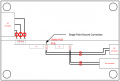
Going with a 4x6 box will be a big help because it will now give you room to work. Referring to the very crude drawing below, I will make the following suggestions.
  • Use the general layout shown in the drawing.
  • Make a Shield PCB and place it close to the AC Connector.
    • Cut a hole in the “shield” so that the AC wiring can pass through it.
    • Mount the PCB to the Shield PCB by any practical means (nut-and-bolt standoff, stiff wire standoff, hot-melt glue, etc.). Beware of spacing requirements around the AC wiring – you don’t want any shorts. Having about 1/8" of space around the wiring won't hurt anything.
    • Ground the “shield” to the DC Connector, negative input (common ground). Make sure this is a “single-point-ground” connection. Be absolutely certain that the standoffs do not form another ground connection or you will have a ground loop, which will introduce noise directly into the circuit.
  • Keep the AC wiring as short as possible. That will require the PCB connectors be changed to the other side of the PCB from where you now have them. I know this is a pain but it is probably the most important single change - so just do it!
  • Align the PCB AC Input so that the wires from the AC Connector run as “vertical” (as it looks in the drawing) as possible.
  • Run the DC In and Mic In wires “horizontally”. This will place all wiring (including the PCB wires) roughly at 90° to the AC wiring and will further minimize pickup.
  • Twist the wires (shown as a figure-8 across the wires). Shielding the AC and Mic wires may help, but this is not a strong suggestion (the AC wires will only be about 1-1/2” long and the Mic wires about 3” long). Twisting IS important though.
upload_2017-12-5_7-49-39.png
If these steps don’t work, about the only other thing you can do with your existing PCB is use a shielded metal box (die-cast boxes work well), grounded to the AC ground connection. The circuit ground should be connected to the metal box through a capacitor; somewhere between 0.01uf and 0.47uf. The value is not critical, but ideally (and by code) it should be an AC-rated capacitor. If an AC rated capacitor is not used, use at least a 600V film capacitor.

If that doesn’t work you will probably have to go with a multi-layer PCB with guard rings around the C2 node. Beyond that, there really isn’t any further “advice” I can give you because it just simply comes down to trying something different. Most things you try will have minimal to no effect, but, if you stay persistent and keep trying different things LOGICALLY with PURPOSE, suddenly it will work. After the fact it will make perfect sense.

Good luck. Let me know how it works out.
 

Thread Starter

Copey84

Joined Jul 27, 2015
198
Hi Parkera thanks for reply.

The sky box is for satellite TV, it sits on top of my wardrobe with dvd player and electric toothbrush charger.
The enclosure sits a couple of feet away from tooth brush charger but only 6inches from sky box and dvd player. The sky box is on 24/7 along with toothbrush charger.
I think the electrical noise from the sky box or toothbrush charger may have caused false triggering. There was three times the lights mysteriously turned on by themselves without the TV or light switch been used.
To help prevent this I'll face the screen towards the appliances.

With all the info you have provided I should be able to make an improved enclosure, although it won't exactly be as your diagram shows.
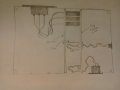
As the PCB is 4inches long it will have to slot across the shorter side of the enclosure with the screen at the same length fitted into the next set of slots at 1inch spacing.
I'll solder a piece of wire across the 1 inch gap at 90 degrees from the screen to the DC ground.
Because of the size of the plugs that join the AC wires to the PCB I won't be able to bring then through drilled holes in the screen, instead I will notch a piece out of the screen allowing the wires to fit underneath the base of enclosure and the screen.
I'll also have to notch out a piece of the PCB to allow the DC and mic wires to reach there sockets.

Included diagram to try and make things clearer.1512511830840-1631233409.jpg
 

Parkera

Joined May 3, 2016
127
Hi Copey84 – Sky Box makes sense. You Brits have a way with the English language. I don’t know if you would be getting periodic interference from that because of the very strict emission regulations that must be passed, but any AC wiring, including its AC cord before the ferrite bead, could be radiating noise that is on the power line. In an unshielded enclosure the interference could be coming from anywhere. That is why you may HAVE to go to a metal box; but let’s see if we can avoid that since that will drive the cost and complexity up.

What you want to avoid at all “costs” is bringing in noise that is on the power line and radiating it INSIDE your box close to the C2 node. For that reason, keep the AC wiring AS SHORT AS ABSOLUTELY POSSIBLE ! ! !

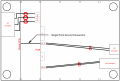
I revised a layout that will allow your 4” PCB to fit directly into a slot. The drawing is not to scale, but put the AC Connector as close to the relative position as possible. Put the DC and Mic connectors on the opposite wall of the box in a position that will keep the wires as short and direct as possible. You can allow about ½” of extra wire on the DC and Mic lines, but keep the AC wiring AS SHORT AS ABSOLUTELY POSSIBLE ! ! !Remember, that is your ‘high-power transmitter antenna’, and as such you can’t afford the luxury of pushing the connectors on the PCB with two hands and then putting the PCB into the slot. Push each connector on using needle nose pliers or mount the AC Connector , PCB and Shield after making the connections. I really can’t stress enough to keep these lines short, straight and twisted.
upload_2017-12-5_22-11-19.png

A better variation on this layout would be to put the Shield PCB closer to the main PCB with some form of standoff as described in the last post. That brings the shield closer to the PCB and keeps more of the AC wiring away from the PCB. You are trying to solve a radiated/conducted noise problem. It is a pain in the ass to solve these. Don’t try to take short cuts – they don’t work!

I just thought of something else that may work very well - putting ferrite beads on the AC wires right at the AC Connector, or getting an AC connector with built-in filtering (probably the better option). Before you cut your new box, select what ferrite beads or EMI AC connector would work (if you have to go that route). Leave enough room to make that modification if you have to. You will still want to keep the wiring as short as possible, but the filtering action will at least minimize the noise on the internal wiring.

Good luck.
 

Thread Starter

Copey84

Joined Jul 27, 2015
198
Hi Parkera I'll try and keep my new layout as close to your drawing as possible.
The AC socket fixing screws won't allow fitting that close to corner, and the AC PCB plugs are an inch long, the same as the gap. It just makes forming the wires a bit tricky, they will have to be 3inch long with a couple of bends to reach the pcb. There's also half an inch on AC socket entering the enclosure so i won't be able to keep the screen that close to the socket, it will have to be on the next set of slots.

[QUOTE="Parkera, post: and as such you can’t afford the luxury of pushing the connectors on the PCB with two hands and then putting the PCB into the slot. Push each connector on using needle nose pliers or mount the AC Connector , PCB and Shield after making the connections.
Does this mean the AC wires will have to go through holes drilled on screen instead of notching a piece out?

Also I might have some of those ferrite beads from old stuff I've taken apart.
Will the bead go over all three twisted wires with a connection to ground?
 

Parkera

Joined May 3, 2016
127
Hi Copey84 - You want the AC wires to be as short and straight as possible. That does not necessarily mean everything has to be at 0/90 degrees - nothing wrong with a 30 degree angle if that is how it works out. Just make it a straight shot (the shortest distance between two points).There is also no problem with cutting a single 3/4" (?) hole through the Shield PCB so that the PCB plugs will stick through. That way the shield can be almost directly on top of the PCB if desired. I showed the AC Connector right at the corner because I don't have detail part drawings of the connector or your box. The goal is a short, straight wire run to the connectors, not putting the connector as close to the corner of the box as possible.

If the AC Socket extends inside the box by 1/2", that means the shield PCB can be in the 1st slot (1" from the side"). With a single large hole in the shield PCB that means the main PCB can be in the 2nd slot (if you don't use the mother/daughter board approach), putting it about 1-1/2" from the inside edge of the AC connector. If the AC Connector terminals are 1/4" long and the PCB AC connectors are 1" long, you should not need a wire length more than about 1-1/2", and maybe less, even with a small angle from the AC Connector to PCB connectors.

As for the ferrite beads, you can try placing a single one over the 3 twisted wires or place one on the "line" and one on the "neutral". You don't usually find them on the ground lead when used individually, but that is not to say that won't be the best way. Do what ever works best. EMI suppression ultimately requires a lot of trial and error, even by experienced pros. Ferrite beads are shelf shielding so their length can be 'neglected', at least from a radiation standpoint. Keep them as close as possible to the body of the AC Connector.

All of this advice is only a guideline, I don't have detailed part dimensions so I can't tell you ABSOLUTELY how to put this together. I can envision the possibility that the best layout would be for the AC Connector to be in the corner of the 6" wall, but I would have to have all the parts in front of me, including the PCB is made and its dimensions before recommending that layout. When it comes to layout for noise reduction, go back to the very early post(s) where I described how each piece of wire has the characteristics of resistance, inductance and capacitance and also acts as both a receiving and transmitting antenna. Keep all those "rules" in mind while you think "outside the box" for the best layout.
 

Thread Starter

Copey84

Joined Jul 27, 2015
198
Hi Parkera I had a look online about sizing a ferrite bead for my circuit. Thought I'd go for a clip on type with a 7mm hole to allow all three twisted wires through. Problem is I'm not sure what impedance and frequency values I should be looking for, please could you advise.
Also would it be worth trying the ferrite bead on the circuit before I make any changes, to see if it helps.
 

Parkera

Joined May 3, 2016
127
Hi Copey84 - A ferrite bead basically turns the wire into a larger inductance, therefore puts a lumped impedance in series with the power line. This series impedance works against a parallel capacitance on the load side, forming an L-C filter for noise coming in. If a single ferrite is placed over all 3 lines, it forms a double-L network and rejects common-mode noise. This is most likely the kind of noise you are trying to filter out, so the clip-on type is probably the best one. Since you want to prevent the noise from even coming into the box (so it can't "transmit" to other parts of the circuit), the right place to put the filter is as close to the input AC Connector as possible. As to the best impedance and frequency values - We don't have the information to determine that. You would need to do a full EMI spectrum analysis to get that information. I'm sure that is not in your budget.

If you look at the impedance characteristics of a typical ferrite, it will start out having a slowly rising impedance with frequency (inductive), which will increase in slope and then suddenly drop (self resonance point). It will then begin to rise again (capacitive) and eventually level out (losses). Generally you want to have the highest inductance possible and still keep the self-resonant point above the highest frequency noise you need to eliminate. I know this doesn't give you an answer, but knowing how they work at least gives you some information to make a guess with. Certainly try just putting the ferrite on the circuit before making any changes - it is easy to do and it may just work.

By the way, ferrite beads are also known as "prayer beads". If you work with them very much, you will know why they they took on that name.
 
Top