Facebook
 Google
 GitHub
 Linkedin
Hi guys, so currently i'm on a project where i'm suppose to add multiple sensors together and create a form of alert through LED light up and vibration motor. As such, when any of these sensors have sense a "critical" value as defined in arduino IDE, the LED will light up accordingly and vibration motor will vibrate accordingly as well.
And as such the sensors that are used for my project are :
1) DS18B20 Temperature sensor module (with breakout)
2) DFRobot SEN0219 carbon dioxide sensor
3) Adafruit ultimate GPS sensor
4) DIY Sweat sensor
5) TCS3200 colour sensor
6) RGB LED
7) coin vibration motor
8) arduino nano
The setup for all the sensor, LED and vibration are as based on the following websites (*exclude Vcc and ground setup):
1) Temperature sensor: it has only three pins (+, - , and out), therefore Vcc to +, GND to -, and one jumper wire for output signal
2) Carbon dioxide sensor: https://www.dfrobot.com/wiki/index.php/Gravity:_Analog_Infrared_CO2_Sensor_For_Arduino_SKU:_SEN0219
3) Adafruit ultimate GPS sensor: https://learn.adafruit.com/adafruit-ultimate-gps/arduino-wiring ( tx to arduino nano d3, rx to arduino d2)
4) DIY Sweat sensor: https://hackaday.com/2016/09/21/arduino-detects-pants-on-fire/#more-223595, http://www.circuitbasics.com/arduino-ohm-meter/ (essentially it is voltage divider with the use of known and unknown resistors, in this case skin is the "unknown resistor")
5) TCS3200 colour sensor: http://howtomechatronics.com/tutorials/ ... or-sensor/
6) RGB LED: http://howtomechatronics.com/tutorials/arduino/how-to-use-a-rgb-led-with-arduino/
7) Coin vibration motor: http://tinkbox.ph/learn/tutorial/how-control-vibration-motor-using-arduino-uno/wiring-diagram
The Vcc and GND to power all components are as follows:
1) Lipo battery 7.4V, 850 mAh to pololu step down regulator 5V, 2.5A to: Colour sensor, Sweat sensor, GPS sensor, Temperature sensor, RGB LED and vibration motor
2) arduino nano 5v pin and gnd to carbon dioxide sensor
3) Lipo battery 7.4V, 850 mAh to arduino nano Vin and GND
4) usb connection to arduino nano
And the following code were used to operate all of the sensors:
image attached shows the connections through the breadboard.
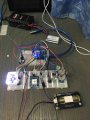
**note: setup and coding works as intended.
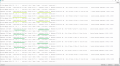
so basically with the setup and coding inplace, this is where problem comes about. when i power up the devices as seen from the listed connection mentioned earlier. and then i open up the serial monitor, i notice that when i touch the DIY sweat sensor (which is the red and black wire as seen in the picture) the value of sweat increase, but however, the carbon dioxide value ALSO increase together with the sweat sensor. this can be seen in the attached image. This happens also when i remove my hand from the wires. the carbon dioxide value also decrease.
This do not happens all the time. sometimes i would try restarting arduino IDE and replug the usb connection and lipo battery. and then it goes back to normal, where the touch of sweat sensor do not affect the carbon dioxide sensor value. but after it becomes normal, i would then "activate" all of the sensors, then the value of sweat sensor AGAIN affect the carbon sensor value.
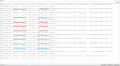
so can anyone tell me what is this happening? i dun really understand because voltage supply to carbon sensor and sweat sensor are different, and the code had also define carbon pin and sweat pin differently, where carbon is given as A0 sweat (GSR) is given as A1 in arduino IDE. My friend actually pinpointed that this could be due to voltage glitch which im not really sure what he meant.
IN addition, can anyone help to resolve this issue?
And as such the sensors that are used for my project are :
1) DS18B20 Temperature sensor module (with breakout)
2) DFRobot SEN0219 carbon dioxide sensor
3) Adafruit ultimate GPS sensor
4) DIY Sweat sensor
5) TCS3200 colour sensor
6) RGB LED
7) coin vibration motor
8) arduino nano
The setup for all the sensor, LED and vibration are as based on the following websites (*exclude Vcc and ground setup):
1) Temperature sensor: it has only three pins (+, - , and out), therefore Vcc to +, GND to -, and one jumper wire for output signal
2) Carbon dioxide sensor: https://www.dfrobot.com/wiki/index.php/Gravity:_Analog_Infrared_CO2_Sensor_For_Arduino_SKU:_SEN0219
3) Adafruit ultimate GPS sensor: https://learn.adafruit.com/adafruit-ultimate-gps/arduino-wiring ( tx to arduino nano d3, rx to arduino d2)
4) DIY Sweat sensor: https://hackaday.com/2016/09/21/arduino-detects-pants-on-fire/#more-223595, http://www.circuitbasics.com/arduino-ohm-meter/ (essentially it is voltage divider with the use of known and unknown resistors, in this case skin is the "unknown resistor")
5) TCS3200 colour sensor: http://howtomechatronics.com/tutorials/ ... or-sensor/
6) RGB LED: http://howtomechatronics.com/tutorials/arduino/how-to-use-a-rgb-led-with-arduino/
7) Coin vibration motor: http://tinkbox.ph/learn/tutorial/how-control-vibration-motor-using-arduino-uno/wiring-diagram
The Vcc and GND to power all components are as follows:
1) Lipo battery 7.4V, 850 mAh to pololu step down regulator 5V, 2.5A to: Colour sensor, Sweat sensor, GPS sensor, Temperature sensor, RGB LED and vibration motor
2) arduino nano 5v pin and gnd to carbon dioxide sensor
3) Lipo battery 7.4V, 850 mAh to arduino nano Vin and GND
4) usb connection to arduino nano
And the following code were used to operate all of the sensors:
Code:
/* Variables for LED */
int redPin = 9; // Declare pin 9 in arduino for RGB LED
int greenPin = 10; // Declare pin 10 in arduino for RGB LED
int bluePin = 11; // Declare pin 11 in arduino for RGB LED
/* Variables for Motor */
const int motorPin = 13; // Declare pin 13 in arduino for motor
/* Variables for Carbon Sensor */
int carbonPin = A0; // declare pin 0 in arduino for Carbon Sensor
/* Variables for Temperature */
#include <OneWire.h> // Include onewire.h library file
#include <DallasTemperature.h> // Include dallas Temperature.h library file
#define ONE_WIRE_BUS 12 // Declare pin 12 in Arduino
OneWire oneWire(ONE_WIRE_BUS); // Setup a oneWire instance to communicate with any OneWire devices (not just Maxim/Dallas temperature ICs)
DallasTemperature sensors(&oneWire); // Pass our oneWire reference to Dallas Temperature
/* Variables for Galvanic Skin Response Sensor */
const int gsrPin = A1; // Declare pin A1 in arduino for GSR Sensor
int raw = 0; // Make raw an integer 0
int Vin = 5; // Make input voltage as an integer of 5
float Vout = 0; // Make output voltage as an decimal point number of 0
float R1 = 510000; // Make known resistor as an decimal point number of 510000 k ohm
float R2 = 0; // Make unknonwn resistor (skin resistance) as a decimal point number of 0
float buffer = 0; // Make buffer as a decimal point number of 0
float conductance = 0; // Make skin conductance as a decimal point number of 0
/* Variables for GPS */
#include <Adafruit_GPS.h> // include library file
#include <SoftwareSerial.h> // include library file
SoftwareSerial mySerial(3, 2); // set up a new serial object
Adafruit_GPS GPS(&mySerial);
#define GPSECHO false // Set GPSECHO to 'false' to turn off echoing the GPS data to the Serial console, // Set to 'true' if you want to debug and listen to the raw GPS sentences.
boolean usingInterrupt = false; // this keeps track of whether we're using the interrupt// off by default!
void useInterrupt(boolean); // Func prototype keeps Arduino 0023 happy
uint32_t timer = millis();
/* Variables for Colour Sensor */
#define S0 4 // Declare pin 4 in arduino for Colour sensor, S0 pin
#define S1 5 // Declare pin 5 in arduino for Colour sensor, S1 pin
#define S2 6 // Declare pin 6 in arduino for Colour sensor, S2 pin
#define S3 7 // Declare pin 7 in arduino for Colour sensor, S3 pin
#define sensorOut 8 // Declare pin 8 in arduino for Colour sensor, Out pin
int redFrequency = 0; // Declare an integer value of 0 in arduino for redFrequency
int greenFrequency = 0; // Declare an integer value of 0 in arduino for greenFrequency
int blueFrequency = 0; // Declare an integer value of 0 in arduino for blueFrequency
void setup() // Setup function will only run once, after each powerup or reset of the Arduino board, Use it to initialize variables, pin modes, start using libraries, etc
{
/* Configuration of pins */
pinMode(redPin,OUTPUT); // Initialize redPin as an output
pinMode(greenPin,OUTPUT); // Initialize greenPin as an output
pinMode(bluePin,OUTPUT); // initialize bluePin as an output
pinMode(motorPin,OUTPUT); // Initialize motorPin as an output
pinMode (carbonPin,INPUT); // initialize digital pin motorPin as an input
pinMode (gsrPin,INPUT); // Initialize gsrPin as an input
pinMode(S0, OUTPUT); // Initialize S0 Pin as an input
pinMode(S1, OUTPUT); // Initialize S1 Pin as an input
pinMode(S2, OUTPUT); // Initialize S2 Pin as an input
pinMode(S3, OUTPUT); // Initialize S3 Pin as an input
pinMode(sensorOut, INPUT); // Initialize SensorOutPin as an input
/* Output frequency scaling of 20% */
digitalWrite(S0,HIGH); // Write a high value (5 volts) for S0 Pin
digitalWrite(S1,LOW); // Write a Low value (0 volts) for S1 Pin
Serial.begin(115200); // Sets the data rate at 9600 in bits per second (baud) for serial data transmission
sensors.begin(); // Initiate the sensor library and join the I2C bus as a master or slave
/* Setup for GPS sensor */
GPS.begin(9600); // 9600 NMEA is the default baud rate for Adafruit MTK GPS's- some use 4800
GPS.sendCommand(PMTK_SET_NMEA_OUTPUT_RMCGGA); // uncomment this line to turn on RMC (recommended minimum) and GGA (fix data) including altitude
GPS.sendCommand(PMTK_SET_NMEA_UPDATE_1HZ); // 1 Hz update rate // For the parsing code to work nicely and have time to sort thru the data, and print it out we don't suggest using anything higher than 1 Hz
useInterrupt(true); // the nice thing about this code is you can have a timer0 interrupt go off every 1 millisecond, and read data from the GPS for you
}
void loop() // Repeat function
{
/* Setup for risk values which will be use for LED lightup */
int SkinRiskValue; // Make SkinRiskValue as an integer number, a value to calculate risk for temperture sensor
int SweatRiskValue; // Make SweatRiskValue as an integer number, a value to calculate risk for GSR sensor
int LocationRiskValue; // Make LocationRiskValue as an integer number, a value to calculate risk for GPS sensor
int ColourRiskValue; // Make ColourRiskValue as an integer number, a value to calculate risk for Colour sensor
int CarbonRiskValue; // Make CarbonRiskValue as an integer number, a value to calculate risk for Colour sensor
int y; // Make y as an integer number, a value to sum all risk values for all sensors, and allow for mapping
char* myStrings[]={"No colour ", "Red detected ", "Green detected ", "Blue detected ","Purple detected ","Orange detected ","Yellow detected "}; // intialize words as characters
int x; // Make x as an integer number, a value to indicate the chosen colour
/* Setup for Carbon Dioxide */
int carbonValue = analogRead (carbonPin); // Make carbonValue as an integer number, a value that reads value from the specified analog pin
float voltage = carbonValue*(5000/1024.0); // Make voltage as an decimal point number, a value that depends on carbonValue which is then multiply by 5000 & divide by 1024.00
int voltage_diference=voltage-400; // Make voltage_diference as an integer number, a value that depends voltage minus 400
float concentration = voltage_diference * 50.0/16.0; // Make concentration as an decimal point number, a value that depends on voltage_diference multiply by 50/16
/* Setup for GSR Sensor */
raw = analogRead(gsrPin); // Reads the value from the specified analog pin, GSR, and intialize it as raw
buffer = raw * Vin; // Intialize buffer as raw value multiply as voltage input value
Vout = (buffer)/1024.0; // Intialize output voltage as buffer divided by value of 1024
buffer = (Vin/Vout) -1; // Intialize buffer as input divided by output voltage, multiply by negative 1
R2 = R1 * buffer; // Intialize unknonwn resistor as known resistor multiply by buffer value
conductance = (1/R2)*1000000; // intialize conductance value as 1 divided by unknown resistance value, multiply by 1000000 (condutance is calculated as microsiemens)
/* Setup for Temperature */
sensors.requestTemperatures(); // Send the command to get temperatures
/* Setup for GPS */
if (GPS.newNMEAreceived()) // If a sentence is received, we can check the checksum, parse it...
{
if (!GPS.parse(GPS.lastNMEA())) // This sets the newNMEAreceived() flag to false
return; // We can fail to parse a sentence in which case we should just wait for another
}
if (timer > millis()) timer = millis(); // If millis() or timer wraps around, we'll just reset it
if (millis() - timer > 4000) // Approximately every 4 seconds or so, print out the current stats
{
timer = millis(); // Reset the timer
/* Display values at serial monitor */
Serial.print("Temperature: "); // Print a message, do not move to the next line
Serial.print(sensors.getTempCByIndex(0)); // Why "byIndex"? You can have more than one IC on the same bus. 0 refers to the first IC on the wire
Serial.print(" Degree"); // Print a message, do not move to the next line
Serial.print(" | "); // Print a message, do not move to the next line
Serial.print("Carbon Dioxide is: "); // Print a message, do not move to the next line
Serial.print(concentration); // Print a value, do not move to the next line
Serial.print(" ppm "); // Print a message, do not move to the next line
Serial.print("voltage: "); // Print a message, do not move to the next line
Serial.print(voltage); // Print a value, do not move to the next line
Serial.print(" mv"); // Print a message, do not move to the next line
Serial.print(" | "); // Print a message, do not move to the next line
Serial.print("Conductance: "); // Print a message, do not move to the next line
Serial.print (conductance, 6); // Print a value, do not move to the next line
Serial.print(" uS "); // Print a message, move to the next line
Serial.print("Resistance: "); // Print a message, do not move to the next line
Serial.print (R2, 4); // Print a value, do not move to the next line
Serial.print(" Ohm"); // Print a message, move to the next line
Serial.print(" | "); // Print a message, do not move to the next line
digitalWrite(S2,LOW); // Write a low value (0 volts) for S2 Pin
digitalWrite(S3,LOW); // Write a low value (0 volts) for S3 Pin
redFrequency = pulseIn(sensorOut, LOW); // pulseIn() waits for the pin to go low, starts timing, then waits for the pin to go high and stops timing. Returns the length of the pulse in microseconds
Serial.print("Red = "); // Print a message, do not move to the next line
Serial.print(redFrequency); // Print a value, do not move to the next line
digitalWrite(S2,HIGH); // Write a high value (5 volts) for S2 Pin
digitalWrite(S3,HIGH); // Write a high value (5 volts) for S3 Pin
greenFrequency = pulseIn(sensorOut, LOW); // pulseIn() waits for the pin to go low, starts timing, then waits for the pin to go high and stops timing. Returns the length of the pulse in microseconds
Serial.print(" Green = "); // Print a message, do not move to the next line
Serial.print(greenFrequency); // Print a value, do not move to the next line
digitalWrite(S2,LOW); // Write a low value (0 volts) for S2 Pin
digitalWrite(S3,HIGH); // Write a high value (5 volts) for S3 Pin
blueFrequency = pulseIn(sensorOut, LOW); // pulseIn() waits for the pin to go low, starts timing, then waits for the pin to go high and stops timing. Returns the length of the pulse in microseconds
Serial.print(" Blue = "); // Print a message, do not move to the next line
Serial.print(blueFrequency); // Print a value, do not move to the next line
Serial.print(" "); // Print a message, do not move to the next line
/* Setup for Temperature */
float skin_temp = sensors.getTempCByIndex(0); // Make skin_temp as a decimal point number, where values is obtain through sensors.getTempCByIndex(0)
/* if else conditions for Colour */
if(redFrequency > 20 && redFrequency < 45 && greenFrequency > 55 && greenFrequency < 80 && blueFrequency > 35 && blueFrequency < 60 && greenFrequency > blueFrequency && blueFrequency > redFrequency) // define for red
{
ColourRiskValue = 3; // Value of ColourRiskValue is equal to 3 (high risk)
x = 1; // Value of x is equal to 1 (red colour detected)
}
else if(redFrequency > 15 && redFrequency < 30 && greenFrequency > 40 && greenFrequency < 65 && blueFrequency > 30 && blueFrequency < 55 && greenFrequency > redFrequency && blueFrequency > redFrequency) // define for orange
{
ColourRiskValue = 3; // Value of ColourRiskValue is equal to 3 (high risk)
x = 5; // Value of x is equal to 5 (orange colour detected)
}
else if(redFrequency > 35 && redFrequency < 55 && greenFrequency > 15 && greenFrequency < 50 && blueFrequency > 30 && blueFrequency < 55 && redFrequency > greenFrequency /*&& redFrequency > blueFrequency*/) // define for green
{
ColourRiskValue = 3; // Value of ColourRiskValue is equal to 3 (high risk)
x = 2; // Value of x is equal to 2 (green colour detected)
}
else if(redFrequency > 45 && redFrequency < 75 && greenFrequency > 25 && greenFrequency < 45 && blueFrequency > 10 && blueFrequency < 30 && redFrequency > greenFrequency && greenFrequency > blueFrequency) // define for blue
{
ColourRiskValue = 3; // Value of ColourRiskValue is equal to 3 (high risk)
x = 3; // Value of x is equal to 3 (blue colour detected)
}
else if(redFrequency > 25 && redFrequency < 45 && greenFrequency > 40 && greenFrequency < 65 && blueFrequency > 15 && blueFrequency < 35 && greenFrequency > blueFrequency && greenFrequency > redFrequency) // define for purple
{
ColourRiskValue = 3; // Value of ColourRiskValue is equal to 3 (high risk)
x = 4; // Value of x is equal to 4 (purple colour detected)
}
else if(redFrequency > 10 && redFrequency < 25 && greenFrequency > 15 && greenFrequency < 30 && blueFrequency > 15 && blueFrequency < 40 && blueFrequency > redFrequency/* && greenFrequency > redFrequency*/) // define for yellow
{
ColourRiskValue = 3; // Value of ColourRiskValue is equal to 3 (high risk)
x = 6; // Value of x is equal to 6 (yellow colour detected)
}
else // If no condition is met as mentioned previously
{
ColourRiskValue = 0; // Value of ColourRiskValue is equal to 0 (no risk)
x=0; // Value of x is equal to 0 (no colour detected)
}
/* Display values at serial monitor */
Serial.print("Colour: "); // Print a message, do not move to the next line
Serial.print(myStrings[x]); // Print a value based on char that was initalize previously, do not move to the next line
Serial.print(" | "); // Print a message, do not move to the next line
Serial.print(" Location (Latitude, Longtitude): "); // Print a message, do not move to the next line
Serial.print(GPS.latitudeDegrees, 6); // Print a value, do not move to the next line
Serial.print(", "); // Print a message, do not move to the next lin
Serial.println(GPS.longitudeDegrees, 6); // Print a value, move to the next line
Serial.println(""); // Print a message, move to the next line
/* if conditions for Temperature */
if (skin_temp < 25.5) // If condition is met
{
SkinRiskValue = 0; // Value of SkinRiskValue is equal to 0 (no risk)
}
if (skin_temp > 25.5 && skin_temp < 26) // If condition is met
{
SkinRiskValue = 1; // Value of SkinRiskValue is equal to 1 (low risk)
}
if (skin_temp > 26.00 && skin_temp < 26.5) // If condition is met
{
SkinRiskValue = 2; // Value of SkinRiskValue is equal to 2 (medium risk)
}
if (skin_temp > 26.50) // If condition is met
{
SkinRiskValue = 3; // Value of SkinRiskValue is equal to 3 (high risk)
}
/* if conditions for Carbon dioxide */
if (concentration < 900) // If condition is met
{
CarbonRiskValue = 0; // Value of CarbonRiskValue is equal to 0 (no risk)
}
if (concentration > 900 && concentration < 1500) // If condition is met
{
CarbonRiskValue = 1; // Value of CarbonRiskValue is equal to 1 (lowrisk)
}
if (concentration > 1500 && concentration < 2000) // If condition is met
{
CarbonRiskValue = 2; // Value of CarbonRiskValue is equal to 2 (medium risk)
}
if (concentration > 2000) // If condition is met
{
CarbonRiskValue = 3; // Value of CarbonRiskValue is equal to 3 (high risk)
}
/* if conditions for Sweat */
if (conductance < 5) // If condition is met
{
SweatRiskValue = 0; // Value of SweatRiskValue is equal to 0 (no risk)
}
if (conductance > 1 && conductance < 5) // If condition is met
{
SweatRiskValue = 1; // Value of SweatRiskValue is equal to 1 (low risk)
}
if (conductance > 5 && conductance < 10) // If condition is met
{
SweatRiskValue = 2; // Value of SweatRiskValue is equal to 2 (medium risk)
}
if (conductance > 10) // If condition is met
{
SweatRiskValue = 3; // Value of SweatRiskValue is equal to 3 (high risk)
}
/* if conditions for GPS */
if (GPS.latitudeDegrees > 1.441700 && GPS.latitudeDegrees < 1.442000 || GPS.latitudeDegrees > 1.443600 && GPS.latitudeDegrees < 1.443900) // If condition is met
{
if (GPS.longitudeDegrees > 103.806400 && GPS.longitudeDegrees < 103.808700) // If condition is met
{
LocationRiskValue = 1; // Value of LocationRiskValue is equal to 1 (low risk)
}
}
else if (GPS.longitudeDegrees > 103.806400 && GPS.longitudeDegrees < 103.806760 || GPS.longitudeDegrees > 103.808425 && GPS.longitudeDegrees < 103.808700) // If condition is met
{
if (GPS.latitudeDegrees > 1.441700 && GPS.latitudeDegrees < 1.443900) // If condition is met
{
LocationRiskValue = 1; // Value of LocationRiskValue is equal to 1 (low risk)
}
}
else if (GPS.latitudeDegrees > 1.442000 && GPS.latitudeDegrees < 1.442516 || GPS.latitudeDegrees > 1.443288 && GPS.latitudeDegrees < 1.443600) // If condition is met
{
if (GPS.longitudeDegrees > 103.80676 && GPS.longitudeDegrees < 103.808425) // If condition is met
{
LocationRiskValue = 2; // Value of LocationRiskValue is equal to 2 (medium risk)
}
}
else if (GPS.longitudeDegrees > 103.806760 && GPS.longitudeDegrees < 103.807276 || GPS.longitudeDegrees > 103.807909 && GPS.longitudeDegrees < 103.808425) // If condition is met
{
if (GPS.latitudeDegrees > 1.442000 && GPS.latitudeDegrees < 1.443600) // If condition is met
{
LocationRiskValue = 2; // Value of LocationRiskValue is equal to 2 (medium risk)
}
}
else if (GPS.latitudeDegrees > 1.442516 && GPS.latitudeDegrees < 1.443288 && GPS.longitudeDegrees > 103.807276 && GPS.longitudeDegrees < 103.807909) // If condition is met
{
LocationRiskValue = 3; // Value of LocationRiskValue is equal to 3 (high risk)
}
else // If no condition is met as mentioned previously
{
LocationRiskValue = 0; // Value of LocationRiskValue is equal to 0 (no risk)
}
/* Setup for fading LED and summation of values */
int TotalRiskValue = SkinRiskValue + SweatRiskValue + ColourRiskValue + LocationRiskValue + CarbonRiskValue; // Make total as a integer, where values is depending of all the risks combine (values of sensors)
y = map(TotalRiskValue, 1, 15, 0, 255); // Make y as a value that depends on the value of total, in which is map linearly to 0 to 255
int i = 255 - y; // Make i as an integer, where values is 255 minus off the value of y
Serial.print("LED Colour Mapping (R,G,B): "); // Print a message, do not move to the next line
//Serial.print(y); // ********Print a value, do not move to the next line
Serial.print("255 "); // ********Print a message, do not move to the next line
Serial.print(" , "); // Print a message, do not move to the next line
Serial.print(i); // Print a value, move to the next line
Serial.print(" , 0 "); // Print a message, do not move to the next line
Serial.print(" | "); // Print a message, do not move to the next line
Serial.print(" total risk: "); // Print a message, do not move to the next line
Serial.print(TotalRiskValue); // Print a value, do not move to the next line
Serial.print(" skin: "); // Print a message, do not move to the next line
Serial.print(SkinRiskValue); // Print a value, do not move to the next line
Serial.print(" Carbon: "); // Print a message, do not move to the next line
Serial.print(CarbonRiskValue); // Print a value, do not move to the next line
Serial.print(" sweat: "); // Print a message, do not move to the next line
Serial.print(SweatRiskValue); // Print a value, do not move to the next line
Serial.print(" color risk: "); // Print a message, do not move to the next line
Serial.print(ColourRiskValue); // Print a value, do not move to the next line
Serial.print(" location risk: "); // Print a message, do not move to the next line
Serial.println(LocationRiskValue); // Print a value, move to the next line
Serial.println(" "); // Print a message, move to the next line
delay(1000);
if (TotalRiskValue > 0 && TotalRiskValue <16) // If condition is met, where value of total is between 1 to 15, else do not display colour when TotalRiskValue is 0
{
setColor(255, i, 0); //******** Display LED colours based on the value of i and y, blue value is set to zero
if (TotalRiskValue > 10) // If condition is met, where value is more than 10 (high risk)
{
digitalWrite(motorPin, HIGH); // Write a HIGH value to a digital pin
delay(500); // Delay action for 500 milliseconds
digitalWrite(motorPin, LOW); // Write a LOW value to a digital pin
delay(500); // Delay action for 500 milliseconds
digitalWrite(motorPin, HIGH); // Write a HIGH value to a digital pin
delay(500); // Delay action for 500 milliseconds
digitalWrite(motorPin, LOW); // Write a LOW value to a digital pin
delay(500); // Delay action for 500 milliseconds
digitalWrite(motorPin, HIGH); // Write a HIGH value to a digital pin
delay(500); // Delay action for 500 milliseconds
digitalWrite(motorPin, LOW); // Write a LOW value to a digital pin
delay(500); // Delay action for 500 milliseconds
}
else if (TotalRiskValue > 5 && TotalRiskValue < 11)// If condition is met, where value is between 6 and 10 (medium risk)
{
digitalWrite(motorPin, HIGH); // Write a HIGH value to a digital pin
delay(1000); // Delay action for 1000 milliseconds
digitalWrite(motorPin, LOW); // Write a LOW value to a digital pin
delay(1000); // Delay action for 1000 milliseconds
}
delay(1000); // Delay action for 1000 milliseconds
setColor(0,0,0); // Turn off LED colours
}
else // If condition is not met, where values are not more than 1
{
setColor(0, 0, 0); // Turn off LED colours
}
}
}
SIGNAL(TIMER0_COMPA_vect) // Interrupt is called once a millisecond, looks for any new GPS data, and stores it
{
char c = GPS.read(); // Make C a character, reads incoming serial data
#ifdef UDR0 // If you want to debug, this is a good time to do it!
if (GPSECHO) // If condition
if (c) UDR0 = c; // Writing direct to UDR0 is much much faster than Serial.print but only one character can be written at a time.
#endif // Specifies the end of a conditional directive
}
void useInterrupt(boolean v)
{
if (v) // Timer0 is already used for millis() - we'll just interrupt somewhere in the middle and call the "Compare A" function above
{
OCR0A = 0xAF;
TIMSK0 |= _BV(OCIE0A);
usingInterrupt = true;
}
else // Do not call the interrupt function COMPA anymore
{
TIMSK0 &= ~_BV(OCIE0A);
usingInterrupt = false;
}
}
void setColor(int redValue, int greenValue, int blueValue) // setColor(redValue, greenValue, blueValue)
{
analogWrite(redPin, redValue); // Writes an analog value (PWM wave) to a pin, analogWrite(pin port, value set)
analogWrite(greenPin, greenValue); // Writes an analog value (PWM wave) to a pin, analogWrite(pin port, value set)
analogWrite(bluePin, blueValue); // Writes an analog value (PWM wave) to a pin, analogWrite(pin port, value set)
}image attached shows the connections through the breadboard.
**note: setup and coding works as intended.
so basically with the setup and coding inplace, this is where problem comes about. when i power up the devices as seen from the listed connection mentioned earlier. and then i open up the serial monitor, i notice that when i touch the DIY sweat sensor (which is the red and black wire as seen in the picture) the value of sweat increase, but however, the carbon dioxide value ALSO increase together with the sweat sensor. this can be seen in the attached image. This happens also when i remove my hand from the wires. the carbon dioxide value also decrease.
This do not happens all the time. sometimes i would try restarting arduino IDE and replug the usb connection and lipo battery. and then it goes back to normal, where the touch of sweat sensor do not affect the carbon dioxide sensor value. but after it becomes normal, i would then "activate" all of the sensors, then the value of sweat sensor AGAIN affect the carbon sensor value.
so can anyone tell me what is this happening? i dun really understand because voltage supply to carbon sensor and sweat sensor are different, and the code had also define carbon pin and sweat pin differently, where carbon is given as A0 sweat (GSR) is given as A1 in arduino IDE. My friend actually pinpointed that this could be due to voltage glitch which im not really sure what he meant.
IN addition, can anyone help to resolve this issue?
Last edited: