I asked you @Papabravo about the Transceiver IC you're using because I'm still trying to understand how CAN IDs work in messages. Now that we have real hardware with a one Atmel T89C51CC01 microcontroller , two PCA82C251 Transceiver ICs, and two LEDs (Red and Green), let's create CAN IDs to control these LEDs. I am assuming 0x01 for the red LED on Node 1 and 0x02 for the green LED on Node 2 because previously said CAN ID may any value My question is, when the microcontroller sends a message, how do the nodes know it's meant for them? like an I2C slave can be identify because of its physical adress given in datasheet.?
The consumer of a message has one or more mask and match filters that it can use to restrict the identifiers that it must receive and process. In the case of the T89C51CC01, each message object has its own mask and match filter. The way mask and match works is that 1 bits in the mask register(s) mean the incoming identifier must match in that bit position. On the other hand, a 0 bit in the mask register means that the corresponding bit in the identifier is a "don't care", that is it can be either a 1 or a 0. I suppose you could receive every message and do the work of determining who the message is for, but if there is hardware available you might as well use it.
CAN bus is a multimaster bus. Any node on the bus can send the data it wants. If multiple nodes are transmitting in same time, the node with smaller ID wins (refer to dominant and reccesive signals in binary form ID and you understand why). On the other side, any node on the bus can listen all the messages it wants. Usually CAN controller hardware on MCU has incoming messages ID filters and masks for offloading MCU core from excessive filtering tasks in high speed transmission cases.
So you must write a code for listening a node ID who can possibly send some commands to switch LEDs on the board.
If you use the PIC18F45K80 then it needs only CAN tranceiver chip (MCP2551, MCP2561 or PCA82C251 for example) not the CAN controller chip (MCP2515) because the PIC has onboard CAN controller. Connect MCU CANRX and CANTX pins to tranceiver receive and transmit pins and you are in. MCP2561 needs only 5V power, a 100nF capacitor between power pins, a resistor from RS pin to GND (i use 10 ohms) and 120 ohm terminating resistor on CAN bus interface.
You could answer that by saying that the message ID indicates the message Content.
If the node has an interest in the message content, then it can read the message, ergo, the message is meant for that node.
I recently purchased an MCP 2551 board to work alongside my existing PIC18F45K80. I need help on selecting the correct options to configure the CAN module. Could you provide some pointers to help me set this up properly?
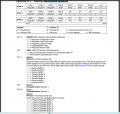
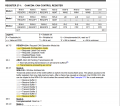
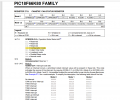
CAN CONTROL REGISTER
Request Normal mode (REQOP<2:0> = 000):
Abort All Pending Transmissions (ABAT = 1):
I don't understand rest configuration setting for CAN CONTROL REGISTER
• Control and Status Registers
• Dedicated Transmit Buffer Registers
• Dedicated Receive Buffer Registers
• Programmable TX/RX and Auto RTR Buffers
• Baud Rate Control Registers
• I/O Control Register
• Interrupt Status and Control Registers
Could you please confirm whether the current configuration settings for the Control and Status Registers are correct?

 Facebook
 Google
 GitHub
 Linkedin