Button - state machine [solved]

click_here

Joined Sep 22, 2020
548
I think that you'll find that there are multiple ways to debounce an input - some will use a delay and then re-check, some will have a number of loops before re-checking, some will use an average reading over a number of samples, some won't de-bounce at all, some will only change state if 'n' amount of high readings are found, ect...

It is always going to be a solution that fits the architecture of the code and does not cause any errors.

If you want to study a particular state diagram, choose one and give it a go.

If it's the actual diagram structure that you are struggling with, find an online course, like this one, and set aside some time each day to go through it. Note that going through the whole course in one day is a trap for new players - Take your time and soak it in.
 

JohnInTX

Joined Jun 26, 2012
4,787
It makes sense but you must label each edge transition between the states.
The stable state just needs to monitor the button, you are done using the debounce timer.
Nicely done.
 

Thread Starter

Pushkar1

Joined Apr 5, 2021
416
It makes sense but you must label each edge transition between the states.
The stable state just needs to monitor the button, you are done using the debounce timer.
Nicely done.
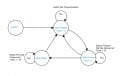
Any state diagram must be logically correct and I think this state diagram is not logically correct because it doesn't show debounce logic.

Is this state diagram logically correct ?
Does it need to show when timer starts and when it reset ?
FSM4.jpg
 

trebla

Joined Jun 29, 2019
599
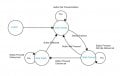
Is this state diagram logically correct ?
Does it need to show when timer starts and when it reset ?
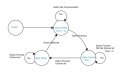
When waiting for button press the system is in State_Waiting and when button press is detected the system moves to State_Pressed. So far is all in logical order. But when you want debounce this button press then you can't go straight back from State_Pressed to State_Waiting, so this path must be deleted. Timer must started within changing State_Waiting to State_Pressed. When system is in State_Pressed then you check timer to count down, if it is done, system moves to State_Stable and stays here until button released. So the actions in State_pressed and State_Stable are correspondingly "checking timer counting down" and "button still pressed".
 

click_here

Joined Sep 22, 2020
548
It might help to break "state_pressed" up into two states

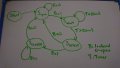
This is how I would do the diagram for debouncing using a timer delay...
DSC_0402.JPG

There are 2 inputs, 'B' for button and 'T' for timer.

Notice that the flow is based on what is happening on the arrows, not what's in the state.
 

Thread Starter

Pushkar1

Joined Apr 5, 2021
416
When waiting for button press the system is in State_Waiting and when button press is detected the system moves to State_Pressed. So far is all in logical order. But when you want debounce this button press then you can't go straight back from State_Pressed to State_Waiting, so this path must be deleted. Timer must started within changing State_Waiting to State_Pressed. When system is in State_Pressed then you check timer to count down, if it is done, system moves to State_Stable and stays here until button released. So the actions in State_pressed and State_Stable are correspondingly "checking timer counting down" and "button still pressed".
Does this make a sense to you ?
FSM4.jpg
 

Thread Starter

Pushkar1

Joined Apr 5, 2021
416
Yes, this diagram makes quite clear how to write code for button reading
so we have state machine, It's interesting to see How do we write code for button pressing state machine ? How do we get idea form state machine for coding ?

C:
enum  Debounce{Waiting, Pressed, Stable} Button_state;

void main(void)
{
    Button_state = Waiting;

    while(1)
    {
        switch (Button_state)
        {
            case Waiting :
         
            case Pressed :
         
            case Stable :        
        }
    }

}
Update : Ignore MCU and Compiler I am just asking in simple C language
 
Last edited:

trebla

Joined Jun 29, 2019
599
How do we get idea form state machine for coding ?
Just fill cases:
states change example code::
case Waiting:
    if(Button == PRESSED) { //button press detected
        Button_state = Pressed; //next state
        Button_signal = 1; //send signal outside
        Debounce_counter = 20; //reload counter
    }
    break;
case Pressed:
    if(millis_flag){ //if 1 ms passed
        millis_flag = 0; //EDIT: do not forget clear flags!!!
        if(Debounce_counter){ //if counter not zero
            Debounce_counter--;
        }
        else{ //if counter is zero then next state
            Button_state = Stable;
        }
    }
    break;
case Stable:
    if(Button !=PRESSED){ //if button released
        Button_state = Waiting; //go to next state
    }
    break;
 

Irving

Joined Jan 30, 2016
5,168
This is the typical code for a non-state machine implementation, though if you look carefully you can see the states:
C:
//switch debounce inline code
#define switchPin 10
#define debounceTime 20
bool switchPressed = false;

void loop() {

  // get switch state
  if(((digitalRead(switchPin) == LOW) && !switchPressed) ||
     ((digitalRead(switchPin) == HIGH) && switchPressed)) {
    delay(debounceTime);
    if(digitalRead(switchPin)==LOW)
      switchPressed = true;
      // call function to be executed on press
      onSwitchPressed();
    else
      switchPressed = false;
  }


}// end loop
 

Irving

Joined Jan 30, 2016
5,168
Neither of the above solutions works well in an event driven FreeRTOS environment... here's one way to do it in FreeRTOS (caveat, I've not tested this specific code - its an amalgam of Arduino ESP32 interrupt handling and FreeRTOS task/timer handling- it should work however.)

We set up an interrupt to trigger on the falling edge of a GPIO pin with a weak pullup. When the button is pushed the interrupt service routine starts a 20mS one-shot timer. When that expires it calls a routine that checks to see if the input pin is still LOW and if so notifies the actual task to be run before re-enabling the interrupt.

Of course an interrupt handled button doesn't really need debouncing. If your task takes longer than the 'bounce' time then only the first closure triggers the interrupt. All subsequent bounces are ignored. If not, then an alternative approach would be to start the debounce timer at the same time as starting the onButtonPressed task, so that it can re-enable the interrupt after a suitable time interval.

ESP32/FreeRTOS interrupt driven debounced button push example:
// don't forget to set configUSE_TIMERS to 1 in your local FreeRTOSConfig.h
// else timers won't work!

#include <Arduino.h>
#include <FreeRTOS.h>

#define debounceTime pdMS_TO_TICKS(20) // in mS
#define buttonPin 18 // button pulls down pin 18

// declare some global handles
static TaskHandle_t h_onButtonPush = NULL;
TimerHandle_t debounceTimer = NULL;

//declare button input ISR
void IRAM_ATTR buttonISR() {
 
  BaseType_t xHigherPriorityTaskWoken = pdFALSE;

  if(xTimerStartFromISR(debounceTimer, &xHigherPriorityTaskWoken) != pdPASS){ // start debounce timer
      /* The timer start command was not executed successfully.  Take appropriate
      action here. */
  }
 
  if( xHigherPriorityTaskWoken != pdFALSE )
  {
      /* Call the interrupt safe yield function here (actual function depends on the FreeRTOS port being used). */
      /* plus Arduino ISR functionality may handle this already */
  }
}

// declare task to be executed when button pressed
static void onButtonPush( void *pvParameters ){  // task to run when button pressed...
  while(1){
    if( ulTaskNotifyTake( pdFALSE, portMAX_DELAY ) != 0 ) // wait on notification...
    {
        // We received a 'debounced button push' notification from the debounce timer , so do something!
        // doSomethingInteresting()
    }
  }
}

// declare debounce timer callback function
void buttonDebounced(TimerHandle_t pxTimer ){
  // check if button still low... & if so
  //  - release waiting task

  if(digitalRead(buttonPin) == LOW) {
    xTaskNotifyGive( h_onButtonPush );  // wake up onButtonPush task.  Alternatively could put code to be performed here...
  }
}

void setup() {
  // put your setup code here, to run once:
  xTaskCreate(onButtonPush," Button Push", 100, NULL, tskIDLE_PRIORITY, &h_onButtonPush); //create button pushed task
  debounceTimer = xTimerCreate( "debounceTimer", debounceTime, pdFALSE, 0, buttonDebounced ); // create debounce timer
  pinMode(buttonPin, INPUT_PULLUP);
  attachInterrupt(buttonPin, buttonISR, FALLING);
}

void loop() {
  // put your main code here, to run repeatedly:
  // nothing here as all done in tasks

}
 

BobaMosfet

Joined Jul 1, 2009
2,211
@Pushkar1 - A state machine is nothing more than a way a program keeps track of what mode/state it is in. Nothing fancy or complicated about it. You do that part, it isn't done for you. Whether it's a key-press, a key-release, an RFID tag entering or leaving a field, or any other type of 'event' that can occur, you keep track of it and manage it with code.
 

click_here

Joined Sep 22, 2020
548
If you were going to use threading you can use the state machine as is and put it in a task fired every 1mS.

You would then have a binary semaphore to display what state the button is in to be read by other parts of the code.
 
Top