Facebook
 Google
 GitHub
 Linkedin
I just got Audacity 3.3.3 and I always used the other Audacity as well.
In the other Audacity I would open a File and it will show you the Bit Rate it was Recored at and the FREQ. it was Recorded at.
So I could always select the whole track and change the Bit Rate it was Recorded at.
I would also turn it from Stereo to Mono.
So when I Export this new File it would be smaller in Size.
The one thing I never would do is change the FREQ. that it was Recorded at.
Because if you do this the Audio will play slower.
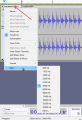
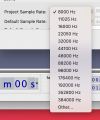
On the Bottom Left Hand side of the Screen it had a Project Box with all these FREQ. in it.
I would pick 44.1 kHz from the list.
then I would Export my File as Wave.
What was I doing and they got Rid of this in Audacity 3.3.3 I think?
In the other Audacity I would open a File and it will show you the Bit Rate it was Recored at and the FREQ. it was Recorded at.
So I could always select the whole track and change the Bit Rate it was Recorded at.
I would also turn it from Stereo to Mono.
So when I Export this new File it would be smaller in Size.
The one thing I never would do is change the FREQ. that it was Recorded at.
Because if you do this the Audio will play slower.
On the Bottom Left Hand side of the Screen it had a Project Box with all these FREQ. in it.
I would pick 44.1 kHz from the list.
then I would Export my File as Wave.
What was I doing and they got Rid of this in Audacity 3.3.3 I think?