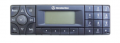
Assistance requested - Aux input for Becker Audio30 BM3309 Head unit via Cassette player

Thread Starter

len9881

Joined May 8, 2025
10
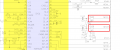
I am looking for some expert input on where I may add aux input using a 3.5mm audio jack for BT output, onto the cassette circuit and where I may need to cut trace lines to complete this little project.

Thank you, in advance.
Screen Shot 2025-05-08 at 2.10.47 PM.png

Here is the pdf wiring schematics link for the radio unit:
https://www.manualslib.com/manual/994039/Becker-Audio-30-Usa-3309.html

PDF also attached.
 

Attachments

0ri0n

Joined Jan 7, 2025
160
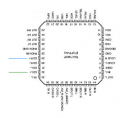
At the audio controller (TDA7340G) remove R426/R428 (3.9k) (NFCCR, NFCCL lines) and connect instead the audio from the BT module. You may have to adjust the audio line level.

It is interesting that Becker chose to use the CD input of the audio controller for the cassette tape deck audio and the cassette tape deck input for the CD audio.
 

Thread Starter

len9881

Joined May 8, 2025
10
Thank you for your reply and your insight on the CD input of the audio controller.

Sorry for being a noob, on my queries, but how does one physically, connect the BT audio on the BT module, to these lines?
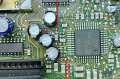
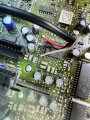
I understand to remove these 2 Rs, cut the connection here in the "red box". Would I then just solder a BT module 2-wire to these locations? I have a few standard plug n play BT devices that I could repurpose for this project.

I presume in doing this, I would require the use of a cassette tape into the cassette system to activate its use? Or could I possibly 'fool the cassette portion' (to minimize wear tear on the cassette)?

Thank you

Screen Shot 2025-05-09 at 3.17.21 PM.png
 

0ri0n

Joined Jan 7, 2025
160
00_Becker.png

In case the audio level from the BT module is too high, put resistors in line with the blue LEFT/RIGHT wires.

I presume in doing this, I would require the use of a cassette tape into the cassette system to activate its use? Or could I possibly 'fool the cassette portion' (to minimize wear tear on the cassette)?
I don't think you have to put in a cassette inside the tape deck. Even if you do , you don't have to actually play it. Pushing the TAPE button on the front panel should suffice and instruct the audio controller to switch to the cassette (now BT) audio input.
 
Last edited:

Thread Starter

len9881

Joined May 8, 2025
10
Thank you for your prompt reply.
I will apply this on the weekend, and report back on my results.
I have a few olde potentiometers, I believe I can dig up, and possibly add these in lieu of the resistors (which I dont have), if required (or maybe snatch these off an old board to reuse?)
 

Thread Starter

len9881

Joined May 8, 2025
10
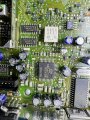
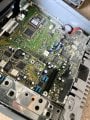
I found the chip on the cb.
Yah!

Now, How does one determine the required location of these 2 resistors?
Is there such a thing as a reference point to use? or a standardized method?
I attempted to reference to the diagram…
I failed.

IMG_0748.jpeg
 

Thread Starter

len9881

Joined May 8, 2025
10
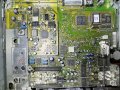
No components on the bottomside of the pcb.
This sits on the very bottom of the HU metal case.
Secured with 2-3 hex screws and tabs on the underside of the case.

1746904033737.jpeg
1746904201477.jpeg
 

Thread Starter

len9881

Joined May 8, 2025
10
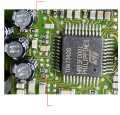
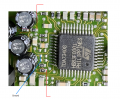
Remove the two resistors circled and connect the BT output where the red lines indicate.
...
Thank you to you both, kind Sirs, for your information here.

I have successfully removed both resistors as shown in the red circles.
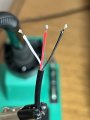
With respect to the 2 RED lines to connect the BT wiring, soldering the 3.5mm audio jack red or white wiring to either location is ok?

Screen Shot 2025-05-14 at 2.26.21 PM.png
3.5mmAudiojack.JPG
 
Before approaching firms or freelancers, document a block diagram of your device:


  • MCU/SoC: Unisoc 8910DM (LTE Cat-1 modem with MCU, supports FreeRTOS, OpenCPU SDK).
  • GPS Module: Airoha AG3335 or Sony CXD5610/CXD5612.
  • Display: OLED or TFT with touch, size preference?
  • Power: LiPo battery + PMIC (power management), e.g., TI, AXP series.
  • Sensors: Accelerometer, gyroscope, heart rate?
  • Other: Microphone, speaker, haptic, SIM slot (eSIM?).

Make a block diagram. At least a hand drawn block diagram will do. This will help others understand your concept.
 

Thread Starter

len9881

Joined May 8, 2025
10
Ive been working OT for the last week so I finally got some time to plug-in the HU and test it.
No success on the above changes.
1) The radio works fine
2) I get a BT signal and can connect to the BT signal with my mobile device with a cassette tape installed, but no sound when the cassette is playing.
3) with no cassette tape in-place, there is no active BT signal to connect to.

it seems that there is another step I need to take on this circuit board? to get the sound thru the cassette portion?
 

0ri0n

Joined Jan 7, 2025
160
It's debugging time. Any pics of the work you have done?

2) I get a BT signal and can connect to the BT signal with my mobile device with a cassette tape installed, but no sound when the cassette is playing.
Is the BT module not just connecting but putting out any audio signal at all? Do you have any test equipment to check that? Do you have something like a audio signal generator (soundcard, phone etc. with suitable cable) so you can inject a signal into the tape deck inputs instead of the BT module?

3) with no cassette tape in-place, there is no active BT signal to connect to.
This makes no sense. There is no causality between the tape deck respectively a cassette tape being in place and you being able to connect to the BT module.
 

Thread Starter

len9881

Joined May 8, 2025
10
Sorry, for this late reply. I've had no time between my job and a family emergency to address this.
I will get back to recap my steps here. So sorry.
 

gavitron

Joined Feb 7, 2026
2
I just tried this mod on my BE3309, and I discovered that there are three test pads for tape audio right behind the tape-assembly connector. On the schematic, part 15, they are marked as MP701, MP702, and MP703, and expose NFCCL, NFCCR, and GND respectively. I soldered a 3-wire headphone socket to these pads, and I can hear audio from an aux-in source, but it is quite attenuated. should I be able to simply replace the 3K9 resistors with 0-ohm solder bridges, or do I have to pull the 8K2 resistors as well? (R426 thru R429)
 
Top