Facebook
 Google
 GitHub
 Linkedin

Hello All,
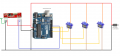
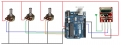
As a part of my audio amplifier project, I want to design a RF based remote volume controller. I am using 433 MHz transceiver pair. I wired three 10K pots to analog pins A0,A1 and A2 of an ARDUINO board with the 433 Tx module.
Then I wired three servos to another ARDUINO board with 433 Rx module.
I took the example codes from VirtualWire.h.
The Tx and Rx modules are successfully communicating. The POT values from Tx are being displayed in the COM port of Rx Arduino. The values are updating successfully but the servos are not responding.
To check the servos, I used another code (without Tx Rx modules) just to make them rotate. They are working.
Please see the attachments.
Tx code:
Rx Code
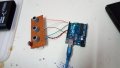
As a part of my audio amplifier project, I want to design a RF based remote volume controller. I am using 433 MHz transceiver pair. I wired three 10K pots to analog pins A0,A1 and A2 of an ARDUINO board with the 433 Tx module.
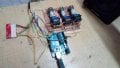
Then I wired three servos to another ARDUINO board with 433 Rx module.
I took the example codes from VirtualWire.h.
The Tx and Rx modules are successfully communicating. The POT values from Tx are being displayed in the COM port of Rx Arduino. The values are updating successfully but the servos are not responding.
To check the servos, I used another code (without Tx Rx modules) just to make them rotate. They are working.
Please see the attachments.
Tx code:
C:
// transmitter.pde
//
// Simple example of how to use VirtualWire to transmit messages
// Implements a simplex (one-way) transmitter with an TX-C1 module
//
// See VirtualWire.h for detailed API docs
// Author: Mike McCauley (mikem@airspayce.com)
// Copyright (C) 2008 Mike McCauley
// $Id: transmitter.pde,v 1.3 2009/03/30 00:07:24 mikem Exp $

#include <VirtualWire.h>

const int led_pin = 13;
const int transmit_pin = 12;
const int receive_pin = 2;
const int transmit_en_pin = 3;

void setup()
{
    // Initialise the IO and ISR
    vw_set_tx_pin(transmit_pin);
    vw_set_rx_pin(receive_pin);
    vw_set_ptt_pin(transmit_en_pin);
    vw_set_ptt_inverted(true); // Required for DR3100
    vw_setup(2000);       // Bits per sec
    pinMode(led_pin, OUTPUT);
}

byte count = 1;

void loop()
{
  char msg[5] = {analogRead(A0),analogRead(A1),analogRead(A2)};

  //msg[6] = count;
  digitalWrite(led_pin, HIGH); // Flash a light to show transmitting
  vw_send((uint8_t *)msg, 3);
  vw_wait_tx(); // Wait until the whole message is gone
  digitalWrite(led_pin, LOW);
  delay(1000);
  //count = count + 1;
}
Rx Code
C:
// receiver.pde
//
// Simple example of how to use VirtualWire to receive messages
// Implements a simplex (one-way) receiver with an Rx-B1 module
//
// See VirtualWire.h for detailed API docs
// Author: Mike McCauley (mikem@airspayce.com)
// Copyright (C) 2008 Mike McCauley
// $Id: receiver.pde,v 1.3 2009/03/30 00:07:24 mikem Exp $

#include <VirtualWire.h>
#include <ServoTimer2.h>

#define rollPin  6
#define pitchPin 9
#define yawPin   10

ServoTimer2 servoRoll;    // declare variables for up to eight servos
ServoTimer2 servoPitch;
ServoTimer2 servoYaw;


const int led_pin = 13;
const int transmit_pin = 12;
const int receive_pin = 11;
const int transmit_en_pin = 3;

int x,y,z;

void setup()
{

   servoRoll.attach(rollPin);     // attach a pin to the servos and they will start pulsing
  servoPitch.attach(pitchPin);
  servoYaw.attach(yawPin);
  delay(1000);
    Serial.begin(9600);    // Debugging only
    Serial.println("setup");

    // Initialise the IO and ISR
    vw_set_tx_pin(transmit_pin);
    vw_set_rx_pin(receive_pin);
    vw_set_ptt_pin(transmit_en_pin);
    vw_set_ptt_inverted(true); // Required for DR3100
    vw_setup(2000);    // Bits per sec

    vw_rx_start();       // Start the receiver PLL running

    pinMode(led_pin, OUTPUT);
}

void loop()
{
    uint8_t buf[VW_MAX_MESSAGE_LEN];
    uint8_t buflen = VW_MAX_MESSAGE_LEN;

    if (vw_get_message(buf, &buflen)) // Non-blocking
    {
    int i;

        digitalWrite(led_pin, HIGH); // Flash a light to show received good message
    // Message with a good checksum received, dump it.
    Serial.print("Got: ");

    for (i = 0; i < buflen; i++)
    {
       //Serial.print(buf[i], DEC);

if(i==0)
{x=buf[0];x=map(x,0,255,0,179); servoRoll.write(x);Serial.print("x= ");Serial.print(x);Serial.print(' ');}
if(i==1)
{y=buf[1];y=map(y,0,255,0,179);servoPitch.write(y);Serial.print("y= ");Serial.print(y);Serial.print(' ');}
if(i==2)
{z=buf[2];z=map(z,0,255,0,179);servoYaw.write(z);Serial.print("z= ");Serial.print(z);Serial.print(' ');}


    }
    Serial.println();
        digitalWrite(led_pin, LOW);
    }
}