Anyone on the forum know about PIC16F84 ASM and 1602 LCD displays?

Thread Starter

Bigphil

Joined Sep 11, 2025
15
There are four common issues with trying to get 1602 displays to work.

1) Adjusting and setting the contrast voltage properly.
2) Initializing the LCD.
3) Proper time delays when sending control signals.
4) Proper power supply decoupling.

Start by attempting to display a single character such as ’A’ or ‘0’.
The next step would be display a sequence of characters using an iterative loop.

For example, ’0’ to ‘9’.
‘0’ is 48 or 0x30.
Iterate ten times, incrementing the output register at each iteration.

If that works, try 16 characters from ‘A’ to ’P’.
MrChips,

1) on initlal power up I send to the display 'PLEASE WAIT' which it displays reliably and regularly. The reason for this is on power up they will have to wait for a minute to count the revolutions per minute.
This rules out incorrect settings of the contrast voltage.
2) as above means the displaay is initialized correctly.
3) the delay called is approx. 2mS which far exceeds the minimum requirements, their is no maximum.
4) the unit is powered from a 12v battery with a LM7805 on board with a .22uF on the input and a 0.1uF on the output. Properly not necessary but I done it just in case.

'For example, ’0’ to ‘9’.
‘0’ is 48 or 0x30.
Iterate ten times, incrementing the output register at each iteration.'

I did that and it displayed 0 to 7 but not 8 or 9, it's repeatable so it not random but something to do with 8 and or 9.
This is really weird - i sent the Ascii code for 8 after PLEASE WAIT expecting to see PLEASE WAIT8. PLEASE WAIT displayed briefly but when it hit 8 the display went blank. I thought the only way to clear the display was to send the Clear Display command.
 

Thread Starter

Bigphil

Joined Sep 11, 2025
15
Ok. Skip the startup “PLEASE WAIT”.

Simply send “8” repeatedly with about 1-second delay after each send.
Ok done as above and the display stayed blank. I substituted "8" for "0" and it quite happily displayed 0 approx. every second.
 

MrChips

Joined Oct 2, 2009
35,276
I've already tried that, even tried 38hex and binary 00111000, all produce the same affect.
Ok.
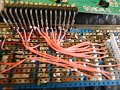
Can you post a photo of your setup?
We would like to see the wiring between the PIC MCU and the LCD.

The next step is to put a 0.1 μF ceramic capacitor across pins 1 and 2 at the LCD, not on the Vero board but on the LCD itself.

Edit: And if that doesn’t fix the problem, try a 10 μF electrolytic capacitor next.
 

Thread Starter

Bigphil

Joined Sep 11, 2025
15
Ok.
Can you post a photo of your setup?
We would like to see the wiring between the PIC MCU and the LCD.

The next step is to put a 0.1 μF ceramic capacitor across pins 1 and 2 at the LCD itself.
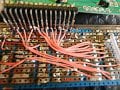
Attached is the photo, it's not very good quality as my digital camera does not focus to good for close ups.

The build is not up to my usual standard as the Windmill Trust hasn't got a lot of money. If no expense spared I would have bought some new stripboard but, in order to keep the cost down, I used some old stripboard from a redundant project.

I will add the 100nF cap. tomorrow.
 

Attachments

ericgibbs

Joined Jan 29, 2010
21,625
Hi Big,
One common cause of PCB short circuits is when using the spot faced cutter to remove copper between holes.
A thin sliver of uncut copper can cause a short, check the cut holes.
E
wiring.JPG
 

Thread Starter

Bigphil

Joined Sep 11, 2025
15
Ok.
Can you post a photo of your setup?
We would like to see the wiring between the PIC MCU and the LCD.

The next step is to put a 0.1 μF ceramic capacitor across pins 1 and 2 at the LCD, not on the Vero board but on the LCD itself.

Edit: And if that doesn’t fix the problem, try a 10 μF electrolytic capacitor next.
I tried an 0.1 μF cap. but didn't have a 10 μF cap. to hand so used a 47 μF, unfortunately neither fixed the problem.


MrChips

Joined Oct 2, 2009
35,276
I tried an 0.1 μF cap. but didn't have a 10 μF cap. to hand so used a 47 μF, unfortunately neither fixed the problem.
We are running out of possible things to try.

One last thing I can suggest is, there is E signal that is sent after the data is sent. Try lengthening the delay between the data and E.

I will have a look at your code a bit later today.
 

MrChips

Joined Oct 2, 2009
35,276
In your SEND2LCD subroutine, you have E signal inverted.

Use:

BSF PORTA, RA1
CALL DELAY_3
BCF PORTA, RA1

Remove the first instruction
BSF PORTA, RA1
 

Thread Starter

Bigphil

Joined Sep 11, 2025
15
In your SEND2LCD subroutine, you have E signal inverted.

Use:

BSF PORTA, RA1
CALL DELAY_3
BCF PORTA, RA1

Remove the first instruction
BSF PORTA, RA1
MrChips, I'm confused as to the changes you want me to make, would you kindly post SEND2LCD with your changes incorporated.

I'm trying to learn how to use the Special Characters function but the datasheet doesn't provide much information. My thoughts are if I generate an 8 as a special character will it then display it.
 

MrChips

Joined Oct 2, 2009
35,276
Code:
;this routine sends data/commands to display
;NOTE - RS (RA0 bit 0) must be set to data or command
;        prior to using this routine.
SEND2LCD   
            BCF     PORTA,RA1          ; this line can be eliminated if already done at initialization

            MOVWF    PORTB
            CALL    DELAY_3
            BSF      PORTA,RA1            ;LATCH IN DATA
            CALL    DELAY_3
            BCF      PORTA,RA1            ;FOR NEXT TRANSMISSION
            RETURN
 

Thread Starter

Bigphil

Joined Sep 11, 2025
15
Code:
;this routine sends data/commands to display
;NOTE - RS (RA0 bit 0) must be set to data or command
;        prior to using this routine.
SEND2LCD  
            BCF     PORTA,RA1          ; this line can be eliminated if already done at initialization

            MOVWF    PORTB
            CALL    DELAY_3
            BSF      PORTA,RA1            ;LATCH IN DATA
            CALL    DELAY_3
            BCF      PORTA,RA1            ;FOR NEXT TRANSMISSION
            RETURN
That didn't work MrChips, in fact it didn't even initialise the LCD let alone display please wait.
I substituted the original SEND2LCD and that worked, well at least it displayed please wait.
I guess my only hope is to find out how to use Custom Characters, generate an 8 and hope it displayes.
 

MrChips

Joined Oct 2, 2009
35,276
That didn't work MrChips, in fact it didn't even initialise the LCD let alone display please wait.
I substituted the original SEND2LCD and that worked, well at least it displayed please wait.
I guess my only hope is to find out how to use Custom Characters, generate an 8 and hope it displayes.
No. The problem is not resolved by using Custom Characters.
The problem is with how your control signal E is being generated.
There is something wrong that I cannot see from where I am sitting.
If I were there with an oscilloscope I would get a clearer picture.

Do you have access to an oscilloscope?
 
Top