Any comments on my design ?!

Thread Starter

ahmedzaidan

Joined Jul 22, 2017
39
Hi All,

I'm going to build a circuit to control the on time of water pump.

here is the schematic
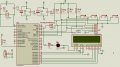
shm.jpg

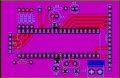
and the pcb layout
pcbcountdouwn.jpg


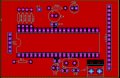
top
pcbcountdouwntop.jpg

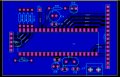
bottom
pcbcountdouwnbot.jpg


the unused pins of MCU configured as an outputs and 0V written to them ..

should i do any modification on my design?


regards :)
 

WBahn

Joined Mar 31, 2012
32,823
I don't see the power/ground connections for the PIC in the schematic. The board layout appears to have them connected and bypassed, though. How does your schematic capture tool specify power pins on these kinds of parts? Are they hidden pins that have to be set via a text box?

You might want to bypass the power/ground pins on your display -- remember, it's got a microcontroller in it, too.

You have unconnected data lines on your display. Unless the datasheet specifically says that this is acceptable, this is almost always a bad idea.

I don't know enough about your design goals to know whether doing things like tying the RW line on the display hard LO is a good thing or not.

Overall, the board layout looks pretty clean. You might flip the orientation of R1 and move it slightly so that the track from Pin 1 of the PIC goes straight out to it. The fewer jogs and turns the less opportunity for fab issues.

The sizing of the thermal relief tabs on your power connect seem odd -- different sizes on different sides. I'd probably want to make all of them the size of the larger ones.
 

Thread Starter

ahmedzaidan

Joined Jul 22, 2017
39
I don't see the power/ground connections for the PIC in the schematic. The board layout appears to have them connected and bypassed, though. How does your schematic capture tool specify power pins on these kinds of parts? Are they hidden pins that have to be set via a text box?

In proteus simulator they are connected by default to power and ground terminals ^^


You might want to bypass the power/ground pins on your display -- remember, it's got a microcontroller in it, too.


You have unconnected data lines on your display. Unless the datasheet specifically says that this is acceptable, this is almost always a bad idea.

would be better to connect them ?
i saw a lot of lcd circuit most of them leave unused data line unconnected ^^
i used 1602A lcd.


I don't know enough about your design goals to know whether doing things like tying the RW line on the display hard LO is a good thing or not.

Overall, the board layout looks pretty clean. You might flip the orientation of R1 and move it slightly so that the track from Pin 1 of the PIC goes straight out to it. The fewer jogs and turns the less opportunity for fab issues.

The sizing of the thermal relief tabs on your power connect seem odd -- different sizes on different sides. I'd probably want to make all of them the size of the larger ones.
thank you for your appreciated effort.:)
 

Thread Starter

ahmedzaidan

Joined Jul 22, 2017
39
Hello,
PORTB[4:5:6:7] have internal weak pull-up resistor, as these pin have IOC. Check the datasheet TABLE 4-3 at pag. 47.
So you don't need external pull-up resistors.

thank you :)
what is the best ? use internal or external ?

simozz
Make sure you include switch de-bouncing logic in your code.

thank you :)

what i did
read the switch
20ms delay
read switch
if(switch...)
 

dendad

Joined Feb 20, 2016
4,637
Add a 1N4148 or 1N914 diode from the LCD contrast pin (Vee) cathode to ground. That is the way I've used them for many years. Of course you could use a trim pot if you really want to. Also check that you don't need a current limiting resistor for the LCD back light. I'd put one in and you can use a link if it is not needed. We have used them with the R/W permanently wired too as we have never read the LCD. The other 4 data pins can be left nc.
Does the relay module have a built in FET or transistor? It is a good idea to have a pull down resistor on the relay output so if the PIC resets or crashes and switches to default inputs on the ports, the pump relay does not come on. In fact, on our designs, there is a PIC pin that pulses and drives a capacitively coupled charge pump to supply the output drive so if the PIC is not running, the outputs turn off. That is a good idea when you are driving things in the real world. Loss of control automatically means off.
 
Last edited:

Thread Starter

ahmedzaidan

Joined Jul 22, 2017
39
Add a 1N4148 or 1N914 diode from the LCD contrast pin (Vee) cathode to ground. That is the way I've used them for many years. Of course you could use a trim pot if you really want to.

Also check that you don't need a current limiting resistor for the LCD back light.
how to check that.. i connect it directly on breadboard without any problem :)

I'd put one in and you can use a link if it is not needed. We have used them with the R/W permanently wired too as we have never read the LCD. The other 4 data pins can be left nc.


Does the relay module have a built in FET or transistor? It is a good idea to have a pull down resistor on the relay output so if the PIC resets or crashes and switches to default inputs on the ports, the pump relay does not come on. In fact, on our designs, there is a PIC pin that pulses and drives a capacitively coupled charge pump to supply the output drive so if the PIC is not running, the outputs turn off. That is a good idea when you are driving things in the real world. Loss of control automatically means off.
i dont understand this point ^^
the relay module which i used like in this link
 

Thread Starter

ahmedzaidan

Joined Jul 22, 2017
39
Internal: Reduced parts count, simpler layout, you have some control over behavior via software.
External: You have greater control over pullup strength, you don't have to worry about behavior during power-up or unusual operating conditions.
thank you WBahn :)

should i connect capacitor with buttons ?

what is the type of decoupling capacitor ?
 

simozz

Joined Jul 23, 2017
170
Hello,
Thanks WBahn for replying.
For capacitor on buttons, you have to decide a time constant, typically 20 ms, take a look at the datasheet for voltage threshold values. BTW you can make debouncing via firmware.
Polyester should be fine.
simozz
 
Last edited:

Thread Starter

ahmedzaidan

Joined Jul 22, 2017
39
thank you guys :)

i did these steps to read the switches in the code ^^

>>read the switch
>>20ms delay
>>read switch
>>if(switch pressed)....
 

Thread Starter

ahmedzaidan

Joined Jul 22, 2017
39
No problem. It's up to you to do what u prefer but I always try to free the program pins if I can, so I can do debugging without disabling any codes that uses the program pins as IO's.
thank you R!f@@ :)

I didn't use port C and A because next time i may use analog signals,ccp and (Uart or spi or I2C)

:)
 
Top